










In Stock
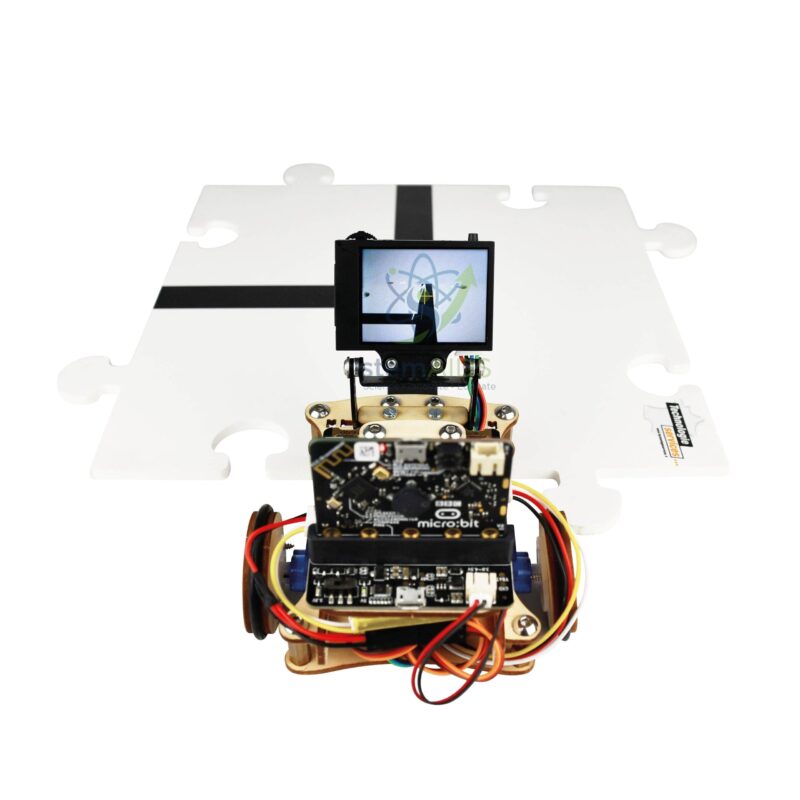
Camera AI Option Kitro:bot V2
₹1,254.00
Quick Answer: The Camera AI Option Kitro:bot V2 is an add-on vision camera for the Kitro:bot V2 micro:bit robot. It lets the robot recognise what it sees, such as a line, a coloured object or a face, and react to it in code, so it is ordered as an upgrade for a robot the school already has.
What a Vision Camera Adds to the Kitro:bot V2
A standard Kitro:bot V2 steers from simple sensors: line sensors that report dark or light under the chassis and a distance sensor that reports how far away an obstacle is. The AI camera changes the kind of input the robot receives. Instead of one number, the program gets the result of an image-recognition step, typically an ID for the thing recognised and its position and size in the camera frame.
Cameras of this type carry their own processor, because a micro:bit has neither the memory nor the speed to analyse video. Educational AI cameras commonly offer modes such as face recognition, object recognition and tracking, colour recognition, line tracking and tag or QR code reading. Students usually teach the camera a new target by pointing it at the object and pressing a learn button, then write MakeCode blocks or Python that read back the result. Which modes this option supports, and how it mounts and connects to the robot, should be confirmed with the module documentation.
The real lesson is in the control loop that follows. If the learned object is left of centre, turn left; if it grows larger in the frame, slow down and stop. That links artificial intelligence to ordinary conditions and variables. It also opens honest discussion of how recognition fails, for example in poor light or with similar-looking objects, and of the privacy questions raised whenever a camera stores faces.
Specifications
| Item | AI vision camera option for the Kitro:bot V2 robot |
| Works with | Kitro:bot V2 micro:bit robot, listed separately |
| Processing | Recognition runs on the camera module; results pass to the micro:bit |
| Common modes on such cameras | Face, object, colour, line and tag recognition |
| Programming | Block coding or Python, as used for micro:bit robots |
| Supported modes, mounting and cable | Confirm at enquiry |
Classroom AI Projects
- A line-following robot that uses the camera’s line mode, compared with following the same track on the floor sensors
- A robot that follows a coloured ball or a learned object round the room
- A delivery or sorting course in which printed tags mark each station
- Lessons on how machine-learning models are trained and why they misrecognise things
Care & Handling
- Keep fingers off the lens and clean it only with a dry lens cloth; smears blur recognition.
- Switch the robot off before fitting or unplugging the camera cable.
- Teach learned objects again under the lighting of the room where the robot will run.
- Agree class rules for face activities: use willing volunteers and clear stored faces after the lesson.
Why Choose LabEquip
Schools that already run Kitro:bot V2 robots add this option once students have mastered sensor-based driving and are ready for computer vision. LabEquip supplies it in the STEM kits range; if you are planning a wider micro:bit build, the Micro:bit programming interface is listed alongside. Tell us how many robots you want to upgrade on the contact page.
Frequently Asked Questions
Does the camera option work without a Kitro:bot V2?
It is sold as an option for the Kitro:bot V2 and is designed around that robot’s mounting and connection. Fitting it to another robot may be possible if the camera and its code extension are compatible, but that should be checked against the module documentation first.
How does the camera learn a new object?
On AI cameras of this kind, the student points the camera at the object and presses a learn button or runs a learn command. The camera stores features of the object and gives it an ID number. Learning it from several angles and distances makes recognition more reliable.
Why does recognition work in one room but not in another?
The camera compares what it sees with what it learned, and lighting changes colours, shadows and contrast. Teach objects in the room where the robot will run, avoid strong backlight from windows and keep the lens clean.
Is the image processed on the micro:bit?
No. The camera module does the recognition itself and sends short results, such as an object ID and its position in the frame. The micro:bit program only uses those results to decide how the robot moves.
Can the camera replace the robot’s line sensors?
Line-tracking mode can steer the robot and sees further ahead than sensors under the chassis. Floor sensors react faster on sharp bends and are less affected by lighting, so comparing the two makes a good class investigation.
What level of student suits AI camera projects?
Students who can already program a micro:bit robot with loops and conditions get the most from it, typically middle and senior school. Younger classes can still use ready-made colour or face modes in guided demonstrations.
Last Updated: September 2026
You must be logged in to post a review.
Bestsellers


Sale
Sale
Sale


Reviews
There are no reviews yet.