
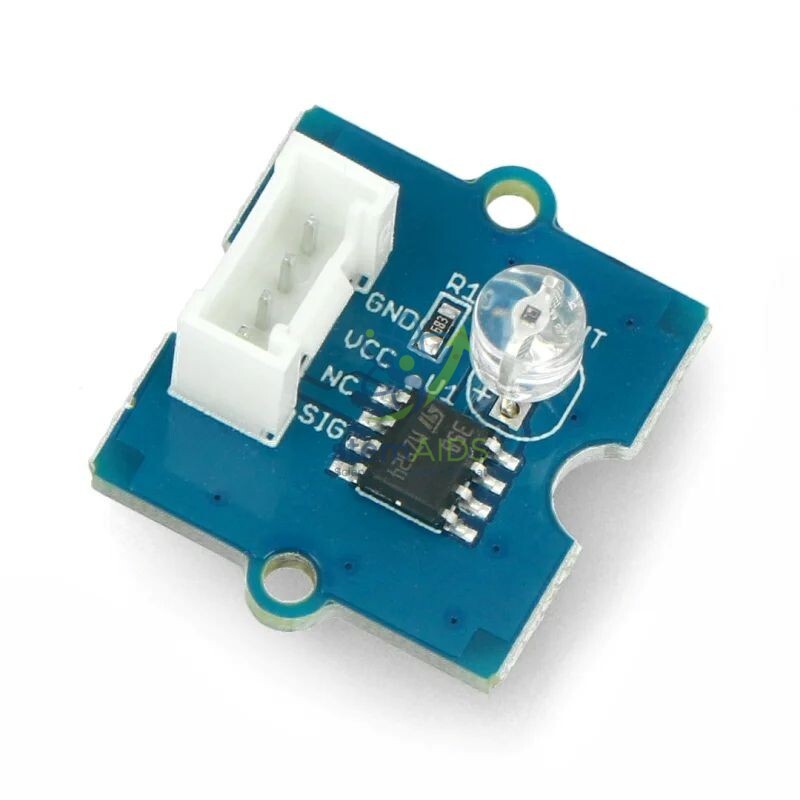
Quick Answer: The Grove Light Sensor is an analogue sensor module on a Grove board whose output voltage changes with the amount of light falling on it. Read by a microcontroller, the Grove light sensor gives a relative brightness value used in automatic lights, light-following robots and science investigations.
Reading Brightness as a Number
A light-dependent component on the board changes its electrical behaviour as more light reaches it, and the module turns that change into a voltage on its signal pin. The microcontroller’s analogue input converts the voltage to a number, so a dark cupboard gives a low reading and a sunny windowsill a high one. Depending on the version, the sensing element is a photoresistor or a phototransistor; the idea taught is the same either way.
The reading is relative rather than a calibrated lux value, and that is worth discussing with students. They can compare readings in different places, set a threshold for ‘dark enough’, and see why a threshold chosen at noon fails at dusk. Adding a small gap between the switch-on and switch-off levels, called hysteresis, stops an automatic light from flickering at the boundary.
Pairing the sensor with an output such as the Grove Red LED 5mm Module gives the classic first automation project: a street light that comes on by itself when it gets dark.
Applications
- Automatic street-light and night-light models
- Light-following or line-seeking robots that compare two sensors
- Plant investigations logging light levels at different spots in a classroom or garden
- Comparing how much light passes through tissue paper, tinted film and glass in physics lessons
- Day-length logging over a week, with readings shown on the Grove 2 x 16 Characters LCD Display
Care & Handling
- Keep the sensing window of the Grove Light Sensor clean; dust and fingerprints lower the reading.
- Shade it from desk lamps when calibrating so room lighting does not swamp the change you want to measure.
- Mount the sensor where a hand or cable will not cover it by accident during a test.
- Store modules dry and in antistatic packaging.
Specifications
| Sensor | Ambient light sensor on a Grove board |
| Output | Analogue voltage that increases with light level |
| Connection | Grove analogue port on a shield or Grove-ready board |
| Reading type | Relative brightness, not calibrated in lux |
| Sensing element and supply voltage | Confirm at enquiry |
Why Choose LabEquip
Primary coding clubs and secondary science departments both use light sensors because the effect of covering one is instant and easy to see. LabEquip lists this module among its STEM kits; request class sets through the contact page.
Frequently Asked Questions
Does the light sensor measure lux?
Not directly. It gives a relative reading that rises with brightness. It can be compared against a calibrated light meter to build a rough conversion, but for most projects a relative value and a threshold are all that is needed.
Why does my automatic light flicker at dusk?
The reading is hovering around a single threshold. Use two thresholds, a lower one to switch on and a higher one to switch off, so small fluctuations near the boundary do not toggle the light.
Which port should the sensor use?
An analogue port, because the module outputs a voltage that changes smoothly with light. Plugged into a digital port it would give only on or off values and lose the detail.
Can it detect the colour of light?
No. It responds to overall brightness, with a sensitivity that varies across the spectrum. Identifying colours needs a colour sensor with separate filtered channels.
How can it be used in a biology investigation?
Students can log light levels at plant positions around the classroom or school grounds and compare them with growth, or record light under leaf cover and in open ground to discuss habitats.
Will room lights affect readings?
Yes. Mains lighting can add a small ripple, and switching room lights on or off shifts the baseline. Averaging several readings, and recalibrating when the lighting changes, gives steadier results.
Last Updated: September 2026







Reviews
There are no reviews yet.