
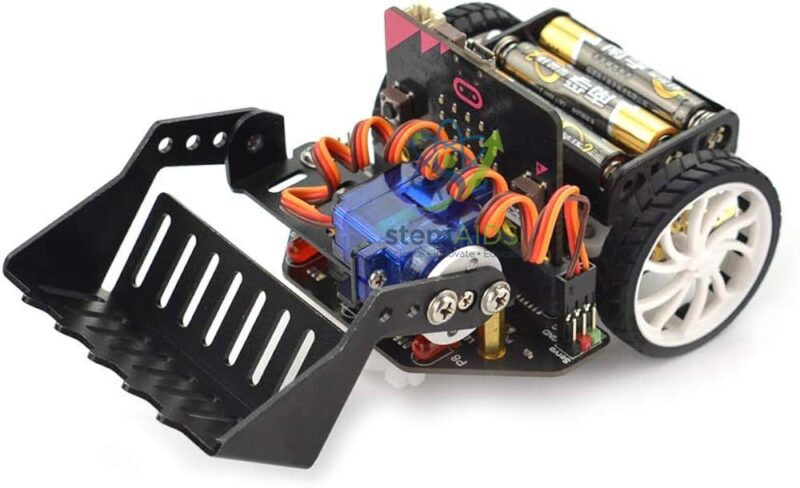
Quick Answer: The Micro:bot Pickup Kit is an attachment kit that lets a Micro:bot micro:bit robot car pick up and carry small objects, turning a driving robot into a collecting robot for delivery and clean-up challenges. Students assemble it and control the pickup action from code.
From Driving Robot to Collecting Robot
Once students can make a robot drive a course, the next question is what the robot is for. The Micro:bot Pickup Kit answers with object handling: the robot approaches an item, picks it up, carries it and puts it down somewhere else. Pickup attachments for these robots are normally operated by a servo, so the whole sequence is programmed alongside the driving code.
Collection tasks reward planning. Students decide the approach direction, the stopping distance, how long to wait for the pickup movement to finish and how to recover when an item is missed. A good lesson format is a clean-up or parcel-delivery challenge scored on items collected in two minutes, which pushes groups to improve reliability rather than raw speed.
The kit is listed for Micro:bot robots, micro:bit cars of the Maqueen type. The pickup mechanism, the parts and whether a servo is included are not given in the title and should be confirmed; the Micro:bot Gripper Kit is the attachment to choose when objects must be clamped firmly between jaws.
Specifications
| Item | Pickup attachment kit for Micro:bot robot cars |
| Task | Picking up, carrying and releasing small objects |
| Operation | Servo-controlled movement, usual for these attachments |
| Fits | Micro:bot micro:bit robots |
| Programming | MakeCode or Python, alongside the driving code |
| Mechanism, parts and servo | Confirm at enquiry |
Challenge Formats
- Timed clean-up: collect as many items as possible from a marked area
- Parcel delivery between numbered stations on a floor map
- Line-following route with pickup and drop-off points
- Remote-controlled collection using a second micro:bit as a radio controller
Care & Handling
- Use light objects of a size the attachment is made for, such as small balls or foam cubes.
- Stop the program before clearing a jammed object by hand.
- Keep the robot’s batteries charged, because a weak supply makes servo movement unpredictable.
- Check screws and pivots after each challenge day.
Why Choose LabEquip
The pickup kit is chosen by teachers running robotics competitions and clubs, where collection tasks keep every group engaged. It sits in LabEquip’s STEM kits range; share your robot model on the contact page to confirm fit.
Frequently Asked Questions
What does the Micro:bot Pickup Kit add to a robot?
It adds the ability to pick up, carry and put down small objects, so the robot can do collection and delivery tasks instead of only driving.
Which objects suit the pickup kit?
Light, regular objects such as small balls, foam cubes or card boxes are easiest. Very smooth, heavy or irregular items slip or unbalance the robot.
How should students program a pickup?
Stop the robot at a tested distance from the object, run the pickup movement, pause until it finishes and then drive away. Writing pickup and drop-off as functions keeps longer programs readable.
Why does the robot miss objects?
Small differences in stopping position add up. Measure the distance with a sensor before the pickup, approach slowly and start from the same position each time.
Should I choose the pickup kit or the gripper kit?
Choose the gripper when an object must be clamped firmly while the robot turns. The pickup kit suits collection tasks, and its exact mechanism is worth checking against your challenge.
Which robots can use the pickup kit?
It is listed for Micro:bot robots, micro:bit cars of the Maqueen type. Mounting points vary between versions, so the compatible models should be confirmed at enquiry.
Last Updated: September 2026





Reviews
There are no reviews yet.