


In Stock
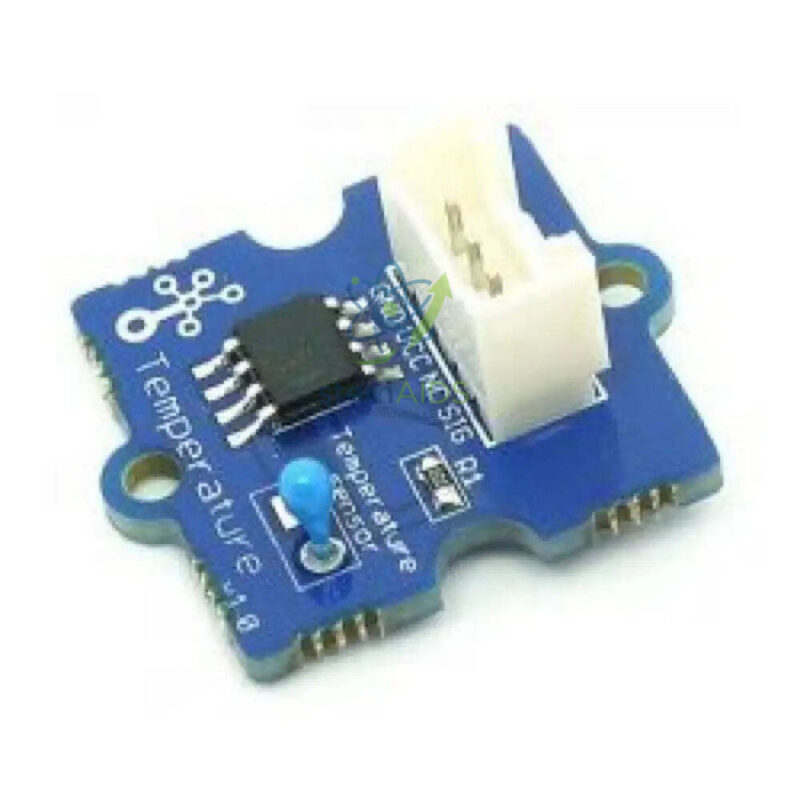
Grove Temperature Sensor
₹205.00
Quick Answer: The Grove Temperature Sensor is a small plug-in module on a printed circuit board that turns the temperature of the surrounding air into an analog voltage. Students connect it with a Grove cable to a microcontroller board and write code that converts the reading into degrees Celsius for logging, alarms or thermostat models.
How a Thermistor Module Reports Temperature
Modules sold under this name are generally built around an NTC thermistor, a resistor whose resistance falls as it warms. On the board the thermistor forms a voltage divider with a fixed resistor, so the voltage on the signal pin shifts as the room warms or cools. The microcontroller reads that voltage through an analog input and hands the program a raw number rather than a temperature.
Turning that raw number into degrees is where students learn the most. The usual route is to calculate the thermistor resistance from the reading and then apply the Beta equation given in the module documentation, which involves a natural logarithm. Younger classes can skip the algebra by recording raw readings next to a reference thermometer and drawing their own calibration graph, which shows why every sensor needs checking against a known standard.
Because it uses the Grove plug, the sensor connects to a shield or base board without breadboard wiring, so a lesson can begin with measurement rather than with chasing loose jumper leads. The listing title names only the module type, so confirm the sensing element, operating range and documentation supplied when you order.
Specifications
| Item | Temperature sensor module with a Grove connector |
| Sensing principle | Thermistor-type analog sensing, as generally used on modules of this name |
| Output | Analog voltage read by the host board through an analog input |
| Connection | Grove 4-pin cable to a Grove shield or base board |
| Measures | Air temperature around the module |
| Measuring range and accuracy | Confirm at enquiry |
Applications
- Logging classroom air temperature through a school day and plotting the curve
- Building a model thermostat that switches a fan or an LED when a set temperature is passed
- Comparing the air temperature inside insulated and uninsulated model houses placed in sunlight
- Teaching analog-to-digital conversion and the Beta equation in electronics or physics lessons
Care & Handling
- Keep the module dry. The exposed thermistor and board are not made for dipping in water or other liquids; use a sealed probe for liquid temperatures.
- Unplug the Grove cable by gripping the plug housing, not the wires.
- Store modules in anti-static bags or a labelled box so the thermistor legs are not bent flat.
- Avoid holding the thermistor while taking readings, since finger warmth changes the result.
Why Choose LabEquip
Schools usually buy temperature modules alongside a Grove shield so each group can finish a working sensor project in one lesson. LabEquip carries this module in its STEM kits range next to other Grove inputs such as the rotary potentiometer module, which can set the switching point of a thermostat project. Send class quantities and the host boards you use through the contact page.
Frequently Asked Questions
How accurate is a thermistor temperature module?
Accuracy depends on the thermistor tolerance, the fixed resistor and the conversion formula used in the code. Classroom modules are good for showing trends and comparing conditions, but for recorded values students should check the reading against a reference thermometer and apply an offset if needed.
Can the Grove temperature sensor measure water temperature?
Not directly. The thermistor sits on an open circuit board, and dipping it in water can short or corrode the board. For liquids, use a waterproof probe-type sensor. This module is intended for air temperature.
Why does my reading change when I touch the sensor?
The thermistor is small and responds quickly to heat, so the warmth of a finger or of breath raises the reading within seconds. Handle the module by its edges or the cable, and let it settle for a minute after moving it to a new place.
How do I convert the analog reading into degrees Celsius?
Use the reading to work out the thermistor resistance from the voltage divider, then apply the Beta equation with the values from the module documentation and subtract 273.15 to go from kelvin to Celsius. Block-based editors often have an extension that does this conversion for you.
Which boards can read this sensor?
Any board with an analog input and a Grove port can read it, for example an Arduino-type board with a Grove base shield or a micro:bit with a Grove adaptor. Check that the supply voltage of the board suits the module documentation.
What is a good first project with this sensor?
A temperature alarm is a quick start: read the sensor every second, show the value, and turn on an LED or buzzer when it passes a limit. Pupils then extend it to log data over a lesson and plot a graph, which links coding with science practical skills.
Last Updated: September 2026
You must be logged in to post a review.
Bestsellers



Sale
Sale

Sale


Reviews
There are no reviews yet.