
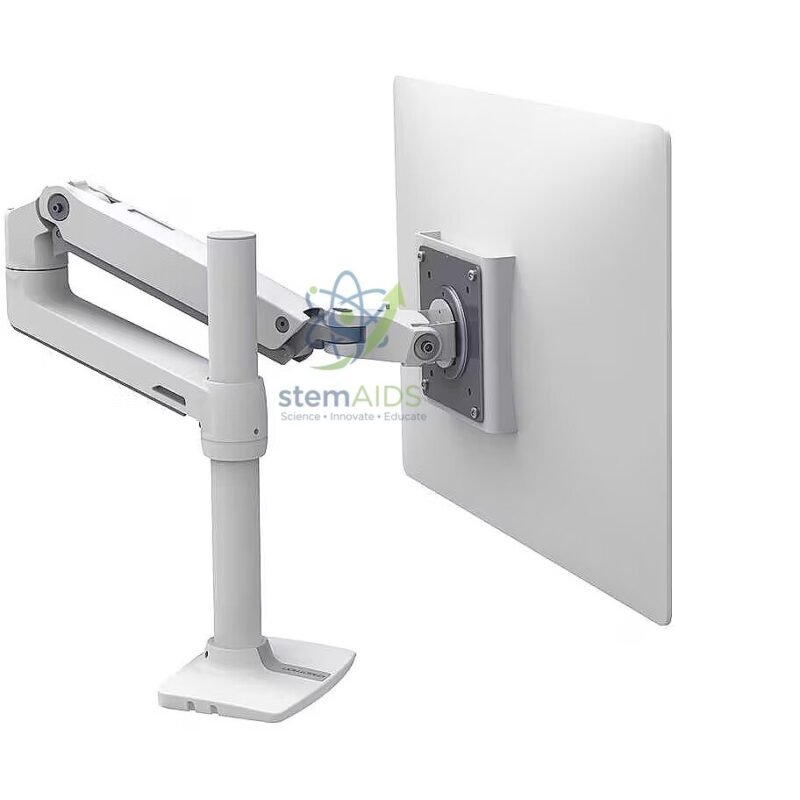
The StemAids Articulated Arm for Ergonomic Flat Screen (Bras articulé pour écran plat ergonomique) is a practical and adjustable mounting solution designed to support flat-screen monitors and display panels in classrooms, computer labs, offices, STEM labs, robotics workstations, and technical training environments. It helps position the screen at a comfortable viewing height and angle, improving posture, reducing workspace clutter, and supporting long-duration digital learning or working sessions.
This ergonomic flat-screen arm is ideal for users who require flexible screen movement for teaching, coding, designing, monitoring, demonstrations, and laboratory applications. Its articulated design allows the screen to be moved closer, pushed back, tilted, swivelled, or adjusted according to the user’s seating position and task requirements.
Product Overview
The StemAids Articulated Arm for Ergonomic Flat Screen is designed to provide stable support and smooth positioning for compatible flat-screen displays. It is commonly used in digital classrooms, smart labs, computer workstations, science labs, control desks, and office setups where screen comfort and desk organization are important.
By lifting the monitor from the desk surface, this articulated arm creates more usable workspace for keyboards, books, laboratory tools, notebooks, and STEM project materials. It also helps users maintain a better viewing position, which can reduce neck strain, shoulder discomfort, and screen glare during regular use.
Key Features
- Ergonomic Screen Positioning: Helps adjust screen height, angle, and distance for comfortable viewing.
- Articulated Arm Design: Allows flexible movement for teaching, working, coding, and demonstration setups.
- Flat Screen Compatibility: Suitable for compatible LCD, LED, and monitor display panels.
- Space-Saving Installation: Keeps the display lifted from the desk to create a cleaner workstation.
- Tilt and Swivel Adjustment: Helps reduce glare and improve screen visibility from different angles.
- Rotation Support: Allows landscape or portrait orientation depending on screen and model compatibility.
- Strong and Stable Build: Designed for reliable use in classrooms, offices, laboratories, and training centers.
- Ideal for STEM Labs: Useful for robotics stations, coding benches, electronics labs, and digital learning environments.
Product Specifications
| Product Name | Articulated Arm for Ergonomic Flat Screen |
|---|---|
| Brand | StemAids |
| Product Type | Ergonomic Flat Screen / Monitor Mounting Arm |
| Compatible Screen Type | Flat-screen LCD, LED, and monitor display panels |
| Mounting Style | Desk clamp, wall mount, panel mount, or workstation mount depending on model variant |
| Adjustment Options | Height adjustment, tilt, swivel, extension, retraction, and rotation depending on model |
| VESA Compatibility | Compatible with standard VESA-supported screens as per model specification |
| Material | Durable metal / alloy construction with stable mounting hardware |
| Load Capacity | Model dependent; screen weight must be checked before installation |
| Screen Size Support | Suitable for compatible flat screens within recommended size and weight limits |
| Application Area | STEM labs, computer labs, smart classrooms, offices, control rooms, and workstations |
| Recommended Users | Students, teachers, trainers, engineers, designers, technicians, and office users |
How to Use the Articulated Arm for Ergonomic Flat Screen
- Check Screen Compatibility: Confirm the screen size, weight, and mounting pattern before installation.
- Select the Mounting Surface: Choose a strong desk, wall, panel, or workstation surface suitable for the arm.
- Install the Base: Fix the clamp, bracket, or mounting plate securely using the supplied hardware.
- Attach the Screen Plate: Fasten the mounting plate to the back of the flat screen using suitable screws.
- Mount the Screen: Carefully attach the screen to the articulated arm and ensure it is locked properly.
- Adjust the Position: Set the screen height, tilt, swivel, and distance according to the user’s eye level and working posture.
- Manage the Cables: Arrange power and display cables neatly so they do not pull, bend, or restrict arm movement.
- Perform Final Safety Check: Make sure all screws, joints, and locking points are tightened before regular use.
Ergonomic Benefits
The StemAids Articulated Arm for Ergonomic Flat Screen helps create a comfortable and organized digital workspace. It supports better monitor positioning, which is important for classrooms, offices, laboratories, and training centers where users spend long hours in front of screens.
- Helps position the screen at eye level
- Reduces unnecessary bending of the neck
- Supports comfortable viewing during long working sessions
- Helps reduce glare by changing screen angle
- Creates more usable desk space
- Improves workspace organization and cable management
- Supports flexible screen sharing during teaching and demonstrations
Applications
- Computer lab monitor mounting
- STEM classroom workstation setup
- Robotics and coding lab display support
- Office desk screen positioning
- Digital teaching and smart classroom display setup
- Electronics workbench monitor support
- Control room display arrangement
- Training center and demonstration station use
- Laboratory data monitoring workstation
Why Choose StemAids Articulated Arm for Ergonomic Flat Screen?
StemAids provides practical equipment and accessories for modern educational, technical, and laboratory environments. The Articulated Arm for Ergonomic Flat Screen is designed to support flexible screen placement, better posture, organized workspaces, and improved user comfort.
It is a suitable choice for institutions, offices, schools, colleges, STEM labs, and technical training centers that require durable and adjustable monitor mounting solutions. Its ergonomic design helps create a professional workstation where screens can be positioned according to the user’s viewing needs.
Safety and Installation Guidelines
- Do not exceed the recommended weight capacity of the articulated arm.
- Confirm screen size, weight, and mounting compatibility before installation.
- Install the arm only on a strong and stable surface.
- Use the correct screws and mounting hardware supplied with the product.
- Do not force the arm beyond its designed movement range.
- Keep cables loose enough to allow smooth arm movement.
- For wall installation, ensure the wall structure can safely support the screen and arm.
- Installation should be performed by a trained person or under proper supervision.
Google E-E-A-T Focus
This product is suitable for educational and professional environments where ergonomic screen placement, safe installation, and long-term usability are important. StemAids focuses on practical, user-friendly, and institution-ready solutions for STEM labs, classrooms, technical workstations, and digital learning spaces.
Frequently Asked Questions
1. What is an articulated arm for an ergonomic flat screen?
It is an adjustable mounting arm used to hold and position a flat-screen monitor or display panel at a comfortable viewing height, angle, and distance.
2. Is this product suitable for computer labs?
Yes, the StemAids Articulated Arm for Ergonomic Flat Screen is suitable for computer labs, STEM labs, classrooms, offices, and training centers.
3. Can the screen height be adjusted?
Yes, most articulated arms allow height adjustment, tilt, swivel, extension, and rotation depending on the model design.
4. Does this arm help improve posture?
Yes, it helps position the screen closer to eye level, which can reduce unnecessary neck bending and improve viewing comfort.
5. Is it compatible with all flat screens?
It is compatible only with screens that match the supported mounting pattern, weight capacity, and screen size range of the specific arm model.
6. Can it be used in portrait and landscape mode?
Many models support screen rotation for portrait and landscape use, but compatibility depends on the screen and articulated arm design.
7. Does it save desk space?
Yes, it lifts the screen from the desk surface and creates more space for keyboards, books, lab tools, notebooks, and other accessories.
8. Is professional installation required?
Desk-mounted models may be installed with basic tools, but wall-mounted or heavy-screen installations should be completed by a trained person for safety.
SEO Keywords
Articulated Arm for Ergonomic Flat Screen, StemAids monitor arm, ergonomic flat screen arm, adjustable monitor mount, flat screen mounting arm, ergonomic monitor stand, VESA monitor arm, monitor arm for computer lab, screen arm for STEM lab, adjustable LCD LED monitor arm, articulated screen holder, flat panel display arm, ergonomic workstation monitor mount.






Reviews
There are no reviews yet.