















In Stock
USB Optical Mouse
₹210.00
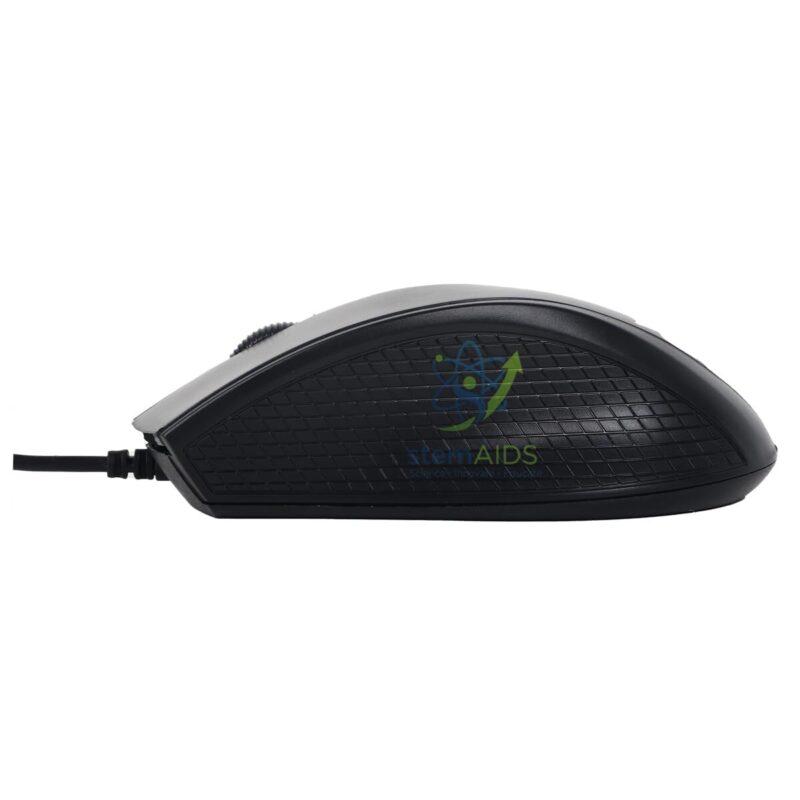
Quick Answer: The USB Optical Mouse is a wired computer mouse that plugs into a USB port and uses an LED-lit optical sensor to track movement. The listing photo shows a black USB optical mouse with a cable, suited to computer labs and workstations where wireless mice would need batteries and pairing.
Why Labs Choose Wired Optical Mice
A wired USB mouse needs no batteries, no receiver and no pairing: the computer recognises it as a standard input device as soon as it is plugged in. In a computer lab that means fewer lessons interrupted by flat batteries or lost receivers, and a mouse that is less likely to wander to another room.
The optical sensor lights the surface beneath the mouse and detects movement from changes in its texture. That works on most matt desks and on a mouse pad, but glossy or glass tops confuse it. The listing photo shows a contoured black body with a scroll wheel between the buttons; sensor resolution and cable length are not stated.
Where the mouse shares a computer’s ports with a keyboard and data logger, a 4-port USB hub keeps the connections at desk level.
Specifications
| Type | Wired optical mouse |
| Connection | USB |
| Sensor | Optical, LED illuminated |
| Colour | Black (per listing photo) |
| Sensor resolution and cable length | Confirm at enquiry |
Applications
- Computer labs and ICT rooms with shared workstations
- Science lab PCs running data-logging or simulation software
- Library, exam and staff-room computers
- Replacing worn or faulty mice in existing labs
Care & Handling
- Clean the sensor window on the underside gently with a dry cotton bud if the cursor becomes jumpy.
- Wipe the buttons and body with a cloth dampened with a disinfectant suitable for plastics; do not spray liquid directly onto the mouse.
- Leave slack in the cable at the computer end and avoid wrapping it tightly around the mouse for storage.
- Unplug by the plug, not the cable.
Why Choose LabEquip
Mice are ordered in lab quantities when schools set up or refresh computer rooms, often together with pads and hubs. LabEquip lists this mouse in General Lab Products; send the number of workstations through the contact page.
Frequently Asked Questions
Does the USB optical mouse need drivers?
No special drivers are normally needed. Current operating systems recognise a USB mouse as a standard input device as soon as it is plugged in.
Why choose a wired mouse over a wireless one for a lab?
A wired mouse needs no batteries or receiver, so there is nothing to run flat or lose. It also stays attached to its workstation, which suits shared rooms used by many classes.
On which surfaces does an optical mouse work?
It tracks well on matt desks, wood and mouse pads. Glass, mirrors and high-gloss surfaces reflect the light unevenly, so the cursor may jump or stop.
How do I clean a shared mouse between classes?
Wipe the buttons, wheel and body with a disinfectant wipe that is safe for plastic, then let it dry. Do not let liquid seep into the button gaps or the sensor window.
Can left-handed students use it?
A symmetric mouse can be used in either hand, and the button functions can be swapped in the operating system’s mouse settings. Contoured right-hand shapes are less comfortable for left-handed users.
Why does the cursor move erratically?
Dust or a hair over the sensor, or a glossy surface, are the usual causes. Clean the sensor window, try a mouse pad and check that the USB plug is fully inserted.
Last Updated: September 2026
You must be logged in to post a review.
Bestsellers




Reviews
There are no reviews yet.