
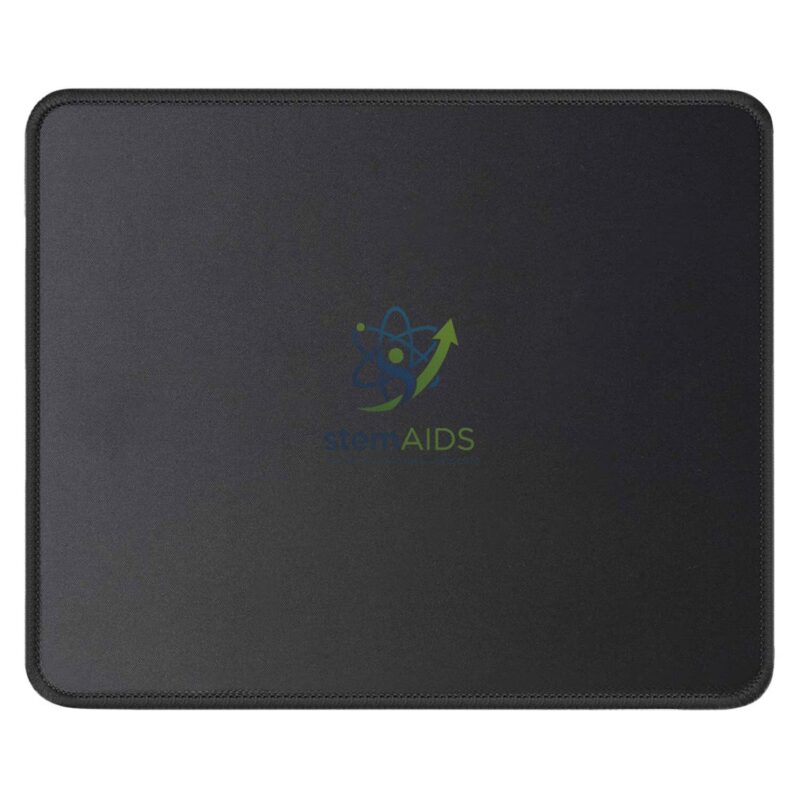
The StemAids Mouse Pad is a practical and durable computer accessory designed for smooth mouse movement, accurate cursor control, and comfortable daily use. It is suitable for schools, computer labs, ICT rooms, offices, libraries, training centers, STEM labs, and home study setups.
This mouse pad provides a stable surface for optical and laser mice, helping students, teachers, office users, and computer operators work more efficiently. Its smooth top surface improves tracking accuracy, while the anti-slip base helps keep the pad in place during regular use.
Product Overview
The StemAids Mouse Pad is designed to support regular computer use in educational and professional environments. It helps protect desk surfaces from scratches and improves mouse performance compared to using a mouse directly on uneven or glossy tables.
It is especially useful in computer labs where multiple systems are used daily by students and staff. The simple, lightweight, and easy-to-maintain design makes it suitable for bulk institutional use.
Key Features
- Smooth Surface: Supports accurate and comfortable mouse movement.
- Anti-Slip Base: Helps keep the mouse pad stable on the desk.
- Compatible with Optical and Laser Mouse: Suitable for different types of computer mice.
- Comfortable Daily Use: Helps reduce friction during long computer sessions.
- Desk Protection: Protects table surfaces from scratches and repeated mouse movement marks.
- Lightweight Design: Easy to place, carry, clean, and store.
- Ideal for Institutions: Suitable for schools, offices, computer labs, libraries, and training centers.
Product Specifications
| Product Name | Mouse Pad |
|---|---|
| Brand | StemAids |
| Product Type | Computer Mouse Pad / Desk Mouse Mat |
| Surface Type | Smooth fabric or textured top surface depending on model variant |
| Base Type | Anti-slip rubber or foam base depending on model |
| Compatibility | Optical mouse, laser mouse, wired mouse, and wireless mouse |
| Shape | Rectangular or standard desk pad design depending on supply |
| Thickness | Standard comfortable thickness suitable for regular computer use |
| Application | Computer labs, offices, classrooms, libraries, training centers, and home desks |
| Recommended Users | Students, teachers, office staff, computer operators, gamers, and general users |
How to Use the StemAids Mouse Pad
- Place on a Flat Surface: Keep the mouse pad on a clean, dry, and flat desk or workstation.
- Position the Mouse: Place the computer mouse on the smooth top surface of the mouse pad.
- Adjust Placement: Position the mouse pad near the keyboard for comfortable hand movement.
- Use Normally: Move the mouse across the pad for smooth cursor control.
- Clean When Needed: Wipe the surface gently with a dry or slightly damp cloth to remove dust.
- Store Properly: Keep the mouse pad flat and avoid folding or bending it unnecessarily.
Benefits for Computer Labs and Workstations
The StemAids Mouse Pad helps create a cleaner and more comfortable computer workstation. It supports better mouse control, protects desk surfaces, and improves daily usability in labs and offices.
- Improves mouse tracking and cursor accuracy
- Helps maintain smooth hand movement during computer use
- Protects desks from scratches and marks
- Useful for students during ICT and computer practicals
- Suitable for bulk use in schools and offices
- Easy to clean, replace, and maintain
Applications
- School computer labs
- ICT classrooms
- Office workstations
- Library computer sections
- Training centers
- STEM and robotics labs
- Reception desks
- Home study tables
- General desktop computer use
Why Choose StemAids Mouse Pad?
StemAids provides practical computer and educational technology accessories for classrooms, ICT labs, STEM labs, offices, and institutional workspaces. The StemAids Mouse Pad is designed to support smooth mouse operation, neat workstation setup, and comfortable daily computer use.
It is a useful accessory for schools, colleges, offices, libraries, and training centers where computers are used regularly. Its simple design, reliable surface, and anti-slip base make it suitable for both individual and institutional requirements.
Safety and Maintenance Guidelines
- Keep the mouse pad on a clean and flat surface.
- Avoid placing heavy or sharp objects on the mouse pad.
- Do not fold, twist, or bend the pad excessively.
- Keep away from water, oil, and excessive heat.
- Clean gently with a soft cloth when dust accumulates.
- Allow the pad to dry fully before reuse if cleaned with a damp cloth.
- Replace the pad if the surface becomes worn or uneven.
Google E-E-A-T Focus
This product content is prepared for school procurement teams, ICT lab coordinators, office administrators, computer lab managers, and institutional buyers. It focuses on practical use, product suitability, safe handling, workstation comfort, and long-term usability to support Google E-E-A-T principles of experience, expertise, authoritativeness, and trustworthiness.
Frequently Asked Questions
1. What is the StemAids Mouse Pad used for?
It is used to provide a smooth and stable surface for computer mouse movement, improving cursor control and protecting the desk surface.
2. Is this mouse pad suitable for school computer labs?
Yes, it is suitable for school computer labs, ICT classrooms, offices, libraries, training centers, and general workstation use.
3. Can it be used with a wireless mouse?
Yes, it can be used with wired and wireless mice, including optical and laser mouse models.
4. Does it have an anti-slip base?
Yes, the mouse pad is designed with an anti-slip base or stable bottom layer depending on the model variant.
5. Does a mouse pad improve mouse performance?
Yes, a proper mouse pad can improve tracking accuracy, movement comfort, and cursor control compared to uneven or glossy desk surfaces.
6. How should the mouse pad be cleaned?
It can be cleaned gently with a soft dry cloth or a slightly damp cloth. Avoid harsh chemicals, excessive water, and rough scrubbing.
7. Is it suitable for office use?
Yes, it is suitable for office desks, reception counters, administrative workstations, and computer training rooms.
8. Can students use it for ICT practicals?
Yes, it is useful for students during ICT classes, computer practicals, digital learning sessions, and coding activities.
9. Does it protect the table?
Yes, it helps protect desk surfaces from scratches, repeated mouse movement marks, and minor wear.
10. Is it suitable for bulk institutional purchase?
Yes, the StemAids Mouse Pad is suitable for schools, colleges, offices, labs, libraries, and training centers requiring multiple workstation accessories.
SEO Keywords
Mouse Pad, StemAids Mouse Pad, computer mouse pad, mouse pad for school computer lab, office mouse pad, anti-slip mouse pad, optical mouse pad, laser mouse pad, ICT lab mouse pad, computer lab accessories, workstation mouse mat, desk mouse pad, mouse pad for students, mouse pad for office use.




Reviews
There are no reviews yet.