


In Stock
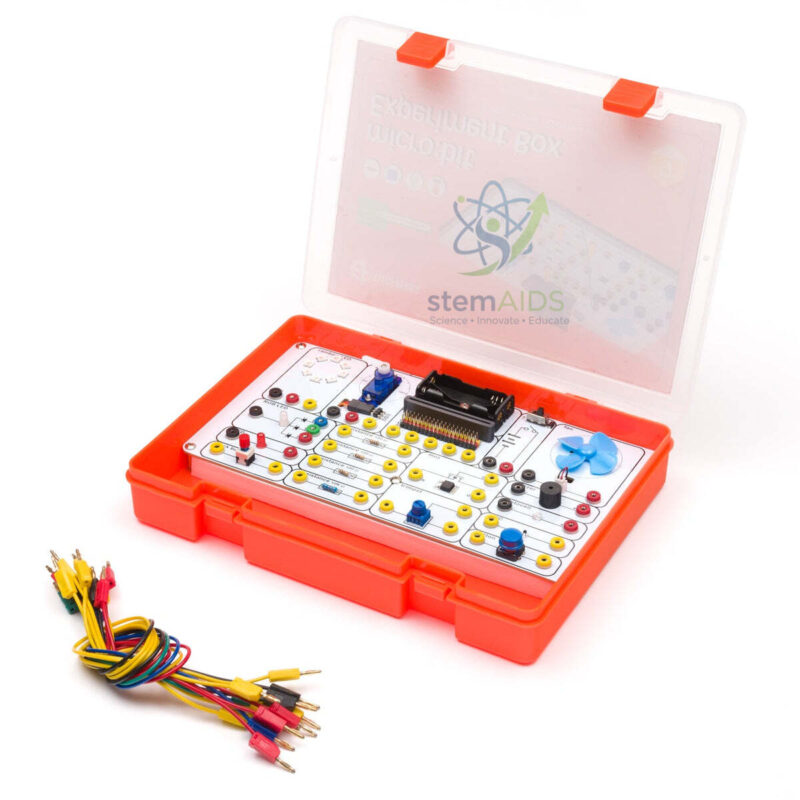
Electronic experimentation kit for micro:bit
₹1,230.00
The Electronic Experimentation Kit for micro:bit by StemAids is an educational STEM learning kit designed to introduce students to electronics, coding, circuit building, programmable input-output control, and practical experimentation using the micro:bit platform. It is suitable for schools, training centers, robotics labs, coding workshops, and innovation-based classrooms.
This kit helps learners understand how electronic components respond to programmed instructions. Students can connect compatible modules, create simple circuits, upload code, test outputs, troubleshoot errors, and improve their projects through repeated experimentation. It is useful for building a strong foundation in electronics and physical computing.
The StemAids Electronic Experimentation Kit for micro:bit supports beginner-friendly block programming through MakeCode and can also be used for Python-based learning depending on the classroom setup. It is ideal for practical STEM activities where students learn by observing real output from coded commands.
Key Features
- Educational experimentation kit for micro:bit-based STEM learning
- Supports MakeCode block programming for beginner-friendly coding
- Can be used for Python-based learning activities
- Useful for learning electronics, circuits, sensors, actuators, and programmable outputs
- Helps students connect coding concepts with real hardware experiments
- Suitable for classroom demonstrations, lab activities, and project-based learning
- Encourages troubleshooting, logical thinking, testing, and design improvement
- Useful for STEM labs, robotics labs, coding classes, and innovation workshops
Product Specifications
| Product Name | Electronic Experimentation Kit for micro:bit |
|---|---|
| Brand | StemAids |
| Product Type | Educational Electronics Experimentation Kit / STEM Learning Pack |
| Compatible Platform | BBC micro:bit-compatible learning platform |
| Programming Support | MakeCode block programming and Python |
| Main Learning Area | Electronics, Coding, Circuit Building, Input-Output Control, Sensors, Actuators, STEM Projects |
| Material Type | Educational kit pack / classroom experimentation pack |
| Recommended Use | School STEM Labs, Coding Classes, Electronics Workshops, Robotics Labs, Project-Based Learning |
| User Level | Beginner to Intermediate |
| Classroom Skills Developed | Programming, Wiring, Circuit Testing, Observation, Troubleshooting, Logical Thinking, Engineering Design |
| Package Note | Exact component list may vary according to final supplied package. Please confirm whether micro:bit board, USB cable, batteries, sensors, modules, and accessories are included before purchase. |
How to Use Electronic Experimentation Kit for micro:bit
- Check the Kit Contents: Open the kit and verify all supplied components, cables, modules, and accessories as per the final package list.
- Prepare the micro:bit Board: Connect the micro:bit board to a computer using a compatible USB cable. If the micro:bit board is not included, arrange it separately.
- Select an Experiment: Choose a simple activity such as LED control, button input, sensor reading, sound output, motor control, or relay switching depending on the supplied components.
- Build the Circuit: Connect the required components carefully using the supplied wires, clips, breadboard, or interface board according to the experiment guide.
- Open the Programming Platform: Use Microsoft MakeCode for block-based programming. Advanced students can use Python for more detailed coding practice.
- Create the Program: Write a program to control the connected component, read an input signal, or generate an output response.
- Upload the Program: Transfer the program to the micro:bit board and connect the required power supply.
- Test the Result: Observe whether the circuit works as expected. Check LED light, sensor response, sound, motor movement, or other output behaviour.
- Troubleshoot Errors: If the circuit does not work, check wiring, pin selection, battery polarity, component placement, and code logic.
- Improve the Project: Modify the program, add conditions, combine multiple components, and create advanced STEM projects.
Educational Benefits
The StemAids Electronic Experimentation Kit for micro:bit helps students learn electronics through direct practical activity. Instead of only reading about circuits and programming, learners can build working experiments and see how code controls real-world electronic components.
This kit supports activity-based STEM learning by encouraging students to test ideas, observe results, find mistakes, and improve their designs. It helps develop problem-solving ability, programming confidence, circuit understanding, teamwork, and engineering thinking.
Applications
- micro:bit electronics experiments
- STEM classroom demonstrations
- Beginner coding activities
- Sensor and actuator learning projects
- LED, buzzer, button, and output-control experiments
- Robotics and automation basics
- Electronics workshop activities
- Project-based learning assignments
- Innovation lab and tinkering lab projects
- Python and MakeCode programming practice
Why Choose StemAids Electronic Experimentation Kit for micro:bit?
StemAids provides practical STEM learning products for schools, colleges, coding labs, robotics classrooms, and innovation-based learning spaces. The Electronic Experimentation Kit for micro:bit by StemAids is designed to make electronics and programming easier to understand through hands-on experiments.
For educational institutions, this kit offers strong classroom value because it can be used across multiple learning activities, from basic circuit connection to programmable electronics projects. It helps teachers conduct structured practical lessons and gives students the confidence to build, code, test, and improve real electronic systems.
SEO Keywords
Electronic Experimentation Kit for micro:bit, StemAids Electronic Experimentation Kit, micro:bit Electronics Kit, micro:bit STEM Kit, micro:bit Programming Kit, Educational Electronics Kit, micro:bit Experiment Kit for Schools, MakeCode micro:bit Kit, Python micro:bit Kit, STEM Electronics Kit for Schools.
FAQ
1. What is the Electronic Experimentation Kit for micro:bit?
It is an educational STEM kit used to teach electronics, coding, circuits, input-output control, sensors, actuators, and micro:bit-based experimentation.
2. Which brand offers this product?
This product is offered under the StemAids brand for STEM education, coding, electronics, robotics, and project-based classroom learning.
3. Which programming platforms can be used?
Students can use MakeCode block programming for beginner-level activities. Python can also be used for advanced programming depending on classroom setup.
4. Is this kit suitable for beginners?
Yes, it is suitable for beginners because students can start with simple block-based programs and basic circuit activities.
5. Is the micro:bit board included?
The kit is designed for micro:bit-based learning, but the micro:bit board may or may not be included depending on the final supplied package. Please confirm package contents before purchase.
6. What can students learn from this kit?
Students can learn circuit connection, programming logic, sensor reading, actuator control, LED output, troubleshooting, project testing, and STEM-based engineering design.
7. Can this kit be used in school STEM labs?
Yes, it is suitable for school STEM labs, coding classes, electronics workshops, robotics labs, innovation labs, and tinkering labs.
8. Does the kit require soldering?
Soldering requirement depends on the final supplied components and project activities. Basic classroom experiments may use plug-in, clip, or breadboard-style connections. Any soldering should be done under teacher supervision.
9. Can Python be used with this kit?
Yes, Python can be used for micro:bit programming where the project and classroom setup support it. Beginners can start with MakeCode first.
10. What safety precautions should be followed?
Students should avoid short circuits, check correct polarity, use suitable batteries or USB power, handle components gently, and work under teacher or trainer supervision.
You must be logged in to post a review.
Bestsellers

Sale
Sale
Sale
Sale


Reviews
There are no reviews yet.