










In Stock
Wireless option for Thymio II
₹1,450.00
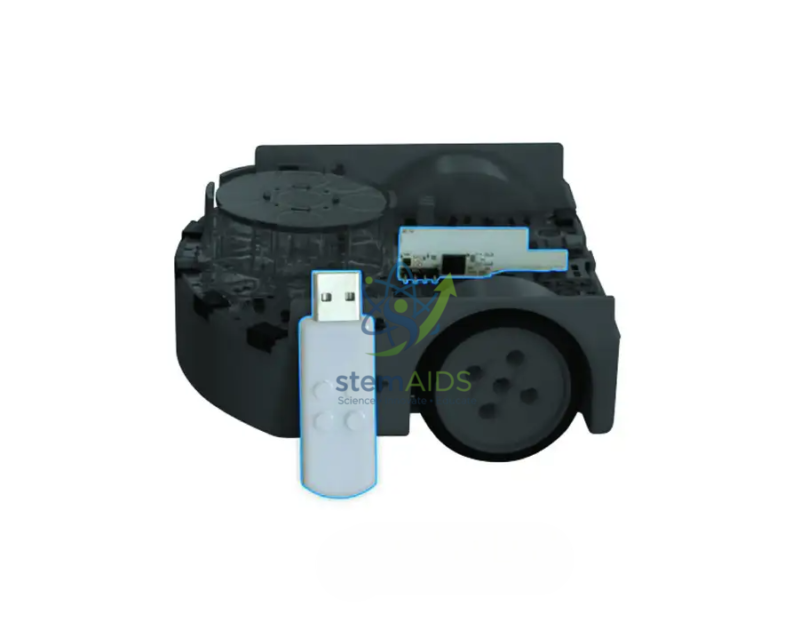
The StemAids Wireless Option for Thymio II gives compatible Thymio II robots wireless programming capability through a dedicated wireless module and USB dongle. Once installed and paired, the robot can communicate with the computer wirelessly, making classroom demonstrations, group projects, and testing activities easier to manage.
This product is useful for teachers who want smoother lesson flow, students who need more freedom during robotics experiments, and labs that use Thymio robots for coding, sensor testing, motion activities, and problem-solving exercises.
Important: This is a technical upgrade kit. The internal module must be installed carefully, and soldering experience is required. Installation should be handled by a qualified technician, electronics teacher, robotics trainer, or experienced user.
Product Specifications
| Specification | Details |
|---|---|
| Brand | StemAids |
| Product Name | Wireless Option for Thymio II |
| Product Type | Wireless upgrade kit for Thymio II |
| Compatible Device | Compatible Thymio II educational robots |
| Main Function | Converts a standard Thymio II into a wireless Thymio |
| Wireless Components | USB dongle and internal wireless electronic module |
| Wireless Protocol | 2.4 GHz, 802.15.4 protocol |
| Computer Connection | USB dongle |
| Installation Type | Internal module installation with soldering |
| Package Dimensions | Approx. 16 cm × 16 cm × 1.5 cm |
| Package Weight | Approx. 40 g |
| Recommended User | Teachers, robotics trainers, technicians, and advanced users |
| Application | STEM education, coding, robotics, classroom programming, and remote robot control |
| Package Includes | Wireless dongle, electronic module, installation instructions, user booklet, and FCC ID sticker |
Compatibility Note: Most Thymio robots are compatible, but very early Thymio units may not support this upgrade. Check your robot version before installation.
Key Features
Wireless programming upgrade: Converts a compatible wired Thymio II robot into a wireless robot.
USB dongle included: Allows the computer to communicate with the upgraded Thymio robot.
Internal wireless module: Designed to be installed inside the robot for wireless communication.
Classroom-friendly use: Reduces cable handling during lessons, demonstrations, and student activities.
Real-time interaction: Helps users test programs and observe robot behavior without keeping the robot physically connected to the computer.
Ideal for STEM learning: Supports programming, robotics, sensor activities, movement tasks, and project-based learning.
StemAids branded solution: Supplied under the StemAids brand for educational robotics environments.
How to Use the StemAids Wireless Option for Thymio II
- Confirm that your Thymio II robot is compatible with the wireless upgrade.
- Turn off the robot and disconnect it from power or USB.
- Open the robot carefully using suitable tools.
- Install the internal wireless module according to the installation instructions.
- Solder the module only if you have proper electronics experience.
- Close the robot body securely after installation.
- Insert the wireless USB dongle into your computer.
- Open Thymio Suite on the computer.
- Use the wireless pairing tool to pair the robot with the dongle.
- Turn on the upgraded Thymio II robot and confirm that it appears in the software.
- Start programming, testing, and controlling the robot wirelessly.
Safety and Care Instructions
Use the StemAids Wireless Option for Thymio II only with compatible Thymio II robots. Installation requires care and soldering experience. Do not install the module if you are unfamiliar with electronics assembly. Incorrect installation may damage the robot or void warranty coverage. Keep the module, dongle, and robot away from water, dust, heat, and static electricity. Adult supervision is recommended in schools, labs, and student environments.
FAQ
Q1. What is the StemAids Wireless Option for Thymio II?
The StemAids Wireless Option for Thymio II is a wireless upgrade kit that helps convert a compatible standard Thymio II robot into a wireless Thymio robot.
Q2. What is included in the kit?
The kit includes a USB wireless dongle, an internal electronic wireless module, installation instructions, a user booklet, and an FCC ID sticker.
Q3. Does this kit require soldering?
Yes. The internal electronic module must be installed inside the robot, and soldering experience is required.
Q4. Can beginners install this kit?
No. Installation should be done by a qualified technician, electronics teacher, robotics trainer, or experienced user.
Q5. What wireless protocol does it use?
The wireless module uses 2.4 GHz communication with the 802.15.4 protocol.
Q6. Is this the same as Wi-Fi?
No. It is a dedicated wireless communication system for Thymio, using a USB dongle and wireless module.
Q7. Can I program Thymio II wirelessly after installing this kit?
Yes. Once the module is installed and paired with the USB dongle, you can program and interact with the robot wirelessly through compatible Thymio software.
Q8. Is it compatible with every Thymio robot?
Most Thymio II robots are compatible, but very early units may not support the upgrade. Always check compatibility before installation.
Q9. What should I do if the robot does not connect wirelessly?
Check the dongle connection, pairing settings, robot power, Thymio Suite version, and installation quality. Re-pair the robot and dongle if needed.
Q10. Is this product suitable for schools?
Yes. It is suitable for STEM classrooms, robotics labs, coding workshops, and makerspaces, provided installation is handled by an experienced adult or technician.
You must be logged in to post a review.
Bestsellers




Reviews
There are no reviews yet.