










In Stock
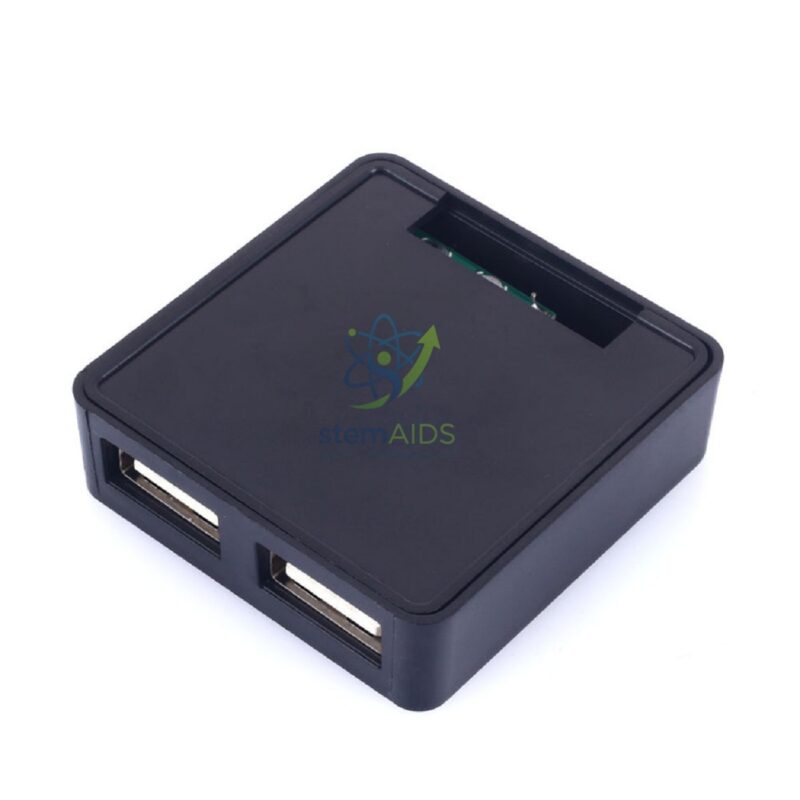
USB Hub 4 ports USB 2.0
₹856.00
The StemAids USB Hub 4 Ports USB 2.0 is a compact and practical connectivity accessory designed to expand a single USB port into four usable USB ports. It is suitable for schools, computer labs, ICT rooms, STEM labs, offices, libraries, training centers, and home workstations where multiple USB devices need to be connected at the same time.
This 4-port USB 2.0 hub is useful for connecting keyboards, mice, pen drives, printers, scanners, USB cameras, document cameras, card readers, and other low-power USB peripherals. Its plug-and-play design makes it easy to use with compatible laptops, desktop computers, smart classroom systems, and training workstations.
Product Overview
The StemAids USB Hub 4 Ports USB 2.0 helps users overcome limited USB port availability on computers and laptops. It provides four additional USB 2.0 ports for daily digital learning, data transfer, peripheral connection, and classroom equipment setup.
It is especially useful in computer labs and smart classrooms where teachers and students frequently connect multiple USB accessories. The lightweight and portable design makes it suitable for both fixed workstation use and mobile teaching setups.
Key Features
- 4 USB Ports: Expands one USB port into four additional USB ports.
- USB 2.0 Interface: Supports data transfer speeds up to 480 Mbps under suitable conditions.
- Plug-and-Play Use: Easy to connect without complicated installation.
- Compact Design: Lightweight and portable for classrooms, offices, and travel use.
- Wide Device Support: Suitable for keyboards, mice, USB drives, printers, scanners, and other USB peripherals.
- Ideal for Computer Labs: Useful for ICT labs, STEM labs, smart classrooms, and training centers.
- Simple Cable Connection: Connects easily to a laptop or desktop USB port.
- Practical Workstation Accessory: Helps reduce port limitations and improves device connectivity.
Product Specifications
| Product Name | USB Hub 4 Ports USB 2.0 |
|---|---|
| Brand | StemAids |
| Product Type | USB Hub / USB Port Expander |
| Number of Ports | 4 USB ports |
| USB Standard | USB 2.0 |
| Data Transfer Speed | Up to 480 Mbps, depending on connected device and system support |
| Input Connection | USB Type-A connector or cable depending on model variant |
| Power Type | USB bus-powered; external power option may vary by model |
| Compatibility | Compatible with laptops, desktops, computer lab systems, and supported USB devices |
| Supported Devices | Keyboard, mouse, USB flash drive, printer, scanner, card reader, webcam, document camera, and other USB peripherals |
| Operating System Support | Windows, macOS, Linux, ChromeOS, and other systems with USB hub support |
| Application Area | Schools, ICT labs, STEM labs, offices, libraries, training centers, and home workstations |
| Recommended Users | Students, teachers, trainers, office users, IT staff, and institutional buyers |
How to Use the StemAids USB Hub 4 Ports USB 2.0
- Connect the Hub: Insert the USB hub connector into an available USB port on your laptop or desktop computer.
- Wait for Detection: Allow the operating system to detect the USB hub automatically.
- Connect USB Devices: Plug compatible USB devices such as a mouse, keyboard, pen drive, webcam, or card reader into the hub ports.
- Check Device Recognition: Confirm that each connected device appears and works properly on the computer.
- Transfer Data Carefully: When using USB storage devices, avoid removing them during data transfer.
- Remove Safely: Use the safe eject option before removing USB drives or storage devices.
- Store Properly: Disconnect and store the hub in a clean, dry place when not in use.
Educational and Workplace Benefits
The StemAids USB Hub 4 Ports USB 2.0 helps students, teachers, and office users connect multiple devices easily. It is a simple but useful accessory for computer-based learning, digital teaching, data sharing, and workstation organization.
- Expands limited USB ports on laptops and desktops
- Supports multiple classroom USB devices at one time
- Useful for ICT labs, coding classes, STEM projects, and digital learning
- Helps connect keyboards, mice, storage drives, and teaching accessories
- Improves workstation convenience and productivity
- Suitable for bulk use in schools, offices, and training centers
Applications
- School computer labs
- ICT classrooms
- STEM and robotics labs
- Office workstations
- Library computer sections
- Training center computer rooms
- Smart classroom equipment setup
- Home study and remote work desks
- Peripheral connection for laptops and desktops
Why Choose StemAids USB Hub 4 Ports USB 2.0?
StemAids provides practical educational technology and computer accessories for classrooms, ICT labs, STEM labs, offices, and institutional workspaces. The StemAids USB Hub 4 Ports USB 2.0 is designed to make computer connectivity easier, cleaner, and more convenient.
It is a suitable choice for schools, colleges, offices, training centers, and computer labs that require reliable USB expansion for everyday use. Its compact design, simple operation, and wide compatibility make it an essential accessory for modern digital workstations.
Safety and Maintenance Guidelines
- Do not overload the hub with high-power USB devices unless the model supports external power.
- Use with compatible USB devices only.
- Do not disconnect storage devices during active data transfer.
- Keep the hub away from water, dust, excessive heat, and physical impact.
- Do not pull the cable forcefully while disconnecting.
- Keep ports clean and free from dust.
- Store the hub in a dry and safe place after use.
- Use under teacher or staff supervision in school computer labs.
Google E-E-A-T Focus
This product content is prepared for school procurement teams, ICT lab coordinators, computer lab managers, office administrators, and institutional buyers. It focuses on practical use, device compatibility, safe handling, workstation productivity, and long-term usability to support Google E-E-A-T principles of experience, expertise, authoritativeness, and trustworthiness.
Frequently Asked Questions
1. What is the StemAids USB Hub 4 Ports USB 2.0 used for?
It is used to expand one USB port into four ports so multiple USB devices can be connected to a computer or laptop.
2. Is this USB hub suitable for school computer labs?
Yes, it is suitable for school computer labs, ICT classrooms, STEM labs, offices, libraries, and training centers.
3. What is the data transfer speed of USB 2.0?
USB 2.0 supports data transfer speeds up to 480 Mbps, depending on the connected device and computer system.
4. Can I connect a keyboard and mouse together?
Yes, you can connect a keyboard, mouse, and other compatible low-power USB devices at the same time.
5. Can I use this hub with a pen drive?
Yes, USB flash drives and other compatible USB storage devices can be connected. Always eject storage devices safely before removal.
6. Does the hub need external power?
Most USB 2.0 hubs are bus-powered from the computer. High-power devices may require a powered USB hub or a model with external power support.
7. Is it compatible with laptops?
Yes, it is compatible with laptops and desktop computers that support USB connections.
8. Can it be used with printers and scanners?
Yes, compatible USB printers, scanners, and other peripherals can be connected, subject to driver and power requirements.
9. Is this hub compatible with USB 3.0 ports?
Yes, USB 2.0 hubs can generally be connected to USB 3.0 ports, but data transfer will operate at USB 2.0 speed.
10. Is it suitable for bulk institutional purchase?
Yes, the StemAids USB Hub 4 Ports USB 2.0 is suitable for schools, colleges, offices, ICT labs, libraries, and training centers requiring multiple computer accessories.
SEO Keywords
USB Hub 4 Ports USB 2.0, StemAids USB Hub, 4 port USB hub, USB 2.0 hub for school lab, computer lab USB hub, USB port expander, laptop USB hub, desktop USB hub, ICT lab USB hub, USB hub for keyboard and mouse, USB hub for classroom, computer accessories for schools, USB hub for office, plug and play USB hub.
You must be logged in to post a review.
Bestsellers




Reviews
There are no reviews yet.