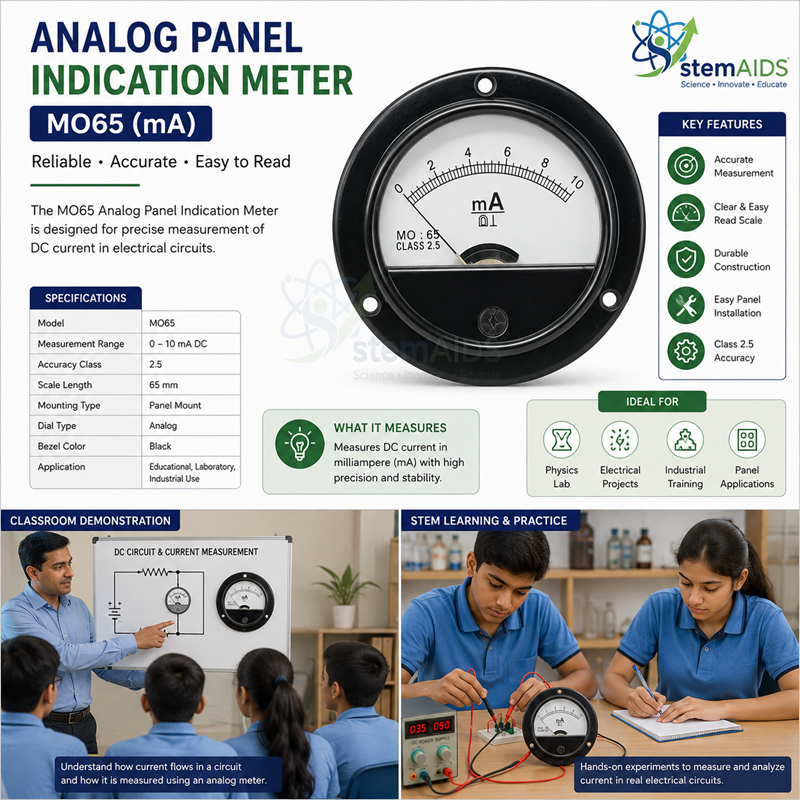
Quick Answer: The Analog Panel Indication Meter MO65 is a panel-mounted MO65 analog panel meter that shows one electrical quantity with a moving pointer over a calibrated scale. It is built for fitting into laboratory trainers, demonstration boards and supervised experiment panels.
Reading an Analog Panel Meter Well
An analog meter shows change as movement. When a rheostat is adjusted or a capacitor charges, the pointer of a panel meter swings steadily across the scale, and students can watch a trend develop in a way that a jumping digital display does not show so clearly. That is why analog panel meters remain common on teaching trainers even where digital meters are available.
Good readings depend on three habits. First, find the least count: divide the value between two numbered marks by the number of divisions between them. Second, look at the pointer straight on, with the eye directly in front of it, because viewing from the side causes parallax error. Third, check that the pointer rests exactly on zero before power is applied; most analog meters have a small zero-adjust screw for this.
MO65 is the model and case designation in this meter’s name. It is a different physical pattern from the Analog Panel Indicator MR66, so a panel opening cut for one should be checked before fitting the other.
Specifications
| Instrument | Analog panel indication meter |
| Model / case | MO65 |
| Display | Moving pointer over a calibrated scale |
| Mounting | Panel-mounted, for trainers and demonstration boards |
| Measured quantity, range and cut-out | Confirm at enquiry |
Applications
- Showing current or voltage trends on electrical and electronics trainer boards
- Teaching least count, scale reading and parallax with a real instrument
- Demonstration panels where a class watches a pointer respond to changes
- Replacing a matching MO65 meter on an existing panel, after checking its range
Care & Handling
- Never connect the meter to a circuit that could exceed its full-scale range; an overload can bend the pointer or damage the movement.
- Avoid knocks while mounting, since sharp shocks can upset calibration.
- Clean the window with a dry, soft cloth and without hard rubbing, which can build static on a plastic window and deflect the pointer.
- Where accuracy matters, compare the meter now and then against a reference instrument.
Why Choose LabEquip
Trainer-board builders and electronics labs choose panel meters like the MO65 when they need a clear pointer display on a fixed panel. It sits in the Measuring Instruments range; give the quantity, range and panel details on the contact page so the right meter is quoted.
Frequently Asked Questions
What is the MO65 panel meter used for?
It gives a pointer reading of one electrical quantity on a panel, typically on laboratory trainers, demonstration boards and supervised experiment panels, where students watch the reading change as they adjust the circuit.
How do you read an analog meter without parallax error?
Position your eye directly in front of the pointer so that you look at it square-on. Reading from an angle makes the pointer appear against the wrong scale mark.
How is the least count of an analog scale found?
Take two numbered marks, subtract their values and divide by the number of divisions between them. For example, if 0 and 10 are ten divisions apart, each division is worth 1 unit.
Why should the pointer be checked at zero before use?
If the pointer does not rest on zero with no input, every reading carries the same offset. Most analog meters have a zero-adjust screw for correcting this with the power off.
Which quantity and range does the MO65 meter show?
It shows one electrical quantity, such as current or voltage. The exact quantity and full-scale range are confirmed at enquiry, so state what your panel needs to display.
Can an MO65 meter replace an MR66 meter on the same panel?
Not without checking. MO65 and MR66 are different model and case designations with different physical patterns, so the panel cut-out and mounting must be compared before swapping one for the other.
Last Updated: October 2026