Search

In Stock

Robot Zumo V1.2 for Arduino

1,105.00

The StemAids Robot Zumo V1.2 for Arduino is suitable for schools, colleges, robotics clubs, coding labs, maker
spaces, engineering workshops, and STEM training programs. It provides a strong hands-on platform for learners who
want to explore Arduino-controlled mobile robotics using motors, tracks, sensors, buzzer output, and programming
libraries.

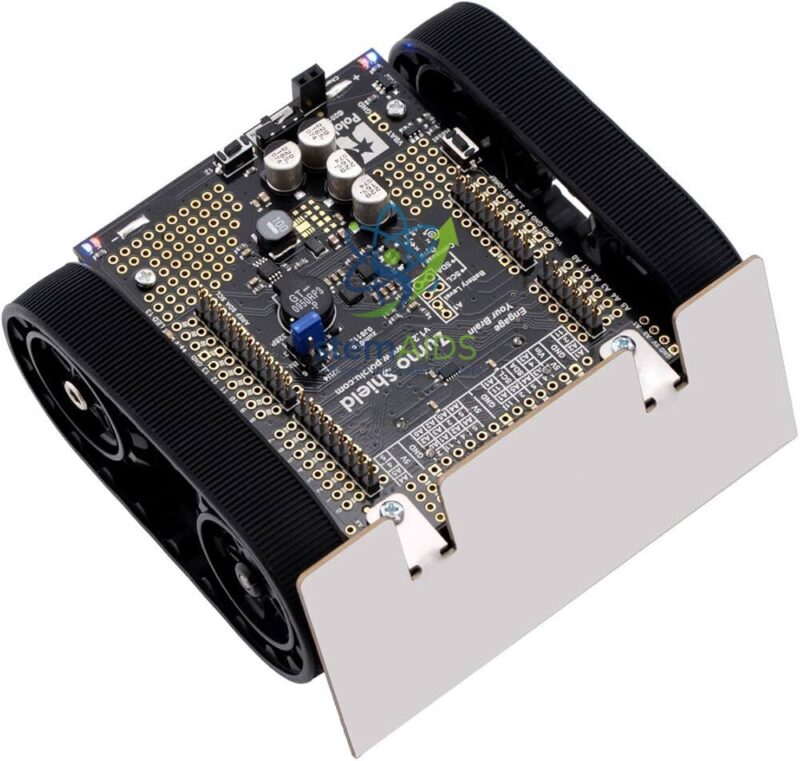
The robot uses a compact tracked chassis measuring less than 10 cm on each side, making it suitable for mini-sumo
style robotics activities. Its silicone tracks provide stable movement over flat surfaces, while the front-mounted
stainless-steel blade allows the robot to push objects or compete in robot-sumo style challenges.

Key Features

  • Compact Arduino-compatible tracked robot platform for STEM and robotics learning.
  • Mini-Sumo compatible size with low-profile chassis under 10 cm x 10 cm.
  • Dual 75:1 HP micro metal gearmotors for strong movement and controlled speed.
  • Silicone tracks provide stable traction during movement-based experiments.
  • Stainless-steel front blade for mini-sumo, pushing, and object interaction projects.
  • Six infrared reflectance sensors for line following and edge detection activities.
  • Integrated DRV8835 dual motor drivers for motor control through Arduino programming.
  • Built-in buzzer for tones, alerts, and simple sound-based feedback.
  • Inertial sensors support impact detection, rotation tracking, and orientation-based learning.
  • Convenient access to Arduino I/O lines, reset, user LED, and expansion areas.
  • Compatible with Arduino Uno R3 and Arduino Leonardo style boards.
  • Useful for robotics competitions, coding workshops, and classroom demonstrations.

Product Specifications

Product Name Robot Zumo V1.2 for Arduino
Brand StemAids
Product Type Programmable Tracked Robotics Platform
Compatible Controller Arduino Uno R3, Arduino Leonardo, A-Star 32U4 Prime, and compatible Uno-form-factor boards
Not Compatible With Arduino Mega and Arduino Due
Chassis Type Low-profile tracked chassis
Size Less than 10 cm x 10 cm
Approximate Weight Approx. 165 g as shipped; approx. 300 g with Arduino Uno and batteries
Motors Two 75:1 HP micro metal gearmotors
Motor Driver Integrated DRV8835 dual motor drivers
Top Speed Approx. 60 cm/s, depending on battery condition and surface
Tracks Pair of silicone tracks
Front Blade Laser-cut stainless-steel sumo blade
Line / Edge Detection Array of six infrared reflectance sensors
Sound Output Built-in buzzer for tones and simple sound feedback
Motion Sensing Integrated accelerometer, gyroscope, and magnetometer sensors
User Input Optional user pushbutton on Arduino pin 12
Power Regulation 7.5 V boost regulator for powering the Arduino from battery supply
Battery Requirement 4 AA batteries required; batteries not included
Programming Arduino IDE with compatible Zumo Arduino libraries and sample sketches
Recommended Use Mini-Sumo Robotics, Line Following, Edge Detection, Arduino Coding, STEM Education, Robotics Projects

Educational Applications

The StemAids Robot Zumo V1.2 for Arduino is designed for practical robotics learning where students can connect
coding concepts with real movement and sensor-based decision making. It supports multiple robotics experiments from
beginner-level motor control to advanced autonomous behaviour.

  • Mini-sumo robot competition practice.
  • Line-following robot experiments.
  • Edge detection and border avoidance activities.
  • Arduino motor control programming.
  • Sensor calibration and reflectance sensor learning.
  • Autonomous movement and decision-making projects.
  • Impact detection and orientation-based robotics experiments.
  • STEM classroom demonstrations and coding workshops.
  • Engineering mini-projects and maker space activities.
  • Robotics troubleshooting and algorithm testing.

How to Use Robot Zumo V1.2 for Arduino

  1. Install the Arduino Controller:
    Mount a compatible Arduino Uno, Arduino Leonardo, or supported controller onto the Zumo shield interface.
  2. Insert Batteries:
    Install four AA batteries in the battery compartment. Rechargeable NiMH cells are recommended for repeated
    classroom use.
  3. Install Arduino IDE:
    Download and install Arduino IDE on the computer used for programming.
  4. Add Zumo Libraries:
    Install compatible Zumo Arduino libraries and sample sketches to control the motors, sensors, buzzer, and other
    integrated hardware.
  5. Connect the Arduino Board:
    Connect the Arduino controller to the computer using a USB cable and select the correct board and port.
  6. Upload a Basic Program:
    Start with a simple motor test, buzzer test, or reflectance sensor reading program.
  7. Test Movement:
    Place the robot on a flat surface and test forward, reverse, left turn, and right turn commands.
  8. Use the Reflectance Sensors:
    Calibrate the six IR reflectance sensors for line following, edge detection, or border avoidance projects.
  9. Create Robotics Logic:
    Program the robot to follow a black line, avoid the edge of a sumo ring, detect collisions, or respond to motion
    changes.
  10. Improve and Experiment:
    Modify speed values, sensor thresholds, turning logic, and competition strategies to improve performance.

Why Choose StemAids Robot Zumo V1.2 for Arduino?

StemAids provides STEM-focused educational products for robotics labs, schools, colleges, technical training
centers, and project-based learning environments. The Robot Zumo V1.2 for Arduino gives students a compact but
powerful robotics platform for learning real coding, movement control, and sensor-based automation.

  • STEM-Focused Robotics Platform: Suitable for hands-on coding, robotics, and automation learning.
  • Arduino-Based Learning: Helps students build confidence with Arduino IDE and embedded programming.
  • Competition-Oriented Design: Compact tracked chassis supports mini-sumo style robotics activities.
  • Multiple Built-In Sensors: Supports line following, edge detection, motion sensing, and impact response.
  • Practical Classroom Value: Useful for demonstrations, lab sessions, coding workshops, and project work.
  • Expandable Platform: Breakout access and prototyping areas allow additional sensors and modules.
  • Project-Based Learning: Encourages problem solving, algorithm design, debugging, and engineering thinking.

E-E-A-T Based Product Information

This product content is created for educational buyers, STEM teachers, robotics trainers, and institutional
procurement teams. The information focuses on practical classroom use, transparent component-level details,
programming relevance, safe handling, and measurable learning outcomes. The StemAids Robot Zumo V1.2 for Arduino is
recommended for supervised educational use in robotics labs, STEM workshops, engineering programs, and coding
classrooms.

SEO Product Summary

The StemAids Robot Zumo V1.2 for Arduino is a programmable Arduino-compatible tracked robot for
STEM education, mini-sumo robotics, line-following projects, edge detection, motor control, sensor-based coding,
autonomous navigation, and robotics competition practice. With dual 75:1 HP micro metal gearmotors, silicone tracks,
six IR reflectance sensors, DRV8835 motor drivers, a buzzer, inertial sensors, and Arduino library support, it is an
excellent educational robotics platform for schools, colleges, robotics clubs, maker spaces, and engineering labs.

Frequently Asked Questions

1. What is the StemAids Robot Zumo V1.2 for Arduino used for?

It is used for STEM robotics learning, mini-sumo robot competitions, line-following projects, edge detection,
Arduino programming, motor control experiments, and autonomous robot development.

2. Is the Robot Zumo V1.2 compatible with Arduino Uno?

Yes. The robot is compatible with Arduino Uno R3 and Arduino Leonardo style boards. It can also work with selected
compatible Uno-form-factor controllers.

3. Does this robot include an Arduino board?

The Arduino controller is generally required separately unless specifically supplied as part of a bundle. Users
should check the package contents before purchase.

4. Does it require batteries?

Yes. The robot requires four AA batteries. Rechargeable NiMH batteries are recommended for repeated classroom and
workshop use.

5. Can the Robot Zumo V1.2 follow a line?

Yes. It includes a six-sensor infrared reflectance array that can be programmed for line-following and surface
contrast detection.

6. Can it be used for mini-sumo robotics?

Yes. Its compact size, tracked design, stainless-steel blade, and strong motors make it suitable for mini-sumo style
robotics activities.

7. What software is used to program this robot?

The robot can be programmed using Arduino IDE with compatible Zumo Arduino libraries and example sketches.

8. Does the robot have built-in motor drivers?

Yes. It includes integrated DRV8835 dual motor drivers for controlling the two micro metal gearmotors.

9. Is soldering required?

The assembled robot version generally does not require soldering or major assembly. Users should confirm whether
they are purchasing an assembled version or a kit version.

10. Is this product suitable for schools and colleges?

Yes. It is suitable for school STEM labs, college robotics labs, coding workshops, robotics clubs, engineering
mini-projects, and maker space activities.

11. Can additional sensors be added?

Yes. The platform provides access to Arduino I/O lines and expansion areas, allowing users to add compatible
sensors, connectors, and custom project modules.

12. Why choose StemAids Robot Zumo V1.2 for Arduino?

StemAids offers STEM-focused robotics and educational technology products. This robot provides a practical platform
for learning Arduino programming, movement control, sensor feedback, autonomous navigation, and competition-style
robotics.

Reviews

There are no reviews yet.

Write a review

Back to Top
Select your currency
INR Indian rupee
Product has been added to your cart
Compare (0)