

This product helps students understand an important concept in digital electronics: how data transmitted one bit at a time can be stored and presented across multiple output lines. It is useful for learning shift registers, binary data transfer, digital communication, LED output indication, timing pulses, clock signals, and logic-level control.
Product Description
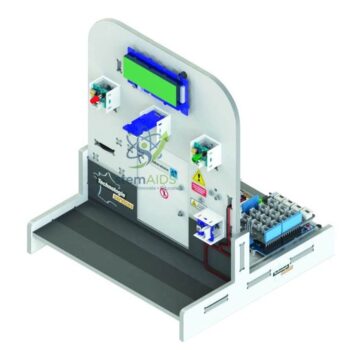
Serial to Parallel Conversion is widely used in digital systems where compact data transmission is required but multiple outputs must be controlled. The StemAids Serial to Parallel Conversion trainer provides a practical platform for observing this process through input signals, clock pulses, and parallel outputs.
In a typical experiment, data is entered serially, usually one bit at a time. With each clock pulse, the data shifts through the circuit and appears at the parallel output terminals. This allows learners to visually understand how digital data is loaded, shifted, stored, and displayed.
Key Features
- Brand: StemAids
- Demonstrates serial data input and parallel data output conversion
- Useful for digital electronics and communication system experiments
- Helps explain shift register operation and binary data movement
- Suitable for school, college, polytechnic, and engineering laboratories
- Supports hands-on learning of clock pulses, data shifting, and output states
- Can be used for microcontroller interfacing and logic training
- Ideal for STEM kits, electronics trainers, and digital circuit demonstrations
Product Specifications
| Product Name | Serial to Parallel Conversion |
|---|---|
| Brand | StemAids |
| Product Type | Digital Electronics Training Module |
| Function | Converts serial input data into parallel output data |
| Learning Concept | Shift registers, binary data transfer, clock pulse operation, digital output control |
| Input Type | Serial digital input signal |
| Output Type | Parallel digital output signals |
| Display Indication | LED output indication may be provided depending on model configuration |
| Application | Digital electronics, microcontroller interfacing, communication system training, STEM learning |
| Recommended Users | Students, teachers, electronics trainers, hobbyists, and engineering learners |
| Usage Area | School labs, engineering colleges, polytechnic labs, robotics labs, and electronics workshops |
How to Use StemAids Serial to Parallel Conversion
- Place the Module Safely: Keep the trainer on a clean, dry, and stable laboratory table.
- Connect the Power Supply: Connect the recommended DC power supply as per the product instructions.
- Apply Serial Input: Enter binary data one bit at a time through the serial data input terminal or switch.
- Provide Clock Pulses: Apply clock pulses to shift the serial data through the internal circuit.
- Observe Output: Watch the parallel output terminals or LED indicators to see how the serial data appears as parallel output.
- Record Results: Note the input sequence, clock pulses, and output states for lab observation.
- Repeat the Experiment: Try different binary input combinations to understand data shifting and storage behavior.
Educational Benefits
The StemAids Serial to Parallel Conversion trainer helps learners understand digital data handling through practical experimentation. It supports activity-based education by connecting theoretical digital electronics concepts with visible output results. Students can study how data moves through logic circuits and how serial communication can be expanded into multiple parallel control lines.
Applications
- Digital electronics laboratory experiments
- Shift register demonstration
- Binary data transfer learning
- Microcontroller output expansion experiments
- STEM and robotics education
- Communication system training
- Engineering and polytechnic lab practicals
- Logic circuit demonstration for classroom teaching
Why Choose StemAids Serial to Parallel Conversion?
StemAids focuses on practical STEM and electronics learning solutions for classrooms, laboratories, and training centers. The Serial to Parallel Conversion trainer is designed to simplify an important digital communication concept through hands-on experimentation. It helps teachers demonstrate data conversion clearly and helps students build confidence in digital logic, microcontroller interfacing, and communication system basics.
SEO and E-E-A-T Focus
The StemAids Serial to Parallel Conversion module is suitable for digital electronics labs, STEM education, Arduino and microcontroller learning, shift register experiments, and communication system training. It supports structured learning of serial data input, parallel output, clock pulse operation, binary logic, and digital signal conversion. This makes it a useful product for educational institutions, robotics labs, electronics workshops, and engineering training programs.
Safety and Handling Instructions
- Use only the recommended power supply voltage.
- Check all input and output connections before switching on the module.
- Avoid short circuits between output terminals.
- Do not touch exposed conductive points with wet hands.
- Use under teacher or trainer supervision in school laboratories.
- Disconnect power after completing the experiment.
Frequently Asked Questions
1. What is Serial to Parallel Conversion?
Serial to Parallel Conversion is a digital process in which data received one bit at a time is converted into multiple output bits available at the same time.
2. What is the StemAids Serial to Parallel Conversion trainer used for?
It is used to demonstrate digital data transfer, shift register operation, binary output indication, and communication system basics.
3. Is this product suitable for school laboratories?
Yes, it is suitable for school STEM labs, electronics practical classes, robotics labs, and technical training workshops.
4. Can this module help in learning microcontroller interfacing?
Yes, serial to parallel conversion is useful for understanding how microcontrollers can control multiple outputs using fewer data lines.
5. What concepts can students learn from this trainer?
Students can learn serial input, parallel output, binary logic, clock pulses, shift registers, data storage, and digital communication basics.
6. Does the trainer show output visually?
Many educational versions include LED output indication so learners can observe the parallel output states clearly.
7. Who can use this product?
Students, teachers, electronics trainers, hobbyists, STEM learners, and engineering students can use this product for digital electronics experiments.
8. Is prior programming knowledge required?
Basic digital electronics knowledge is helpful. Programming may be required only when the module is used with a microcontroller-based experiment.






Reviews
There are no reviews yet.