
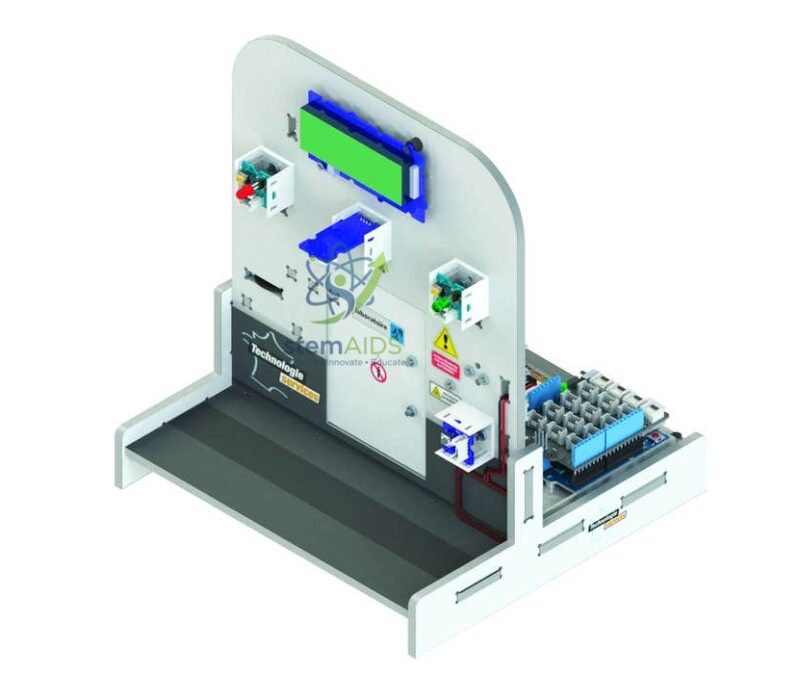
The StemAids Connected Lock Prototype is designed to help students understand the working principles of modern electronic access control systems. The model uses a MEGA programming interface based on the Arduino Mega 2560 platform, providing multiple input-output pins for connecting keypad modules, RFID readers, displays, buzzers, LEDs, servo motors, solenoid lock mechanisms, relay modules, and optional wireless communication modules.
This prototype allows learners to build and test a programmable locking system where access can be granted through a password, RFID card, button command, sensor input, or connected interface. Students can write code, upload programs, test logic, modify access conditions, and observe the locking mechanism in real time.
Key Features
- Educational smart lock prototype for STEM, IoT, and automation learning
- Uses a MEGA programming interface suitable for complex input-output projects
- Demonstrates password, RFID, sensor, or programmed access control logic
- Supports connection of keypad, RFID reader, servo motor, relay, buzzer, LEDs, and display modules
- Useful for understanding electronic locking, access authentication, and control programming
- Allows students to modify code and test different locking conditions
- Large number of I/O pins supports expansion with additional sensors and modules
- Suitable for IoT experiments when used with compatible Wi-Fi, Bluetooth, or Ethernet modules
- Designed for practical classroom demonstration, engineering projects, and robotics labs
Product Specifications
| Product Name | Prototype of a Connected Lock with MEGA Programming Interface |
|---|---|
| Brand | StemAids |
| Product Type | Educational smart lock prototype and programming interface model |
| Programming Platform | MEGA programming interface based on Arduino Mega 2560 architecture |
| Microcontroller | ATmega2560 compatible controller |
| Clock Speed | 16 MHz |
| Operating Voltage | 5V logic level |
| Recommended Input Voltage | 7V to 12V for board power input |
| Digital I/O Pins | 54 digital input-output pins, including PWM supported pins |
| Analog Inputs | 16 analog input pins |
| Memory | 256 KB flash memory, 8 KB SRAM, 4 KB EEPROM |
| Communication Support | USB programming, UART, I2C, SPI, and optional wireless module interface |
| Locking Output | Servo motor, relay-based lock, or solenoid lock demonstration depending on configuration |
| Input Methods | Keypad, push button, RFID module, sensor input, or programmed access logic |
| Indication System | LED indicators, buzzer alert, and optional LCD/OLED display |
| Software Compatibility | Arduino IDE and compatible C/C++ based programming environment |
| Recommended Users | Students, teachers, trainers, robotics labs, STEM labs, and engineering project groups |
| Application Area | Smart lock demonstration, access control learning, automation projects, IoT education, and embedded system training |
How to Use
- Connect the programming interface: Connect the MEGA programming interface to a computer using a USB cable.
- Install the software: Open Arduino IDE or a compatible programming environment on the computer.
- Select board and port: Choose the correct MEGA-compatible board and communication port from the software.
- Connect input modules: Attach the keypad, RFID reader, push button, or other input sensors as per the experiment requirement.
- Connect output modules: Connect the servo motor, relay, lock actuator, buzzer, LED indicators, and display module.
- Upload the code: Write or upload a smart lock program that checks the password, RFID card, or access condition.
- Test access control: Enter the password or scan the RFID card to check whether the lock opens or remains closed.
- Add alerts: Program buzzer sounds, LED status signals, or display messages for correct and incorrect access attempts.
- Expand the project: Add Wi-Fi, Bluetooth, Ethernet, logging, or cloud-based monitoring modules for connected lock experiments.
Educational Benefits
The Connected Lock Prototype by StemAids helps learners understand how programming controls real-world devices. It combines coding, electronics, authentication logic, actuators, sensors, and automation in one project-based learning model.
- Introduces smart security and access control concepts
- Develops programming and logical decision-making skills
- Explains input-output control using real hardware
- Helps students understand RFID, keypad, relay, servo, and sensor integration
- Supports IoT and connected device learning when wireless modules are added
- Encourages troubleshooting, circuit building, and project modification
- Useful for STEM labs, engineering mini-projects, and robotics workshops
Applications
- Smart lock prototype demonstration
- STEM and robotics classroom projects
- IoT-based access control learning
- Embedded system programming practice
- RFID and keypad authentication experiments
- Automation and control system training
- Engineering college mini-projects
- Science exhibitions and innovation lab activities
- Digital electronics and microcontroller workshops
Why Choose StemAids Connected Lock Prototype?
StemAids focuses on practical STEM learning products that help students understand real-world technology through hands-on experiments. This connected lock prototype gives learners a clear demonstration of how electronic access systems are designed, programmed, tested, and improved.
- Designed for practical STEM, IoT, and embedded system education
- Suitable for classroom demonstrations and student projects
- Uses a MEGA programming interface for wider expansion and advanced experiments
- Supports multiple authentication and output control methods
- Encourages project-based learning and real-time testing
- Useful for schools, colleges, technical institutes, robotics labs, and innovation centers
SEO Keywords
Connected Lock Prototype, StemAids Smart Lock Kit, MEGA Programming Interface, Arduino Mega Lock Project, Smart Door Lock Educational Kit, RFID Lock Prototype, Keypad Lock Project, IoT Lock Training Kit, STEM Smart Lock Model, Embedded System Lock Project, Automation Learning Kit, Microcontroller Access Control Kit, Smart Security Project for Students.
FAQ
1. What is the Prototype of a Connected Lock with MEGA Programming Interface?
It is an educational smart lock model that uses a MEGA programming interface to demonstrate access control, authentication, actuator control, and connected device concepts.
2. Is this product suitable for students?
Yes, it is suitable for STEM students, school labs, college projects, robotics workshops, electronics training, and engineering mini-projects.
3. Can the lock be opened using a password?
Yes, the prototype can be programmed to accept password-based access through a keypad module, depending on the project configuration.
4. Can RFID access be used with this model?
Yes, an RFID reader can be connected to the MEGA programming interface to demonstrate card-based access control.
5. Is this a real commercial security lock?
No. This product is intended for educational demonstration, prototyping, and project learning. It should not be used as a certified commercial or permanent building security lock.
6. Which software is used for programming?
It can be programmed using Arduino IDE or a compatible C/C++ based programming environment.
7. Can this prototype be connected to the internet?
Yes, internet or wireless connectivity can be added using compatible Wi-Fi, Bluetooth, Ethernet, or IoT communication modules.
8. What concepts can students learn from this model?
Students can learn microcontroller programming, authentication logic, RFID reading, keypad input, relay control, servo operation, LED indication, buzzer alerts, automation, and IoT expansion.
9. Why is a MEGA programming interface useful for this project?
The MEGA interface provides a larger number of digital and analog pins, making it suitable for connecting multiple sensors, displays, buttons, indicators, and control modules in one project.
10. Can the project be modified by students?
Yes, students can modify the code, add new access methods, change lock timing, include alarm conditions, connect extra sensors, or expand it into an IoT-based monitoring project.





Reviews
There are no reviews yet.