
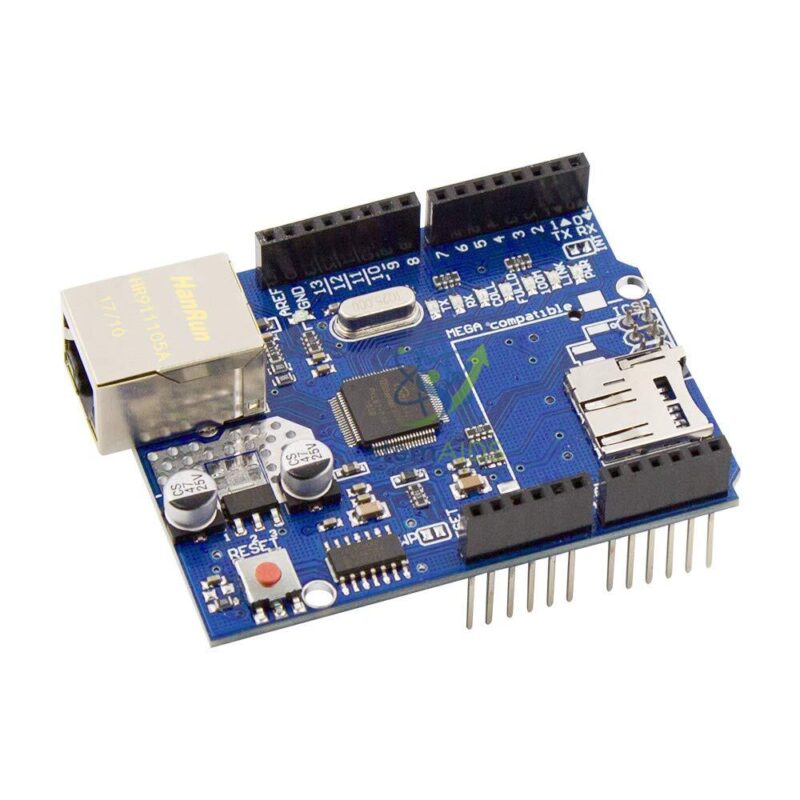
The StemAids Ethernet Shield for Arduino enables students, makers, and technical learners to understand how microcontroller-based devices communicate over a local network or the internet. When mounted on a compatible Arduino board, the shield allows the board to send and receive data using Ethernet protocols.
This shield is useful for creating simple web servers, sensor monitoring systems, remote control projects, data collection units, IoT gateways, and automation demonstrations. It provides a stable wired networking option where Wi-Fi may not be preferred due to signal issues, security requirements, or classroom network limitations.
Key Features
- Ethernet expansion shield for compatible Arduino boards
- Useful for wired IoT, automation, and networking projects
- Based on Ethernet controller architecture commonly used in Arduino Ethernet shields
- Supports TCP and UDP network communication
- Can be used to create Arduino-based web server and client projects
- RJ45 Ethernet port for wired LAN connection
- SPI-based communication with Arduino board
- Supports Arduino Ethernet library examples
- Suitable for sensor monitoring, data logging, control systems, and IoT experiments
- Ideal for STEM education, engineering labs, robotics workshops, and maker projects
Product Specifications
| Product Name | Ethernet Shield for Arduino |
|---|---|
| Brand | StemAids |
| Product Type | Arduino-compatible wired networking expansion shield |
| Compatible Platform | Arduino Uno, Arduino Mega, and other compatible Arduino boards |
| Ethernet Controller | W5500 / Arduino Ethernet Shield compatible controller architecture |
| Network Protocol Support | TCP and UDP |
| Network Interface | RJ45 Ethernet connector |
| Communication Interface | SPI interface |
| Operating Voltage | 5V from Arduino board |
| Socket Support | Supports multiple simultaneous socket connections, depending on controller and library configuration |
| Library Support | Arduino Ethernet library |
| Optional Storage | MicroSD card slot on selected variants for file storage and data logging |
| Typical Uses | Web server, web client, data logger, IoT device, sensor monitoring, and automation control |
| Recommended Users | Students, teachers, trainers, makers, STEM labs, robotics labs, and engineering project groups |
How to Use Ethernet Shield for Arduino
- Mount the shield: Place the Ethernet Shield carefully on a compatible Arduino board, ensuring that all header pins are properly aligned.
- Connect Ethernet cable: Insert a LAN cable into the RJ45 Ethernet port and connect it to a router, network switch, or local network point.
- Connect Arduino to computer: Use a USB cable to connect the Arduino board to the computer for programming.
- Open Arduino IDE: Launch Arduino IDE and select the correct board and port.
- Use Ethernet library: Open an Ethernet library example such as WebServer, WebClient, or DHCP Address Printer.
- Set MAC and IP details: Configure the MAC address and either use DHCP or assign a static IP address as required.
- Upload the program: Upload the sketch to the Arduino board.
- Test the network: Open the serial monitor to check IP details, or access the Arduino web server through a browser.
- Connect sensors: Add sensors or output modules to create real-time monitoring and control projects.
Educational Benefits
The Ethernet Shield for Arduino by StemAids helps learners understand practical networking through real hardware experiments. It connects programming concepts with communication protocols, sensor data transmission, and web-based device control.
- Introduces students to wired IoT and embedded networking
- Helps explain IP address, MAC address, TCP, UDP, client, and server concepts
- Supports hands-on web server and sensor monitoring projects
- Useful for learning automation and remote control systems
- Encourages project-based STEM and engineering education
- Provides reliable wired connectivity for laboratory demonstrations
- Suitable for coding, electronics, robotics, and IoT workshops
Applications
- Arduino web server projects
- IoT sensor monitoring systems
- Wired automation control projects
- Data logging and network data transfer
- Remote device control through LAN
- Smart classroom and smart lab prototypes
- Robotics and embedded networking experiments
- Engineering mini-projects and STEM demonstrations
- Weather station and environmental monitoring projects
- Industrial automation learning models
Why Choose StemAids Ethernet Shield for Arduino?
StemAids provides practical STEM learning products designed for classroom use, project development, and technical training. This Ethernet Shield helps students explore networking and IoT concepts with a stable wired communication method.
- Suitable for schools, colleges, STEM labs, and engineering institutes
- Supports practical learning of IoT and networking fundamentals
- Useful for both beginner and advanced Arduino projects
- Helps learners build real-time sensor and automation systems
- Compatible with standard Arduino programming workflows
- Ideal for structured experiments, workshops, and innovation lab activities
SEO Keywords
Ethernet Shield for Arduino, StemAids Ethernet Shield, Arduino Ethernet Shield, Arduino LAN Shield, Arduino Wired IoT Shield, Arduino Web Server Shield, Arduino Networking Module, Ethernet Module for Arduino, Arduino IoT Project Shield, Arduino Data Logging Shield, STEM Arduino Networking Kit, Arduino Automation Shield.
FAQ
1. What is the Ethernet Shield for Arduino used for?
It is used to connect an Arduino board to a wired Ethernet network for web server, web client, IoT, sensor monitoring, data logging, and automation projects.
2. Which Arduino boards are compatible with this shield?
It is commonly used with Arduino Uno, Arduino Mega, and other compatible Arduino boards that support standard shield headers and SPI communication.
3. Does it require Wi-Fi?
No. The shield uses a wired Ethernet connection through an RJ45 LAN cable, making it useful where stable wired networking is preferred.
4. Can this shield be used for IoT projects?
Yes. It can be used for wired IoT projects such as sensor monitoring, remote control, web dashboards, and network-connected automation systems.
5. Which library is used for programming?
The Arduino Ethernet library is commonly used for programming Ethernet-based web server and client applications.
6. Can students create a web server using this shield?
Yes. Students can create a simple Arduino web server that displays sensor values or controls connected outputs through a browser.
7. Does the shield support data logging?
Selected Ethernet Shield variants include a microSD card slot, which can be used for storing files, logs, or web server content.
8. Is it suitable for STEM labs?
Yes. It is suitable for STEM labs, robotics labs, electronics workshops, IoT training, engineering projects, and classroom networking experiments.
9. What type of projects can be made with this shield?
Students can build web servers, remote switches, temperature monitors, weather stations, network data loggers, automation controllers, and LAN-based sensor systems.
10. Why use Ethernet instead of Wi-Fi?
Ethernet provides stable wired communication, reduced wireless interference, and reliable connectivity for classroom demonstrations, laboratory setups, and fixed automation projects.






Reviews
There are no reviews yet.