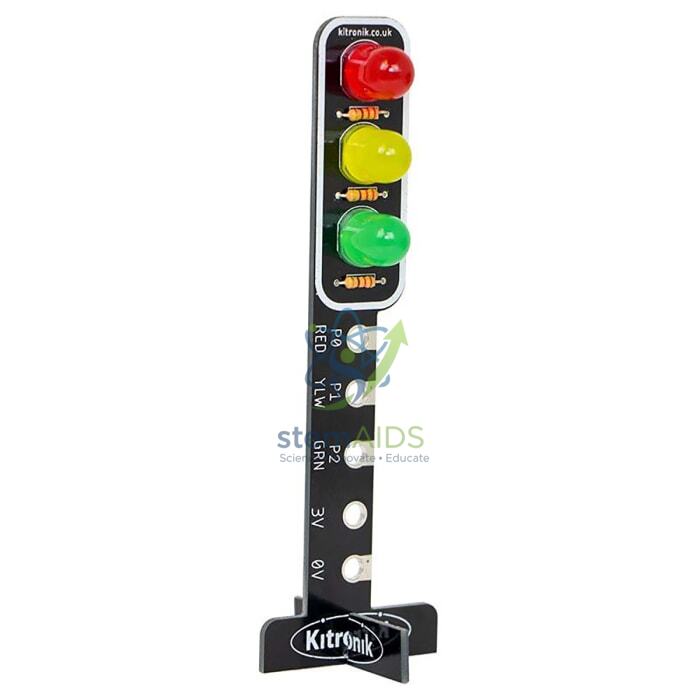
The StemAids Traffic Light for micro:bit is an educational LED traffic signal module designed for coding, electronics, STEM learning, smart city projects, robotics activities, and classroom demonstrations. It helps students understand real-world traffic light logic by programming red, yellow, and green LEDs using the BBC micro:bit board.
This module is ideal for schools, STEM labs, ICT classrooms, coding clubs, maker spaces, robotics labs, and beginner electronics projects. Students can create traffic signal sequences, pedestrian crossing models, road safety demonstrations, timer-based control systems, and smart city simulations using block coding or Python-based programming.
Product Overview
The StemAids Traffic Light for micro:bit provides a simple and practical way to teach input-output programming. The red, yellow, and green LEDs can be controlled individually through micro:bit pins, allowing students to build real traffic signal patterns and understand sequencing, timing, loops, conditions, and digital output control.
Depending on the model configuration, the traffic light module may attach directly to the micro:bit board or connect through a compatible expansion shield, Grove shield, jumper wires, or edge connector. It is suitable for hands-on STEM projects where students learn how software controls physical electronic outputs.
Key Features
- Realistic Traffic Light Simulation: Includes red, yellow, and green LEDs arranged like a real traffic signal.
- Designed for micro:bit Projects: Suitable for BBC micro:bit V1 and V2 based classroom activities, depending on connection method.
- Programmable LED Control: Each LED can be controlled separately using micro:bit digital output pins.
- Beginner-Friendly STEM Module: Helps students learn coding, sequencing, timing, and traffic control logic.
- Useful for Smart City Models: Ideal for road safety projects, traffic signal models, pedestrian crossing systems, and automation demonstrations.
- MakeCode and Python Support: Can be programmed using Microsoft MakeCode, JavaScript, Python, or MicroPython depending on setup.
- No Complex Wiring Required: Direct-fit or connector-based versions reduce wiring difficulty for classroom use.
- Classroom Demonstration Ready: Suitable for individual projects, group activities, and teacher-led STEM lessons.
Product Specifications
| Product Name | Traffic Light for micro:bit |
|---|---|
| Brand | StemAids |
| Product Type | micro:bit Traffic Light LED Module / STEM Coding Accessory |
| Compatible Board | BBC micro:bit V1 and V2, depending on module version and connection type |
| LED Colours | Red, Yellow / Amber, and Green |
| Control Pins | Commonly P0, P1, and P2 or model-specific digital output pins |
| Signal Type | Digital output control |
| Power Source | Powered through micro:bit or compatible expansion board, depending on module type |
| Connection Method | Direct micro:bit mounting, Grove connector, jumper wire, or edge connector depending on model variant |
| Programming Platforms | Microsoft MakeCode, JavaScript, Python, MicroPython, and compatible micro:bit editors |
| Applications | Traffic signal model, road safety project, smart city model, STEM coding activity, automation demonstration |
| Recommended Users | Students, teachers, STEM trainers, coding beginners, robotics learners, and institutional buyers |
How to Use the StemAids Traffic Light for micro:bit
- Connect the Module: Attach the traffic light module to the micro:bit directly or connect it through the required shield, Grove port, jumper wires, or edge connector.
- Check Pin Mapping: Identify which micro:bit pins control the red, yellow, and green LEDs. Common projects use P0, P1, and P2.
- Open Coding Editor: Use Microsoft MakeCode, Python editor, or another compatible micro:bit programming platform.
- Create Traffic Sequence: Program red LED ON, then yellow LED ON, then green LED ON with suitable time delays.
- Download Code: Transfer the program to the micro:bit board using a USB cable or supported programming method.
- Power the Project: Use USB power or a compatible battery pack to run the traffic light model.
- Test the LEDs: Check whether each LED lights correctly according to the programmed sequence.
- Expand the Project: Add push buttons, pedestrian signals, sensors, buzzers, or multiple traffic lights for advanced smart city models.
Educational Benefits
The StemAids Traffic Light for micro:bit makes coding visible and practical. Students can understand how a program controls real-world outputs by creating a working traffic signal model.
- Introduces digital output control using micro:bit pins
- Helps students learn sequencing, loops, delays, and conditions
- Supports road safety and smart city project demonstrations
- Useful for STEM, robotics, IoT, and automation activities
- Encourages problem-solving through real-world traffic control logic
- Suitable for classroom projects, science exhibitions, and coding clubs
Applications
- micro:bit traffic signal project
- STEM lab coding activity
- Smart city model demonstration
- Road safety classroom project
- Pedestrian crossing model
- Robotics and automation learning
- Digital output programming practice
- Science fair and exhibition model
- IoT and sensor-based traffic system projects
- Beginner electronics training
Why Choose StemAids Traffic Light for micro:bit?
StemAids provides practical STEM education products for schools, ICT labs, robotics classrooms, coding clubs, and maker spaces. The Traffic Light for micro:bit is a useful learning module for helping students connect coding concepts with real physical outputs.
With red, yellow, and green LEDs, simple digital pin control, beginner-friendly programming support, and classroom project suitability, this module helps teachers demonstrate traffic systems, automation logic, timing sequences, and smart city applications in an engaging way.
Safety and Maintenance Guidelines
- Use only with compatible micro:bit boards, shields, cables, and power sources.
- Check pin mapping before uploading the program.
- Do not connect the module to voltage higher than the recommended operating range.
- Disconnect power before changing wires or module connections.
- Avoid short circuits between pins, crocodile clips, and jumper wires.
- Keep the module away from water, dust, excessive heat, and direct physical impact.
- Handle the PCB and LEDs carefully to avoid bending or breakage.
- Use under teacher or trainer supervision in school laboratories.
Google E-E-A-T Focus
This product content is prepared for school procurement teams, STEM coordinators, ICT teachers, robotics trainers, coding educators, and institutional buyers. It focuses on practical classroom use, verified module behaviour, safe handling, micro:bit compatibility, and educational value to support Google E-E-A-T principles of experience, expertise, authoritativeness, and trustworthiness.
Frequently Asked Questions
1. What is the StemAids Traffic Light for micro:bit used for?
It is used to create programmable traffic signal projects using a micro:bit board and red, yellow, and green LEDs.
2. Is this module suitable for beginners?
Yes, it is suitable for beginners because students can start with simple MakeCode blocks and later move to Python or MicroPython.
3. Which LEDs are included?
The module includes red, yellow or amber, and green LEDs to simulate a real traffic light.
4. Which micro:bit pins are used?
Many traffic light projects use P0, P1, and P2 for red, yellow, and green LEDs, but exact pin mapping depends on the module version.
5. Does it require soldering?
Most classroom traffic light modules are designed for simple connection and do not require soldering for basic use.
6. Can it be programmed with MakeCode?
Yes, it can be programmed using Microsoft MakeCode, and compatible versions may also support custom blocks.
7. Can it be used with micro:bit V2?
Yes, it can be used with compatible BBC micro:bit V2 boards, subject to module fitment and connection method.
8. Can students make a pedestrian crossing project?
Yes, students can add buttons, buzzers, timers, or additional LEDs to create pedestrian crossing and road safety models.
9. Is it useful for STEM labs?
Yes, it is useful for STEM labs, coding classrooms, robotics clubs, maker spaces, and smart city project activities.
10. What coding concepts can students learn?
Students can learn sequencing, loops, delays, conditions, digital output control, pin mapping, and basic automation logic.
SEO Keywords
Traffic Light for micro:bit, StemAids Traffic Light for micro:bit, micro:bit traffic light module, micro:bit traffic signal project, STEM traffic light kit, micro:bit coding module, red yellow green LED module, traffic light coding project, micro:bit smart city project, road safety STEM model, micro:bit robotics accessory, MakeCode traffic light project, micro:bit LED traffic signal, traffic light module for classroom.


Reviews
There are no reviews yet.