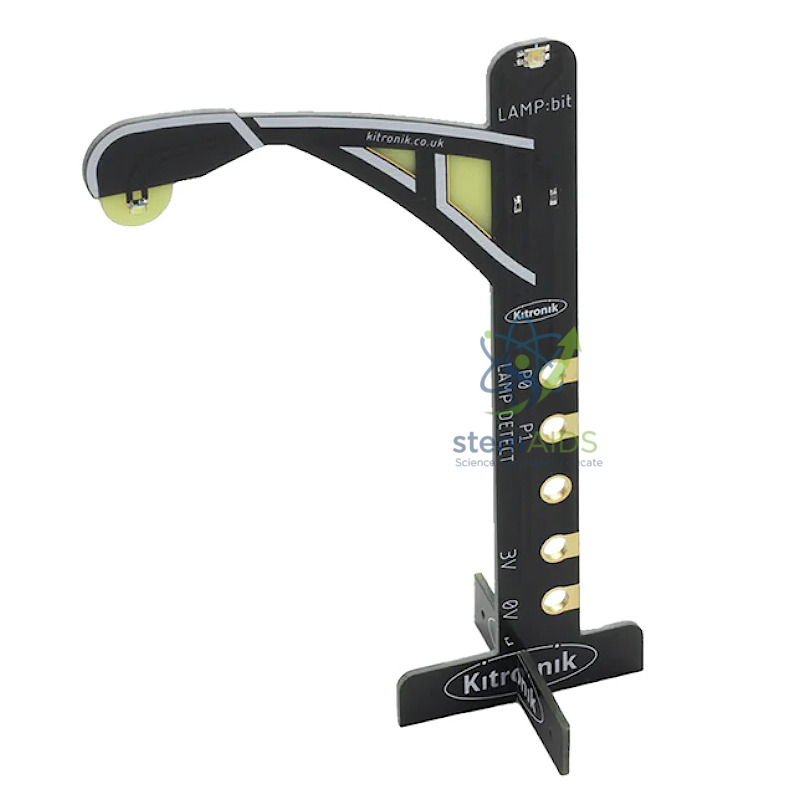
The StemAids Micro:bit Streetlight is an educational street lamp module designed for BBC micro:bit based coding, electronics, STEM learning, smart city projects, and classroom automation demonstrations. It helps students understand how real streetlights can turn on or off automatically based on surrounding light conditions.
This module is suitable for schools, STEM labs, ICT classrooms, robotics clubs, coding labs, maker spaces, and science exhibition projects. It allows learners to create automatic streetlight models, smart city layouts, energy-saving lighting systems, and sensor-based control projects using Microsoft MakeCode, JavaScript, Python, or MicroPython.
Product Overview
The StemAids Micro:bit Streetlight is a practical learning accessory that works with a compatible BBC micro:bit board. It typically includes a white LED lamp and a light-sensing component such as a phototransistor, which helps the system detect ambient light levels.
When programmed correctly, the streetlight can switch on in low light and switch off in bright light. This makes it ideal for teaching input-output control, conditional logic, sensor reading, automation, energy conservation, and smart city concepts.
Key Features
- Streetlight Simulation: Replicates a real street lamp for smart city and road model projects.
- Built-In Light Sensor: Uses a phototransistor or light sensor to detect ambient brightness.
- White LED Lamp: Provides visible streetlight output for classroom demonstrations.
- micro:bit Compatible: Designed for use with BBC micro:bit V1 or V2, depending on module design.
- Automatic Switching Project: Can be programmed to turn on in darkness and turn off in bright light.
- MakeCode Support: Suitable for beginner-friendly block coding and advanced text-based coding.
- Easy Classroom Use: Bolt-on, clip-on, or connector-based setup depending on model variant.
- STEM Project Ready: Ideal for automation, smart city, energy-saving, and road safety models.
Product Specifications
| Product Name | Micro:bit Streetlight |
|---|---|
| Brand | StemAids |
| Product Type | micro:bit Streetlight Module / STEM Smart City Accessory |
| Compatible Board | BBC micro:bit V1 and V2, depending on module version and fitting |
| Main Output | White LED streetlight lamp |
| Sensor | Built-in phototransistor or light sensor for ambient light detection |
| Control Type | Digital or sensor-based programmed control through micro:bit |
| Connection Method | Direct bolt-on / clip-on micro:bit mounting, edge connector, or module connection depending on model |
| Power Source | Powered through the connected micro:bit board or compatible expansion setup |
| Programming Platforms | Microsoft MakeCode, JavaScript, Python, MicroPython, and compatible micro:bit editors |
| Approximate Size | Streetlight-style module; common LAMP:bit type modules are approx. 135 mm x 75 mm |
| Applications | Smart city models, automatic lighting projects, STEM labs, road models, and coding demonstrations |
| Recommended Users | Students, teachers, STEM trainers, coding beginners, robotics learners, and institutional buyers |
How to Use the StemAids Micro:bit Streetlight
- Connect the micro:bit: Attach the compatible BBC micro:bit board to the streetlight module as per the module fitting method.
- Open Coding Editor: Use Microsoft MakeCode, Python editor, or another compatible micro:bit programming platform.
- Create Light-Sensing Logic: Program the streetlight to read ambient light level and decide whether the LED should turn on or off.
- Set the Condition: Use an if-else condition, such as “if light level is low, turn LED on; otherwise, turn LED off.”
- Download the Code: Transfer the program to the micro:bit using a USB cable.
- Power the Project: Use USB power or a compatible battery pack to run the streetlight model.
- Test the Sensor: Cover the light sensor with your hand to simulate darkness and shine light on it to simulate daytime.
- Expand the Model: Add traffic lights, roads, vehicles, pedestrian crossings, or multiple streetlights for a complete smart city project.
Educational Benefits
The StemAids Micro:bit Streetlight helps students connect coding with real-world automation. It demonstrates how sensors can detect environmental conditions and how a program can control physical output based on that data.
- Introduces sensor-based automation and smart lighting concepts
- Helps students learn conditions, loops, variables, and digital output control
- Supports smart city, energy-saving, and road safety project models
- Useful for STEM labs, robotics clubs, coding classes, and maker activities
- Encourages hands-on learning through real working models
- Suitable for science fairs, exhibitions, and classroom demonstrations
Applications
- Automatic streetlight project
- Smart city model
- micro:bit coding activity
- STEM lab automation project
- Road safety model
- Energy-saving lighting demonstration
- Sensor-based control experiment
- Robotics and IoT learning activity
- Science exhibition project
- Classroom programming demonstration
Why Choose StemAids Micro:bit Streetlight?
StemAids provides practical STEM education products for schools, ICT labs, coding classrooms, robotics labs, and maker spaces. The Micro:bit Streetlight is a useful learning module for teaching sensor-based control, automation, smart city design, and real-world coding applications.
With its LED streetlight output, light-sensing capability, beginner-friendly programming support, and classroom project suitability, this module helps students understand how everyday systems can be automated using simple code and electronic sensors.
Safety and Maintenance Guidelines
- Use only with compatible micro:bit boards and approved power sources.
- Do not connect the module to voltage higher than the recommended operating range.
- Disconnect power before attaching or removing the micro:bit board.
- Avoid short circuits between exposed pins, clips, or connectors.
- Do not bend the PCB, LED lamp structure, or sensor area forcefully.
- Keep the module away from water, dust, excessive heat, and physical impact.
- Store the module in a clean, dry box after use.
- Use under teacher or trainer supervision in school laboratories.
Google E-E-A-T Focus
This product content is prepared for school procurement teams, STEM coordinators, ICT teachers, robotics trainers, coding educators, and institutional buyers. It focuses on verified product features, practical classroom use, safe handling, micro:bit compatibility, and educational value to support Google E-E-A-T principles of experience, expertise, authoritativeness, and trustworthiness.
Frequently Asked Questions
1. What is the StemAids Micro:bit Streetlight used for?
It is used to create automatic streetlight models, smart city projects, road safety displays, and sensor-based coding activities with a micro:bit board.
2. Is the micro:bit board included?
The micro:bit board may or may not be included depending on the supplied kit configuration. It should be confirmed before purchase.
3. How does the streetlight turn on automatically?
The module uses a light sensor or phototransistor to detect ambient light. The micro:bit program can turn the LED on when light level is low.
4. Is this suitable for beginners?
Yes, it is suitable for beginners because students can program the streetlight using simple MakeCode blocks.
5. Can it be programmed using Python?
Yes, it can be programmed using Python or MicroPython if the user understands the correct pin control and sensor-reading method.
6. Can it be used with micro:bit V2?
Yes, many micro:bit streetlight modules are suitable for micro:bit V1 and V2, but exact compatibility should be checked with the module version.
7. Does it require soldering?
Most classroom streetlight modules are designed for simple attachment or connector-based use and do not require soldering for normal projects.
8. What coding concepts can students learn?
Students can learn sensor input, conditional logic, loops, variables, thresholds, automation, and digital output control.
9. Can it be used with a traffic light module?
Yes, it can be combined with a micro:bit traffic light module to create larger road safety, transport, and smart city models.
10. Is it suitable for school STEM labs?
Yes, it is suitable for STEM labs, ICT classrooms, coding clubs, robotics labs, maker spaces, and school innovation projects.
SEO Keywords
Micro:bit streetlight, StemAids Micro:bit Streetlight, micro:bit street lamp, micro:bit automatic streetlight, micro:bit smart city project, LAMP bit streetlight, micro:bit light sensor project, STEM streetlight model, micro:bit coding module, streetlight module for micro:bit, micro:bit automation project, smart lighting project for students, micro:bit road safety model, MakeCode streetlight project.


Reviews
There are no reviews yet.