
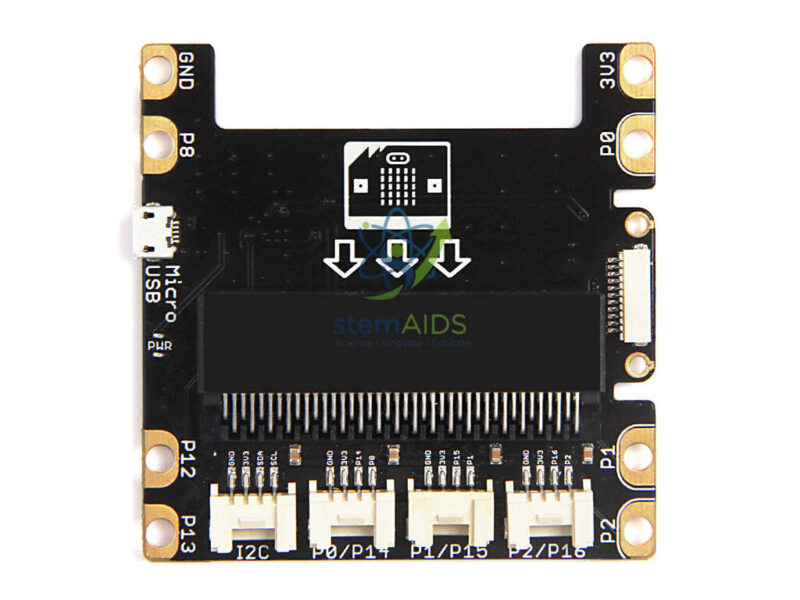
The StemAids Shield Grove micro:bit is a plug-and-play expansion shield designed to connect the BBC micro:bit board with Grove sensors, actuators, communication modules, display modules, and STEM project accessories. It helps students and teachers build electronics, robotics, IoT, sensor-based, and coding projects without complex soldering or wiring.
This Grove shield is suitable for schools, STEM labs, ICT classrooms, robotics clubs, maker spaces, coding labs, and beginner electronics training. It acts as a bridge between the micro:bit board and the Grove ecosystem, allowing learners to connect modules quickly and focus on programming, experimentation, and project development.
Product Overview
The StemAids Shield Grove micro:bit provides a convenient expansion platform for the micro:bit. Instead of connecting sensors and actuators through loose jumper wires, users can plug compatible Grove modules directly into the onboard Grove connectors.
The shield supports different micro:bit pins and interfaces for input-output activities, I2C communication, sensor reading, actuator control, and classroom experiments. It also includes onboard USB power support and accessible edge connector points for crocodile clips and 4 mm banana plugs, making it suitable for practical STEM learning.
Key Features
- Plug-and-Play Grove Expansion: Connects micro:bit with compatible Grove modules easily.
- 4 Grove Ports: Provides onboard Grove connectors for different sensor and actuator interfaces.
- I2C Support: Includes an I2C Grove interface for compatible I2C modules and sensors.
- Micro USB Power Port: Onboard Micro USB interface can help power the micro:bit setup.
- Edge Connector Access: Supports crocodile clip and 4 mm banana plug style classroom connections.
- Logic Pin Access: Provides access to useful pins such as 3V3, P0, P1, P2, P8, P12, P13, and GND.
- No Soldering Required: Beginner-friendly design supports fast classroom project building.
- Ideal for STEM Labs: Suitable for coding, electronics, robotics, IoT, and sensor-based learning.
- Compatible with Grove Ecosystem: Helps connect Grove sensors, displays, buttons, buzzers, LEDs, relays, and communication modules.
- Classroom-Friendly Layout: Makes micro:bit projects cleaner, safer, and easier to demonstrate.
Product Specifications
| Product Name | Shield Grove micro:bit |
|---|---|
| Brand | StemAids |
| Product Type | Grove Expansion Shield / micro:bit Extension Board |
| Compatible Board | BBC micro:bit V1 and V2, depending on shield and board fitment |
| Grove Ports | 4 Grove ports for compatible Grove modules |
| Grove Interfaces | P0/P1, P1/P15, P2/P16, and I2C depending on board version and configuration |
| Additional Interface | Grove Zero interface depending on model version |
| Logic Pin Access | 3V3, P0, P1, P2, P8, P12, P13, and GND |
| Power Interface | Onboard Micro USB power interface |
| Connection Method | Direct micro:bit edge connector insertion and Grove cable module connection |
| External Connection Support | Crocodile clip and 4 mm banana plug edge connector support |
| Output Voltage | 3.3V logic level for compatible Grove modules |
| Dimensions | Approx. 72 mm x 72 mm x 13 mm depending on model variant |
| Weight | Approx. 27.5 g to 28 g depending on model variant |
| Application Area | STEM labs, coding classrooms, robotics labs, ICT rooms, maker spaces, and electronics learning projects |
| Recommended Users | Students, teachers, coding beginners, STEM trainers, robotics learners, and institutional buyers |
How to Use the StemAids Shield Grove micro:bit
- Insert the micro:bit Board: Place the BBC micro:bit board into the shield edge connector carefully and in the correct direction.
- Select a Grove Module: Choose a compatible Grove sensor, actuator, LED, buzzer, button, display, or communication module.
- Connect Grove Cable: Plug one end of the Grove cable into the module and the other end into the correct Grove port on the shield.
- Connect Power: Power the micro:bit through USB, battery pack, or onboard Micro USB power interface as per project requirement.
- Open Coding Platform: Use Microsoft MakeCode, Python, MicroPython, or another compatible micro:bit coding editor.
- Write the Program: Create code to read sensor input, control outputs, display values, or communicate with Grove modules.
- Download Code to micro:bit: Transfer the program to the micro:bit board using a USB cable.
- Test the Project: Observe the connected Grove module response and adjust the code if needed.
- Expand the Project: Add more Grove modules or use crocodile clip points for additional classroom experiments.
Educational Benefits
The StemAids Shield Grove micro:bit helps students learn coding and electronics through practical projects. It reduces wiring difficulty and allows learners to connect sensors and modules quickly, making it easier to understand input, output, communication, logic, and automation.
- Supports hands-on coding and physical computing activities
- Helps students connect sensors and actuators without soldering
- Useful for robotics, IoT, automation, and STEM projects
- Improves understanding of digital input, analog input, output control, and I2C communication
- Encourages project-based learning and experimentation
- Suitable for classroom demonstrations, coding clubs, and innovation labs
Applications
- micro:bit sensor projects
- STEM lab activities
- Robotics and automation projects
- IoT learning experiments
- Environmental monitoring projects
- Light, sound, motion, and temperature sensing activities
- Button, buzzer, LED, and display module projects
- Classroom coding demonstrations
- Maker space and innovation lab projects
- Beginner electronics training
Why Choose StemAids Shield Grove micro:bit?
StemAids provides practical STEM education products for schools, coding classrooms, ICT labs, robotics labs, and maker spaces. The Shield Grove micro:bit is a suitable choice for institutions that want to make micro:bit projects easier, cleaner, and more expandable.
With Grove module compatibility, plug-and-play connectors, Micro USB power support, edge connector access, and classroom-friendly design, this shield helps teachers conduct faster demonstrations and helps students build real electronics projects with confidence.
Safety and Maintenance Guidelines
- Use only compatible micro:bit boards and Grove modules.
- Do not connect modules that require higher voltage than the shield supports.
- Insert the micro:bit board gently and in the correct direction.
- Do not force Grove cables into the wrong connector orientation.
- Keep the shield away from water, dust, excessive heat, and direct physical impact.
- Avoid short circuits between exposed pins, crocodile clips, or banana plug points.
- Disconnect power before changing connections in classroom projects.
- Use under teacher or trainer supervision in school laboratories.
Google E-E-A-T Focus
This product content is prepared for school procurement teams, STEM coordinators, ICT teachers, robotics trainers, coding educators, and institutional buyers. It focuses on verified product features, classroom applications, safe handling, compatibility, and educational value to support Google E-E-A-T principles of experience, expertise, authoritativeness, and trustworthiness.
Frequently Asked Questions
1. What is the StemAids Shield Grove micro:bit used for?
It is used to connect a micro:bit board with compatible Grove sensors, actuators, displays, buzzers, LEDs, buttons, and communication modules for STEM projects.
2. Is it suitable for beginners?
Yes, it is suitable for beginners because Grove connectors reduce wiring complexity and make project building easier.
3. Does it require soldering?
No, the shield is designed for plug-and-play Grove connections and does not require soldering for basic classroom use.
4. Which micro:bit boards are compatible?
It is designed for BBC micro:bit boards. Compatibility with V1 or V2 should be confirmed according to the exact shield version and board fitment.
5. How many Grove ports are available?
The Grove Shield for micro:bit v2.0 commonly includes 4 onboard Grove ports for compatible modules.
6. Does it support I2C modules?
Yes, it includes an I2C Grove interface for compatible I2C Grove modules.
7. Can it power the micro:bit?
Yes, the shield includes onboard Micro USB power support for powering the micro:bit setup, depending on use configuration.
8. Can students use crocodile clips with this shield?
Yes, the shield provides edge connections suitable for crocodile clips and 4 mm banana plugs, depending on the activity.
9. Is it useful for robotics projects?
Yes, it can be used with compatible Grove modules and expansion components for beginner robotics, sensor control, and automation projects.
10. Is it suitable for school STEM labs?
Yes, the StemAids Shield Grove micro:bit is suitable for STEM labs, ICT classrooms, robotics clubs, maker spaces, coding labs, and innovation programs.
SEO Keywords
Shield Grove micro:bit, StemAids Shield Grove micro:bit, Grove Shield for micro:bit, micro:bit Grove expansion board, micro:bit sensor shield, micro:bit robotics shield, micro:bit STEM shield, Grove module shield for schools, coding shield for micro:bit, micro:bit plug and play shield, Grove connector board for micro:bit, STEM lab micro:bit shield, micro:bit extension board, Grove shield for classroom projects.





Reviews
There are no reviews yet.