
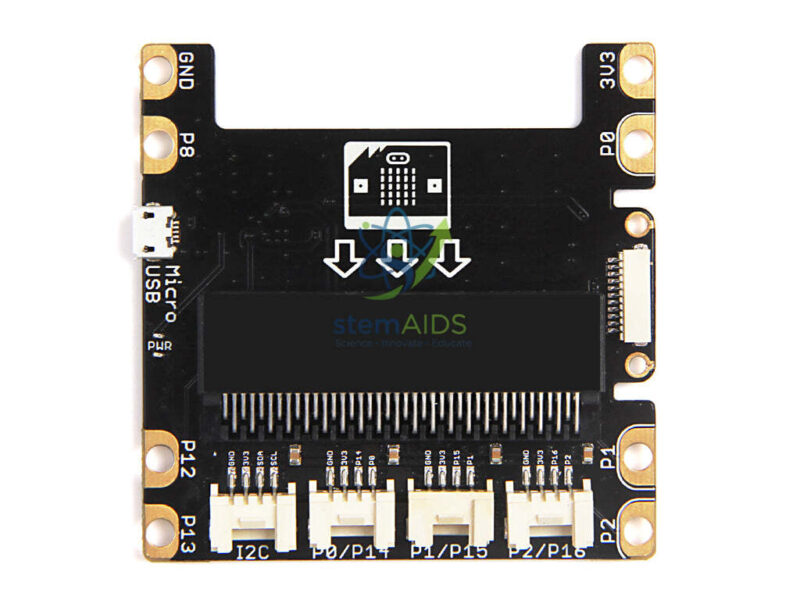
Quick Answer: The Shield Grove micro:bit is an expansion board with an edge-connector slot for the BBC micro:bit and a row of Grove sockets. It routes the micro:bit’s pins to standard Grove ports, so students plug in Grove sensors, displays and actuators with one cable instead of wiring breadboards and crocodile clips.
How the Grove Shield Extends the micro:bit
The micro:bit’s edge connector carries many signals, but its narrow pins are hard to reach without an adaptor. The shield takes the board in a slot and brings chosen pins out to Grove sockets, each with power, ground and signal lines in a keyed plug. Students then connect a temperature sensor, a button or a relay with a single cable, and the socket shape prevents a reversed connection.
Grove shields for the micro:bit typically provide sockets for digital and analog pins and at least one I2C port, used by displays and more complex sensors. MakeCode extensions for Grove modules refer to the pins by the labels printed on the shield, so students can match cable to code. The number and type of ports, and whether the shield has its own power input, vary between versions and should be confirmed for this listing.
The shield itself contains no sensors. It is the base for a project, and often the first item a school adds once students have exhausted the built-in features of the micro:bit. A ready-made set of modules for this purpose is the Kit Grove Micro-bit.
Specifications
| Item | Expansion shield with micro:bit slot and Grove sockets |
| Host board | BBC micro:bit, inserted into the edge-connector slot |
| Port types | Digital, analog and I2C Grove ports, as typical of such shields |
| Connection | Standard 4-pin Grove cables |
| Programming | Grove extensions in MakeCode, or Python libraries |
| Number of ports and power input | Confirm at enquiry |
What It Makes Possible
- Plug-in sensor projects such as weather stations and plant monitors
- Smart-home models with relays, displays and motion sensors
- Swapping modules between lessons without rewiring
- Robotics and automation projects needing several inputs and outputs
Care & Handling
- Insert the micro:bit straight and fully, with its LED grid facing the way shown on the shield.
- Disconnect power before plugging or unplugging modules.
- Keep the edge-connector slot free of dust and debris.
Why Choose LabEquip
Schools usually add Grove shields when their micro:bit lessons move from built-in features to external sensors. The shield is part of the LabEquip STEM kits range. Tell us how many micro:bit boards you use through the contact page so shields and modules can be matched to them.
Frequently Asked Questions
Does the shield include a micro:bit?
No. The title lists the shield only, and the micro:bit is inserted into its slot. Count shields and micro:bit boards separately when planning a class set.
What is a Grove port?
A Grove port is a keyed four-pin socket carrying power, ground and two signal lines. Grove sensors and outputs use matching cables, so modules plug in one way only and can be swapped quickly between projects.
Can I use non-Grove sensors with the shield?
Yes, with an adaptor cable that has a Grove plug at one end and jumper leads at the other, provided the sensor works at the micro:bit’s 3.3 V logic level. Check the sensor’s voltage before connecting.
Which programming tools support the shield?
MakeCode has Grove extensions with blocks for common modules, and Python libraries are available for many of them. The pin labels on the shield tell students which pin number to use in their code.
Why does a Grove module not respond?
Make sure the cable is in the port named in the code, that the micro:bit is fully seated, and that digital, analog and I2C modules are in the correct type of port. An I2C module in a digital port will not work.
Can motors run from the shield?
Small outputs such as LEDs and buzzers can, but motors need a motor driver module and usually a separate power supply. Drawing motor current through the micro:bit can reset the board or damage it.
Last Updated: September 2026




Reviews
There are no reviews yet.