
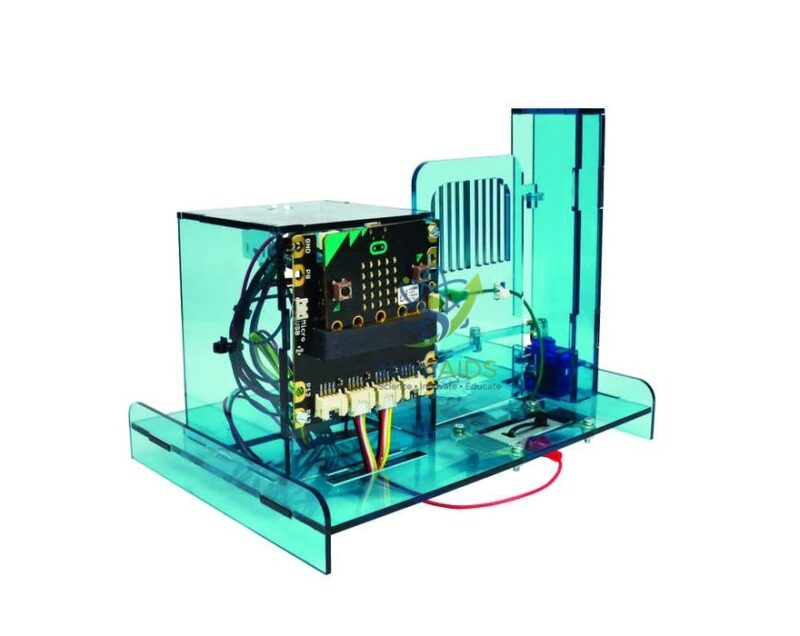
Quick Answer: The Micro:bit gate without interface is a model automatic gate, normally opened and closed by a small servo motor, that students program with a BBC micro:bit to learn how car-park gates and entry systems are controlled. The micro:bit interface board is not included, so it suits schools that already own one.
From Push Button to Automatic Gate
A real automatic gate repeats a short sequence: detect a request, open, wait while someone passes, check the way is clear, then close. The Micro:bit gate reproduces that sequence at desk scale. A servo turns to whatever angle the program commands, so an instruction such as servo to 90 degrees swings the gate open and servo to 0 closes it, and students see straight away whether their code matches the movement they intended.
The project grows in steps. First the micro:bit buttons open and close the gate. Next a timer closes it automatically, then a sensor or a radio message from a second micro:bit acts as the request. Advanced groups add a safety rule: the gate must not close while something is in the opening. That introduces the idea of an interlock, which every industrial machine that moves near people depends on.
Without interface means the board that connects the micro:bit to the servo and any sensors is not part of this listing. Schools with a micro:bit Grove interface or a similar expansion board reuse it here; others should order one at the same time. The exact parts, whether the model arrives assembled and which sensors it accepts should be confirmed.
Automation Lessons
- Car-park barrier or school-gate simulation opened by a button press or a radio message
- Timed opening sequences using pauses and variables
- Obstacle sensing so the gate refuses to close when the way is blocked
- Access control in which only a correct code opens the gate
Specifications
| Item | Programmable model gate for micro:bit automation lessons |
| Actuator | Servo-driven opening and closing, usual for gate models of this type |
| Controller | BBC micro:bit, programmed by the students |
| Interface board | Not included; uses an existing micro:bit interface |
| Programming | MakeCode blocks or Python |
| Parts supplied and assembly state | Confirm at enquiry |
Care & Handling
- Never force the gate by hand while the servo is powered, as this strips the servo gears.
- Try new servo angles in small steps so the gate does not strike its end stops.
- Unplug the servo lead by its connector housing, not the wires.
- Keep the model on a flat, stable surface during programming sessions.
Why Choose LabEquip
Technology teachers who already run micro:bit interfaces buy the gate as a compact automation model that reuses equipment they own. Schools still needing a board can add the Micro:bit programming interface, and more automation models are in the STEM kits range. Send quantities through the contact page.
Frequently Asked Questions
What does without interface mean for this gate?
The interface board that joins the micro:bit to the servo and sensor cables is not included. You need an existing micro:bit interface or expansion board, or you can order one separately.
How does a servo know which angle to move to?
The micro:bit sends a pulse about fifty times a second, and the width of the pulse tells the servo which angle to hold. A sensor inside the servo measures the output position and its circuit drives the motor until the two match.
Why does the gate jitter when it is open?
Jitter usually comes from a weak power supply or a noisy signal. Use fresh batteries or a steady supply, keep servo wires away from motor wires and check that the gate is not straining against a stop.
How can students make the gate close safely?
Add a sensor across the opening and write the program so the gate closes only when the sensor shows the way is clear. If something appears while it is closing, the program should stop and reopen the gate.
Can a second micro:bit open the gate by radio?
Yes. The micro:bit on the gate listens for radio messages while another acts as a remote control or sensor station. Both must be set to the same radio group in the code.
Is a gate model the same as a barrier model?
Both teach the same control ideas. A gate model closes a passage with a gate leaf, while a barrier model uses a lifting arm, so choose the one that matches the real system you want students to simulate.
Last Updated: September 2026





Reviews
There are no reviews yet.