
In Stock
Micro:bit Barrier Accessories
₹560.00
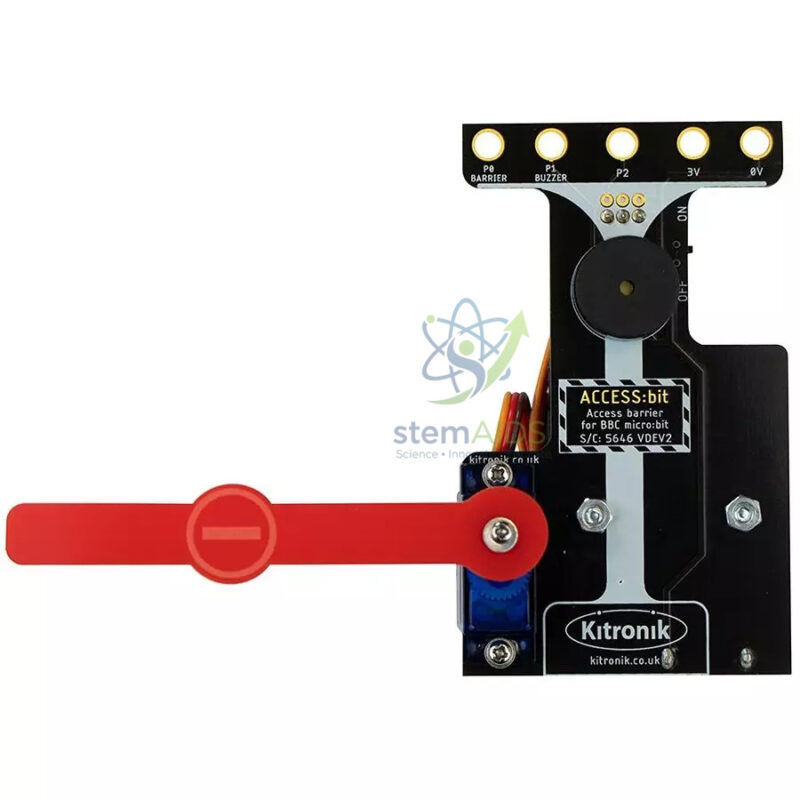
Quick Answer: Micro:bit Barrier Accessories are the parts for building a model barrier gate, such as a car-park or level-crossing arm, controlled by a BBC micro:bit. The arm is normally raised and lowered by a small servo, and students write code that opens the barrier when a trigger such as a button, sensor or radio message arrives.
What Students Build and Learn
A barrier is a simple machine that makes a good control problem. The arm must rise, wait while a vehicle passes and then fall, and it must never close on something beneath it. Students write the basic sequence first, then add conditions: open only for a recognised card, close only when a sensor shows the way is clear, count the cars that pass. Each step adds a programming idea without changing the hardware.
Most micro:bit barrier builds use a hobby servo to move the arm. A servo turns to an angle set by the program, so students learn that two angles, such as 0 and 90 degrees, stand for closed and open, and that moving in small steps with short pauses gives smooth, realistic motion. Whether the servo, fixings and base are included in these accessories, or only the arm and mechanical parts, is not stated in the title and should be confirmed.
The barrier connects naturally with other smart-city modules. With the traffic light for micro:bit it becomes a level crossing, and it is one of the models used in the Complete Micro City Pack.
Specifications
| Item | Accessory parts for a micro:bit-controlled barrier gate |
| Movement | Arm raised and lowered, usually by a servo |
| Control | micro:bit pin output setting the servo angle |
| Triggers | Buttons, sensors, RFID or radio messages |
| Programming | MakeCode servo blocks, JavaScript or Python |
| Parts included (servo, arm, base, fixings) | Confirm at enquiry |
Barrier Projects
- Car-park barrier that opens on a button press and counts vehicles
- Level-crossing model combined with warning lights
- Access gate opened by an RFID card or a radio message
- Engineering discussion of fail-safe design and obstruction sensing
Care & Handling
- Do not force the arm by hand while the servo is powered, as this strips the servo gears.
- Power servos from a supply that can handle their current, through an expansion board if needed, rather than straight from the micro:bit under load.
- Keep small fixings in a labelled bag between builds.
Why Choose LabEquip
Barrier builds are popular in smart-city and control-technology units for upper primary and secondary classes. The accessories sit in the LabEquip STEM kits range. Share group numbers and the parts you already own through the contact page so the order matches.
Frequently Asked Questions
What moves the barrier arm?
Barrier builds for the micro:bit normally use a small hobby servo, which turns to a set angle when it receives a pulse signal from the micro:bit. The code sets one angle for closed and another for open.
How do I make the barrier move smoothly?
Instead of jumping straight from closed to open, change the servo angle a few degrees at a time with a short pause between steps. A loop does this neatly and shows students how animation and timing work.
Can the micro:bit power the servo directly?
Small servos may move from the micro:bit supply when unloaded, but they can draw enough current to reset the board. A servo expansion board or a separate battery supply gives reliable operation.
What can trigger the barrier to open?
A button press, a light or distance sensor detecting a car, an RFID card, or a radio message from another micro:bit. Each trigger introduces a different input and a new condition in the code.
How is fail-safe design taught with the barrier?
Students discuss what should happen if a car is under the arm or the power fails. Adding a sensor that stops the arm closing while something is detected shows how real barriers protect people.
Is the barrier part of a larger kit?
It can be used alone or combined with traffic lights, streetlights and sensors in a smart-city model. The Complete Micro City Pack is built around this kind of model.
Last Updated: September 2026
You must be logged in to post a review.
Bestsellers


Sale

Sale

Sale

Sale


Reviews
There are no reviews yet.