
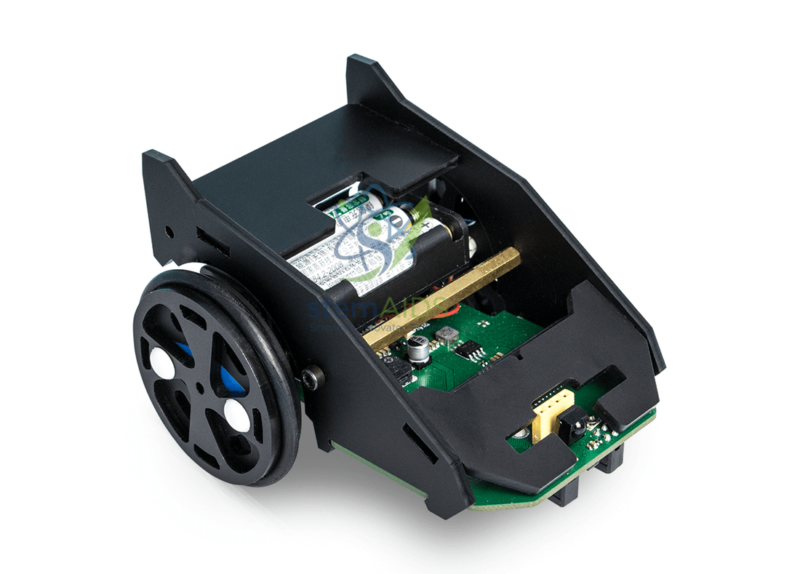
The Bit Car Without micro:bit Card by StemAids is an educational robot car kit designed for students learning robotics, coding, electronics, automation, and sensor-based movement. It is based on the micro:bit programming platform and helps learners build practical projects such as line-following robots, obstacle-aware vehicles, light indication systems, and remote-control robot activities.
This robot car includes useful built-in learning components such as a buzzer, two line followers, four RGB LEDs, and an IR receiver. These features allow students to explore sound alerts, line tracking, colour light programming, signal reception, movement logic, and classroom robotics experiments.
The kit is supplied without the micro:bit card, making it suitable for schools and STEM labs that already have micro:bit boards available. Students can insert a compatible micro:bit board, write programs using block coding or Python, and control the robot for different educational activities.
Key Features
- Educational robot car kit for micro:bit-based STEM learning
- Supplied without micro:bit card, suitable for labs with existing boards
- Includes buzzer for sound alert and signal experiments
- Includes two line followers for line-tracking robot projects
- Includes four RGB LEDs for programmable colour-light activities
- Includes IR receiver for remote-control and signal-based projects
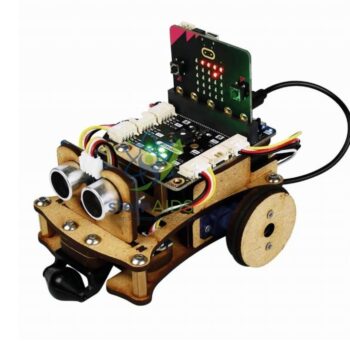
- Option to add ultrasonic sensor or Grove-compatible elements
- Useful for robotics, coding, electronics, automation, and project-based learning
- Suitable for MakeCode block programming and Python-based micro:bit learning
Product Specifications
| Product Name | Bit Car Without micro:bit Card |
|---|---|
| Brand | StemAids |
| Product Type | Educational micro:bit Robot Car Kit |
| Compatible Platform | BBC micro:bit-compatible programming platform |
| micro:bit Card | Not included |
| Built-in Sound Component | Buzzer |
| Line Detection | Two line follower sensors |
| Light Output | Four programmable RGB LEDs |
| Signal Receiver | IR receiver |
| Expansion Option | Can support ultrasonic sensor or Grove elements, depending on compatible setup |
| Programming Support | MakeCode block programming and Python, depending on classroom setup |
| Learning Concepts | Robotics, Line Following, IR Control, RGB LED Programming, Buzzer Output, Sensor Logic, Automation, Coding |
| Recommended Use | School STEM Labs, Robotics Labs, Coding Classes, Robotics Clubs, Innovation Labs |
| User Level | Beginner to Intermediate |
| Package Note | micro:bit board, batteries, ultrasonic sensor, and additional Grove modules may not be included unless specifically mentioned in the final supplied package. |
How to Use Bit Car Without micro:bit Card
- Check the Kit: Verify the robot car body, buzzer, line followers, RGB LEDs, IR receiver, motor system, and connection points before use.
- Prepare the micro:bit Card: Since this version is supplied without the micro:bit card, arrange a compatible micro:bit board separately.
- Insert the micro:bit Board: Fit the micro:bit board into the robot car interface or holder as per the connection guide.
- Connect Power: Insert suitable batteries or connect the recommended power source according to the robot car’s classroom instructions.
- Open the Programming Platform: Use Microsoft MakeCode for beginner-friendly block programming or Python for advanced coding activities.
- Create a Movement Program: Program the robot to move forward, reverse, stop, turn left, or turn right.
- Test Line Following: Use the two line follower sensors to program the robot to follow a black line or track path.
- Add Outputs: Program the RGB LEDs and buzzer to indicate movement status, warning alerts, or activity responses.
- Use IR Control: Use the IR receiver for remote-control or signal-based robot activities if supported by the classroom setup.
- Extend the Project: Add an ultrasonic sensor or Grove module to create obstacle detection, distance sensing, or advanced robotics projects.
Educational Benefits
The StemAids Bit Car Without micro:bit Card helps students understand robotics through practical movement-based learning. It connects coding with real outputs such as motor movement, line detection, sound alerts, RGB light signals, and IR response.
This kit supports activity-based STEM education by encouraging students to write code, test robot behaviour, identify errors, correct logic, and improve the project. It is useful for teaching computational thinking, sensor feedback, automation, debugging, teamwork, and engineering design.
Applications
- micro:bit robot car classroom project
- Line-following robot activity
- IR-controlled robot demonstration
- RGB LED programming experiment
- Buzzer alert and sound-output activity
- Obstacle detection project with optional ultrasonic sensor
- STEM robotics competition practice
- Coding and automation workshop
- School robotics lab and innovation lab project
Why Choose StemAids Bit Car Without micro:bit Card?
StemAids provides practical STEM learning products for schools, robotics labs, coding classrooms, and innovation-based education. The Bit Car Without micro:bit Card by StemAids is designed for institutions that already have micro:bit boards and want a useful robot car platform for programming and robotics activities.
This robot car offers strong classroom value because it combines multiple learning functions in one model, including line tracking, light output, buzzer alerts, IR signal response, and expandable sensor options. It helps teachers conduct structured robotics lessons while giving students hands-on experience with real programmable robot behaviour.
SEO Keywords
Bit Car Without micro:bit Card, StemAids Bit Car, micro:bit Robot Car Kit, micro:bit Car Without Board, STEM Robot Car Kit, Educational Robotics Kit, Line Follower Robot Kit, micro:bit Coding Robot, Robot Car Kit for Schools, micro:bit STEM Learning Kit.
FAQ
1. What is the Bit Car Without micro:bit Card?
It is an educational robot car kit based on the micro:bit platform, designed for learning robotics, coding, line following, RGB LED control, buzzer output, and IR signal response.
2. Which brand offers this product?
This product is offered under the StemAids brand for STEM education, robotics, coding, and classroom project-based learning.
3. Is the micro:bit card included?
No, this version is supplied without the micro:bit card. A compatible micro:bit board must be arranged separately.
4. What built-in features are available?
The robot car includes a buzzer, two line follower sensors, four RGB LEDs, and an IR receiver.
5. Can students make a line-following robot?
Yes, the two line follower sensors allow students to create line-following robot projects and track-based movement activities.
6. Can an ultrasonic sensor be added?
Yes, the robot platform provides the option to add an ultrasonic sensor or Grove elements, depending on compatible setup and classroom requirements.
7. Which programming platform can be used?
Students can use MakeCode block programming for beginner-level activities. Python may also be used for advanced micro:bit programming depending on the classroom setup.
8. Is this kit suitable for beginners?
Yes, it is suitable for beginners when used with block programming and teacher-guided activities.
9. Can this kit be used in school STEM labs?
Yes, it is suitable for school STEM labs, robotics labs, coding classes, robotics clubs, innovation labs, and project-based learning programs.
10. What should be checked before purchase?
Check whether the micro:bit board, batteries, ultrasonic sensor, Grove elements, USB cable, and remote-control accessories are included or need to be purchased separately.
Safety and Classroom Use Note
The Bit Car should be assembled and tested under teacher or trainer supervision. Students should use correct battery polarity, avoid short circuits, keep fingers away from moving wheels, and test the robot on a safe flat surface.





Reviews
There are no reviews yet.