


Sale
In Stock
Arduino Learning Kit
Original price was: ₹1,500.00.₹740.00Current price is: ₹740.00.
The Arduino Learning Kit is a microcontroller-based STEM kit used for teaching coding, electronic circuits, sensors and automated control. It helps students, teachers and laboratory instructors build practical projects, upload programs and observe how software instructions control physical inputs and outputs.
Product Description
The STEMAids Arduino Learning Kit provides a practical platform for introductory physical computing. Learners can connect compatible electronic components to a programmable controller, write or modify code and test how the circuit responds to buttons, sensors, lights, sound devices or actuators supplied with the selected configuration.
The kit supports progressive learning from basic digital input and output to sensor-based automation. The exact Arduino-compatible board, modules, component quantities and project guide must be confirmed against the current STEMAids packing list before publication or procurement.
Key Features
- Combines coding and electronics: Connects software instructions with observable circuit behaviour.
- Supports hands-on projects: Enables learners to assemble, program, test and improve working prototypes.
- Introduces input and output: Helps explain how sensors provide data and output devices respond to code.
- Develops programming logic: Supports variables, conditions, loops, functions and timing activities.
- Encourages troubleshooting: Learners identify wiring, polarity, code and communication errors.
- Suitable for guided progression: Can support beginner activities and more advanced automation projects.
- Reusable laboratory format: Components can be used for repeated exercises when connected within verified ratings.
Technical Specifications
|
Specification |
Detail |
|
Product name |
Arduino Learning Kit |
|
Brand |
STEMAids |
|
Product category |
Microcontroller learning kit / coding and electronics STEM kit |
|
Learning capacity |
One configurable microcontroller project set |
|
Learning concepts |
Coding, circuit building, digital input/output, sensors, actuators and automation |
|
Intended users |
School and college students, coding teachers, STEM instructors and electronics beginners |
|
Standards or certifications |
No product-specific certification publicly verified |
What’s Included in the Kit
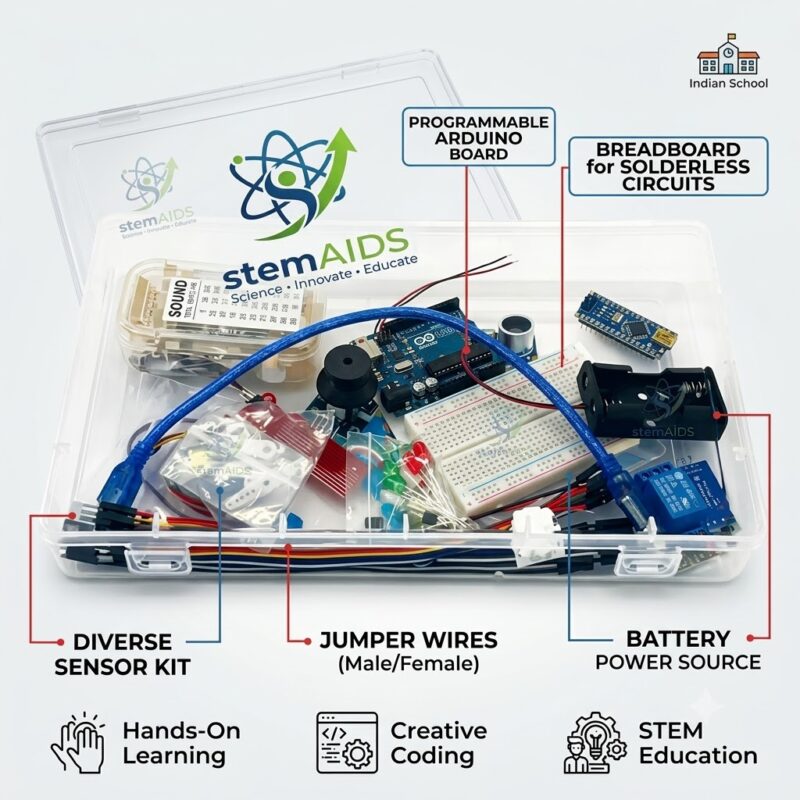
- Arduino or Arduino-compatible controller board
- Breadboard and jumper wires
- Electronic input, output and sensor modules
- Resistors, LEDs, switches and supporting components
- USB programming cable and power accessories
- Project manual, code files or learning resources
Applications and Uses
- Learning basic microcontroller programming and circuit construction.
- Controlling LEDs, buzzers, displays and compatible actuators.
- Reading buttons, analogue inputs and environmental sensors.
- Building alarms, indicators, timers and automation prototypes.
- Introducing robotics, IoT and embedded-system principles.
- Supporting coding classes, innovation labs and science exhibitions.
How to Use the Arduino Learning Kit
- Identify the controller board and required project components.
- Install the confirmed programming software on a compatible computer.
- Build the circuit with the power disconnected.
- Check component polarity, pin numbers and supply requirements.
- Connect the controller to the computer using the approved USB cable.
- Select the correct board and communication port in the software.
- Upload the program and observe the circuit response.
- Disconnect power before modifying the wiring.
Safety and handling: Use only the specified low-voltage supply. Prevent short circuits, observe component polarity and never connect motors or high-current loads directly unless the circuit includes the required driver.
Care & Maintenance
- Store boards and modules in anti-static or protective packaging.
- Disconnect power before changing wiring or replacing components.
- Keep connectors dry and avoid bending board pins.
- Organise small parts in labelled compartments after each activity.
Why Choose STEMAids
STEMAids supplies coding, electronics, robotics and project-based learning resources for schools and institutional STEM laboratories. Explore related STEM learning kits, educational science models, physics laboratory products and the complete scientific and educational product range. STEMAids supports institutional and international procurement requirements. Buyers should request the latest board specification, parts list and software guide before ordering.
Frequently Asked Questions
What is an Arduino Learning Kit used for?
It is used to teach microcontroller coding, electronic circuits, sensor input and programmed output through practical projects.
Which Arduino board is included?
The controller-board model is not publicly verified. Confirm the board version and whether it is an original or compatible board before ordering.
Does the kit require soldering?
The assembly method depends on the supplied components. Breadboard-based projects generally use temporary connections, but the current kit configuration must be confirmed.
What software is used to program the kit?
Arduino-compatible boards commonly use the Arduino IDE or another supported coding environment. Confirm the required software and drivers for the supplied board.
Can beginners use the Arduino Learning Kit?
Yes. It is suitable for supervised beginners when the kit includes structured instructions and projects matched to their experience level.
Are sensors and motors included?
The component inventory is not publicly verified. Request the current packing list to confirm all sensors, motors, displays and accessories.
Explore more STEM kits from STEMAids for coding, electronics, robotics and automation projects.
Recommended primary image ALT text: Arduino Learning Kit with microcontroller board and electronic components for coding projects.
Recommended component image ALT text: Microcontroller, breadboard, sensors and jumper wires supplied in an electronics learning kit.
Recommended application image ALT text: Students programming an Arduino learning project during a supervised STEM laboratory activity.
You must be logged in to post a review.
Bestsellers

Sale

Sale

Sale

Sale


Reviews
There are no reviews yet.