

In Stock
Connected 3D Carpet Kit
₹240.00
Quick Answer: The Connected 3D Carpet Kit is a micro:bit project for building connected floor mats, which generally work as large pressure switches: when a student steps on a mat, the micro:bit detects the contact and the program responds with a sound, light or score. It teaches input circuits, event-driven code and fault-finding.
Turning a Mat into an Input
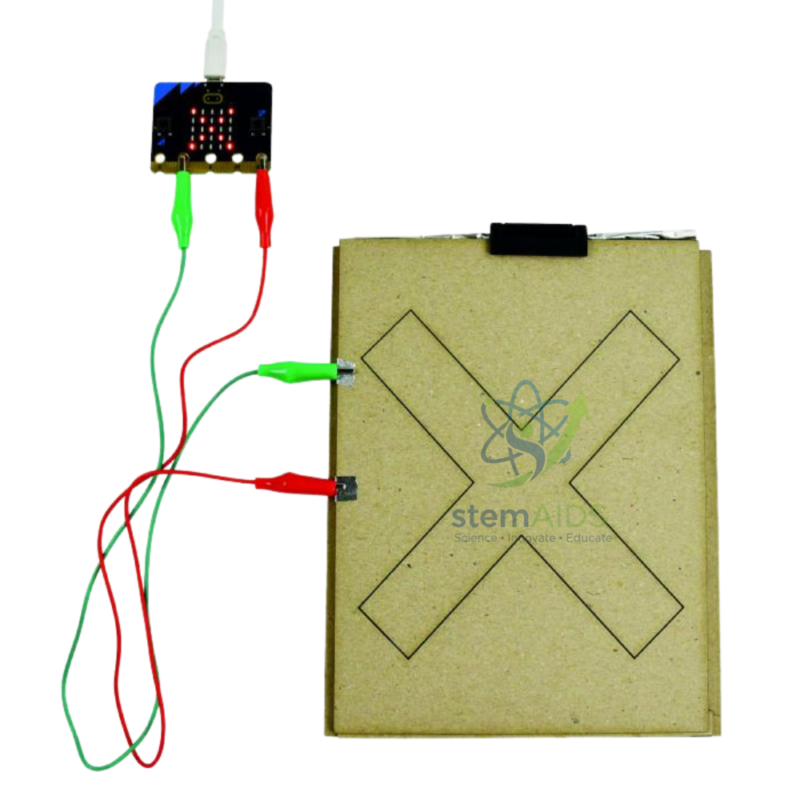
A pressure mat is one of the simplest sensors there is. Two conductive layers are held apart by a spacer with holes; body weight pushes the layers together through the holes and closes a circuit. To the micro:bit a closed mat looks just like a pressed button, so students read it with the same kind of blocks they used for buttons A and B and then build games and systems around it.
With several mats connected, the project becomes a design problem. A reaction game lights a random target and times how quickly a player steps on the matching mat; a quiz gives each mat an answer; an entrance mat counts visitors or sounds an alarm. Long cables, loose contacts and worn layers cause real faults, so the kit is also good for teaching systematic fault-finding: test the mat alone with a meter, then the cable, then the code.
The 3D in the name refers to parts designed for 3D printing, typical of this kit family. The kit is described as supplied without a micro:bit card, for schools that already own boards. The number of mats, any printed parts and the connection method should be confirmed.
Activities with Connected Mats
- Reaction-time game that records how fast each player responds
- Floor quiz where students answer by stepping on a mat
- Entrance counter or intruder-alarm model
- Physical-education warm-ups scored automatically by the micro:bit
Specifications
| Item | Connected floor-mat (carpet) project kit for micro:bit |
| Sensing principle | Mat closes a contact underfoot and is read as a digital input (usual design) |
| Controller | BBC micro:bit, described as not included |
| Skills | Input circuits, event-driven code, assembly and fault-finding |
| Programming | MakeCode blocks or Python |
| Number of mats, printed parts and connectors | Confirm at enquiry |
Care & Handling
- Lay mats on a flat, dry floor and tape cables down so nobody trips.
- Step rather than jump or stamp; repeated hard impacts break the contact layers.
- Keep shoes free of grit, which wears the conductive surfaces.
- Store mats flat or loosely rolled, never sharply folded.
Why Choose LabEquip
Primary and middle-school teachers use connected mats to take coding off the desk and into movement-based lessons. LabEquip lists the kit in the STEM kits range with the Connected Plot kit, another interactive project in the same style. Confirm the number of mats you need through the contact page.
Frequently Asked Questions
How does a floor mat act as a switch?
Mats of this type have two conductive layers separated by a perforated spacer. Standing on the mat presses the layers together through the holes, which closes the circuit exactly as pressing a button does.
How is a mat read in MakeCode?
Treat it as a digital input on the pin it is wired to. Use a pin-pressed event block, or read the pin and compare the value in an if block, then trigger the sound, light or score you want.
Why does a mat trigger when nobody is standing on it?
The layers are usually touching because the mat is creased, folded or weighed down, or a long cable is picking up interference. Lay the mat flat, check the spacer and try a shorter cable.
Can several mats be used at the same time?
Yes, as long as each mat has its own input. Count the inputs your micro:bit setup offers before planning a large game.
Is a micro:bit included in this kit?
The kit is described as supplied without a micro:bit card, for schools that already own boards. The number of mats and any 3D-printed parts should be confirmed at enquiry.
What can students learn from faults in the mats?
Faults teach a logical order of testing: check the mat with a multimeter on continuity, then the cable, then the pin and finally the code. Recording each test builds good engineering habits.
Last Updated: September 2026
You must be logged in to post a review.
Bestsellers


Sale

Sale

Sale
Sale


Reviews
There are no reviews yet.