
In Stock
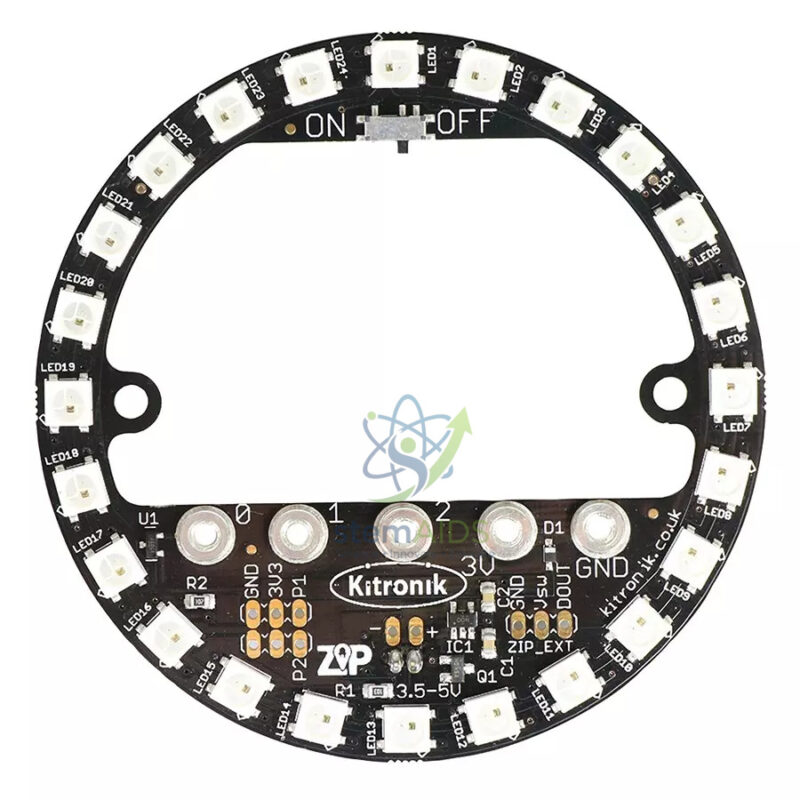
Ring 24 LED RGB
₹489.00
Quick Answer: The Ring 24 LED RGB is a circular board carrying 24 full-colour RGB LEDs, listed for use with the BBC micro:bit. Rings of this type let each LED be set to any colour from code, so students build light shows, clocks, compasses and level indicators.
Colour and Position on One Ring
Each RGB LED mixes red, green and blue at different brightness levels to produce other colours. Rings sold for the micro:bit usually use addressable LEDs of the WS2812 type, often called NeoPixels, which are chained together and controlled from a single micro:bit pin. The micro:bit sends a stream of colour values; each LED keeps its own value and passes the rest along the chain.
In MakeCode the NeoPixel extension lets students choose an LED by number, give it a colour and then show the ring. That makes the ring an effective way to teach arrays and indexing: LED 0 is the first, LED 23 the last, and a loop runs through them. Rotating a pattern round the ring introduces modulo arithmetic, and fading colours introduces RGB values from 0 to 255.
Combining the ring with the micro:bit’s sensors gives meaningful projects: the compass heading shown as one lit LED pointing north, the tilt of the board as a colour, or a sound level as a coloured arc. How the ring connects, by crocodile clips or an edge-connector board, and whether it needs extra power at full brightness should be confirmed.
Specifications
| Item | RGB LED ring for micro:bit projects |
| LEDs | 24 RGB LEDs in a circle, from the listing title |
| Control | Usually addressable (WS2812-type) LEDs on one data pin |
| Programming | MakeCode NeoPixel extension, JavaScript or Python |
| Colours | Mixed from red, green and blue values set in code |
| Connection method and power needs | Confirm at enquiry |
Project Ideas
- Compass display with one LED pointing to north
- Clock or timer with coloured hour and minute markers
- Sound or temperature level shown as a coloured arc
- Light-show and animation challenges using loops and arrays
Care & Handling
- Keep brightness low in code for classroom use; full white on many LEDs is dazzling and draws a high current.
- Connect data, power and ground correctly before switching on, since a reversed supply can damage the LEDs.
- Store the ring flat and protect it from bending.
Why Choose LabEquip
Schools buy the ring when their micro:bit students are ready for colourful output projects. LabEquip lists it in the STEM kits range, and for Grove-based systems the Grove V2 circular 24-LED module is the matching option. Send quantities via the contact page.
Frequently Asked Questions
How do I program the RGB ring with a micro:bit?
Add the NeoPixel extension in MakeCode, then set the pin the ring is connected to and the number of LEDs, which is 24. Set colours for individual LEDs and use the show command to update the ring.
Why do the LEDs flicker or show wrong colours?
Make sure the data wire is on the pin named in the code, that the LED count is set to 24 and that the ground is shared with the micro:bit. Too little power at high brightness also causes odd colours, so reduce brightness first.
Can the micro:bit power the ring on its own?
At low brightness with a few LEDs lit it usually can. Many LEDs at full brightness draw more current than the micro:bit supply comfortably provides, so use lower brightness or a separate supply as documented for the ring.
What does RGB mean?
Red, green and blue. Each LED contains three tiny light sources, and mixing them at different brightness produces other colours, for example red plus green for yellow.
How is this different from the Grove circular 24-LED module?
Both have 24 LEDs in a ring. This ring is listed for the micro:bit and named as RGB, while the Grove module connects through Grove sockets. Choose the one that matches your boards and connection system.
What projects suit a 24-LED ring?
Circular displays such as clocks, compasses, timers and gauges, as well as animations and games like spinning-wheel selectors. Neighbouring LEDs are 15 degrees apart, which makes angles easy to show.
Last Updated: September 2026
You must be logged in to post a review.
Bestsellers


Sale

Sale

Sale


Reviews
There are no reviews yet.