












In Stock
Wireless option for Thymio II
₹1,450.00
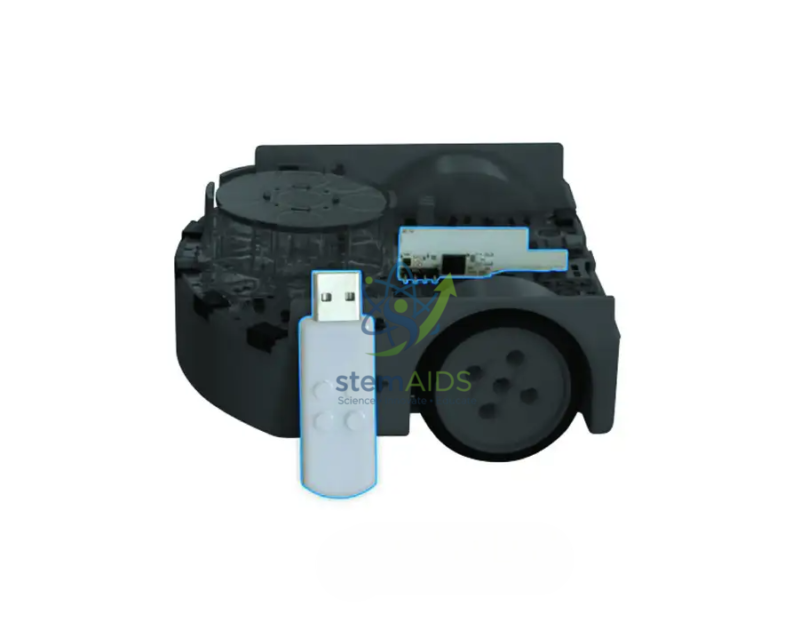
Quick Answer: Wireless option for Thymio II is an upgrade that adds a radio module inside a Thymio II robot and a USB dongle for the computer. With the Thymio II wireless option fitted, pupils can program the robot and watch it respond without a USB cable.
What the Wireless Option Changes
A standard wired Thymio II has to stay connected to a computer while a program is being edited and tested live. The wireless option removes that tether: the radio module inside the robot and the dongle in the computer’s USB port carry the program and the sensor readings, so the robot can drive across the floor while its variables remain visible on screen.
Fitting the option involves opening the robot and plugging the module onto its circuit board, so it should be carried out by a teacher or technician following the robot maker’s instructions. The robot’s firmware may also need updating through Thymio Suite before the wireless link works.
When several wireless robots share one room, each group must select its own robot in Thymio Suite before sending a program, or code can end up on a neighbour’s robot. Numbering every robot and its dongle with the same label saves time at the start of each lesson.
Specifications
| Item | Wireless upgrade for Thymio II robots |
| Parts | Radio module for inside the robot and USB dongle for the computer |
| Installation | Opening the robot and fitting the module on its board |
| Software | Thymio Suite, used as with a wired robot |
| Robot compatibility | Confirm at enquiry, with the robot version |
Installation and Handling Notes
- Switch the robot off and work on a clean table when fitting the module, and touch a grounded metal object first to discharge static.
- Keep each dongle with its robot, for example in a labelled bag, since a lost dongle leaves that robot without its link.
- Remove dongles from laptops before they go back into trolleys so the USB plugs are not bent.
Where Wireless Robots Help
- Floor-based tasks such as mazes, tracks and races where a cable would get in the way
- Live debugging, with sensor values shown on screen while the robot moves
- Demonstrations on a projector, with the teacher’s laptop controlling a robot across the room
Why Choose LabEquip
Schools usually buy the wireless option once a set of wired Thymio II robots is working well and pupils are ready to test programs on the floor. LabEquip supplies it with the Robot Thymio II and other Thymio accessories in its General Lab Products range; send the number of robots to be upgraded through the contact page.
Frequently Asked Questions
Is the wireless option needed to use Thymio II?
No. A wired Thymio II works fully through its USB cable. The wireless option is an upgrade for classes that want robots to stay connected to the software while moving freely.
What does the dongle do?
It plugs into the computer’s USB port and acts as the radio link between Thymio Suite and the module in the robot, carrying programs to the robot and sensor readings back to the screen.
Can a pupil install the wireless module?
It is better done by an adult. The robot has to be opened and the module seated on the internal board, and handling the electronics needs care to avoid static damage or bent connectors.
Does the robot still charge by USB after the upgrade?
Yes. The robot keeps its USB socket for charging, and it can still be programmed by cable if a dongle is not to hand.
Can several wireless robots work in the same classroom?
Yes, but each group has to select its own robot in Thymio Suite before sending a program. Numbering robots and dongles and giving each group a fixed robot avoids programs going to the wrong one.
Will it fit every Thymio II?
It is intended for Thymio II robots. Send the robot version or a photo of the underside with your order and confirm compatibility at enquiry before buying for a whole set.
Last Updated: September 2026
You must be logged in to post a review.
Bestsellers




Reviews
There are no reviews yet.