

In Stock
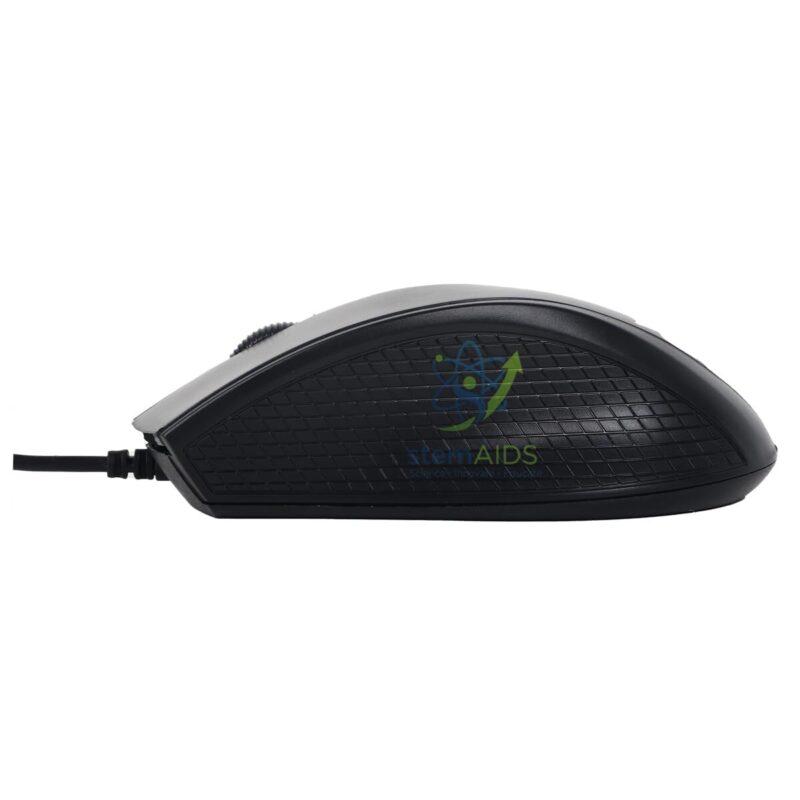
USB Optical Mouse
$2.37
The StemAids USB Optical Mouse is a reliable and easy-to-use computer input device designed for schools, computer labs, ICT rooms, STEM labs, offices, libraries, training centers, and home workstations. It provides smooth cursor movement, accurate tracking, and comfortable control for everyday computer use.
This wired optical mouse connects through a USB port and supports plug-and-play operation with compatible laptops, desktop computers, and educational computer systems. It is suitable for students, teachers, office users, computer operators, and institutions requiring dependable computer lab accessories.
Product Overview
The StemAids USB Optical Mouse is designed for regular digital learning, typing work, browsing, data entry, coding, online classes, office applications, and computer-based training. Its optical sensor helps track movement accurately on suitable surfaces, while the wired USB connection provides stable operation without the need for batteries.
It is a practical accessory for computer labs and ICT classrooms where multiple systems are used daily. The simple design, comfortable grip, and wide system compatibility make it suitable for both individual and bulk institutional use.
Key Features
- USB Wired Connection: Provides stable and reliable connectivity through a standard USB port.
- Optical Tracking Sensor: Supports smooth and accurate cursor movement on suitable surfaces.
- Plug-and-Play Use: Easy to install without complicated driver setup on most compatible systems.
- Comfortable Design: Suitable for regular classroom, office, and computer lab use.
- Standard Button Layout: Includes left click, right click, and scroll wheel for everyday operation.
- No Battery Required: Powered directly through USB connection.
- Ideal for Computer Labs: Suitable for schools, colleges, ICT rooms, STEM labs, offices, and training centers.
- Durable Daily-Use Accessory: Designed for regular workstation and institutional use.
Product Specifications
| Product Name | USB Optical Mouse |
|---|---|
| Brand | StemAids |
| Product Type | Wired Computer Mouse / USB Optical Mouse |
| Connection Type | USB wired connection |
| Sensor Type | Optical sensor |
| Button Layout | Left click, right click, and scroll wheel |
| Power Source | USB powered, no battery required |
| Compatibility | Desktop computers, laptops, computer lab systems, and compatible USB devices |
| Operating System Support | Windows, macOS, Linux, ChromeOS, and other systems with USB mouse support |
| Cable Length | Standard cable length suitable for desk and computer lab use |
| Usage Area | Schools, ICT labs, STEM labs, offices, libraries, training centers, and home desks |
| Recommended Users | Students, teachers, trainers, office staff, computer operators, and institutional buyers |
How to Use the StemAids USB Optical Mouse
- Connect the Mouse: Insert the USB connector into an available USB port on a laptop or desktop computer.
- Wait for Detection: Allow the operating system to detect the mouse automatically.
- Place on a Suitable Surface: Use the mouse on a clean desk surface or mouse pad for smooth movement.
- Use the Buttons: Use the left button for selection, right button for menu options, and scroll wheel for page movement.
- Adjust Settings if Needed: Change pointer speed, scroll speed, or button settings from the computer control panel or settings menu.
- Disconnect Safely: Remove the USB connector gently when the mouse is not required.
- Store Properly: Keep the mouse in a clean, dry place and avoid sharp bending of the cable.
Educational and Workplace Benefits
The StemAids USB Optical Mouse supports smooth computer operation in classrooms, offices, and training environments. It helps students and users perform digital tasks more comfortably and accurately.
- Supports ICT practicals and computer-based learning
- Useful for coding, browsing, typing work, and data entry
- Provides stable wired performance without battery dependency
- Improves workstation comfort and cursor control
- Suitable for bulk use in school computer labs
- Easy to install, replace, and maintain
Applications
- School computer labs
- ICT classrooms
- STEM and robotics labs
- Office workstations
- Library computer sections
- Training center computer rooms
- Reception and administrative desks
- Home study and remote work setup
- General desktop and laptop use
Why Choose StemAids USB Optical Mouse?
StemAids provides practical computer and educational technology accessories for schools, colleges, ICT labs, STEM labs, offices, and institutional workspaces. The StemAids USB Optical Mouse is designed to support reliable cursor control, simple installation, and comfortable daily use.
It is a suitable choice for institutions requiring dependable wired mouse units for computer labs, classrooms, offices, libraries, and training centers. Its plug-and-play design, optical tracking, and USB-powered operation make it a useful accessory for everyday digital tasks.
Safety and Maintenance Guidelines
- Use the mouse on a clean and stable surface.
- Do not pull or twist the USB cable forcefully.
- Keep the mouse away from water, dust, excessive heat, and physical impact.
- Clean the outer surface gently with a soft dry cloth.
- Do not insert sharp objects near the sensor or buttons.
- Avoid dropping the mouse from height.
- Store properly when not in use to prevent cable damage.
- Use under teacher or staff supervision in school computer labs.
Google E-E-A-T Focus
This product content is prepared for school procurement teams, ICT lab coordinators, computer lab managers, office administrators, and institutional buyers. It focuses on practical use, compatibility, safe handling, workstation comfort, and long-term usability to support Google E-E-A-T principles of experience, expertise, authoritativeness, and trustworthiness.
Frequently Asked Questions
1. What is the StemAids USB Optical Mouse used for?
It is used to control the computer cursor, select items, scroll pages, open files, browse the internet, and perform daily computer tasks.
2. Is this mouse suitable for school computer labs?
Yes, it is suitable for school computer labs, ICT classrooms, STEM labs, offices, libraries, and training centers.
3. Does it require batteries?
No, the USB Optical Mouse is powered directly through the USB connection and does not require batteries.
4. Is it plug-and-play?
Yes, it supports plug-and-play operation on most compatible computers and operating systems.
5. Can it be used with laptops?
Yes, it can be used with laptops and desktop computers that have a compatible USB port.
6. Does it work with Windows and macOS?
Yes, it is compatible with Windows, macOS, Linux, ChromeOS, and other systems that support standard USB mouse devices.
7. Should I use a mouse pad with it?
A mouse pad is recommended for smoother movement, better tracking, and desk protection, especially in computer labs.
8. What buttons are included?
The mouse generally includes a left button, right button, and scroll wheel for standard computer operation.
9. Is it suitable for office use?
Yes, it is suitable for office desks, administrative workstations, reception counters, and general computer work.
10. Is it suitable for bulk institutional purchase?
Yes, the StemAids USB Optical Mouse is suitable for schools, colleges, offices, ICT labs, libraries, and training centers requiring multiple computer accessories.
SEO Keywords
USB Optical Mouse, StemAids USB Optical Mouse, wired optical mouse, computer mouse for school lab, USB mouse for computer lab, optical mouse for students, mouse for ICT lab, wired mouse for office, plug and play USB mouse, computer accessories for schools, desktop mouse, laptop USB mouse, optical mouse for classroom, USB mouse for training center.
You must be logged in to post a review.
Bestsellers




Reviews
There are no reviews yet.