











In Stock
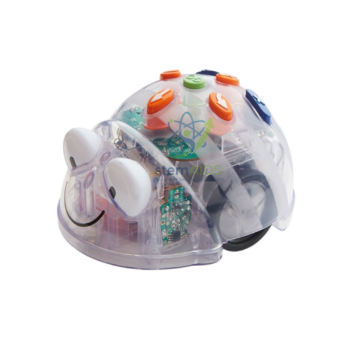
Robot Thymio II
₹32,506.00
Quick Answer: Robot Thymio II is a small, two-wheeled educational robot packed with sensors and coloured lights that pupils program to react to their surroundings. The Thymio II robot has built-in behaviours for first lessons and can then be programmed with visual, block-based or text languages.
What the Thymio II Robot Does in a Classroom
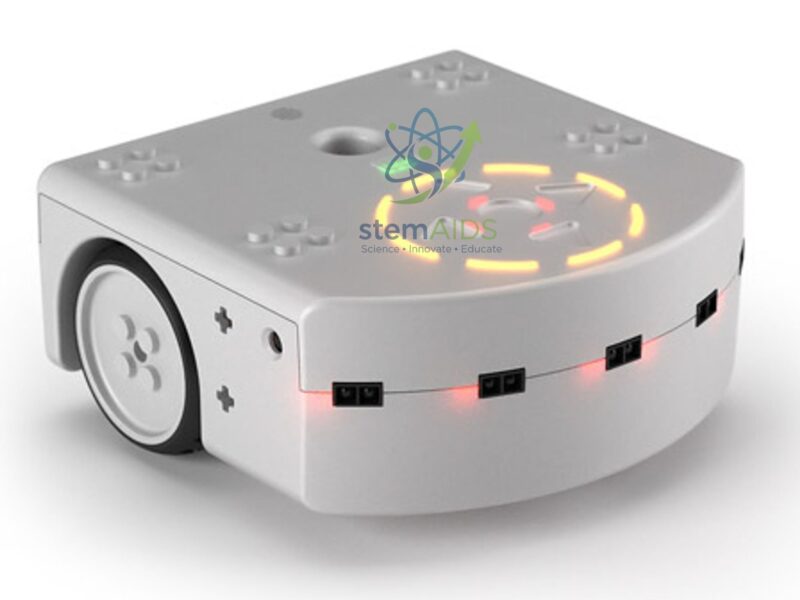
Thymio was developed at the Swiss federal institute of technology in Lausanne (EPFL) together with the ECAL school of art and design, and it is produced by the Swiss non-profit Mobsya. Its hardware and software are open source. The Thymio II body carries infrared proximity sensors facing forward and backward, two ground sensors underneath, an accelerometer, a microphone, a temperature sensor, capacitive touch buttons on top, an infrared receiver, a loudspeaker and many coloured LEDs that light up to show what each sensor is detecting.
Switched on without a computer, the robot runs pre-programmed behaviours chosen with the arrow buttons, each shown by a body colour: it can follow a dark line on the floor, explore while avoiding obstacles, back away from an approaching hand or respond to claps. These behaviours give younger pupils a first idea of how a robot links a sensor to an action before any coding starts.
Programming is done through Mobsya’s free Thymio Suite software, which offers VPL (a visual event-action language), Blockly, Scratch and the text-based Aseba language. The same robot therefore serves a primary class dragging picture blocks and older students typing code, and because an LED glows beside each active sensor, students can see the robot’s inputs while they debug.
Specifications
| Product | Thymio II programmable educational robot |
| Drive | Two motor-driven wheels |
| Sensors | Infrared proximity (front and rear), ground sensors, accelerometer, microphone, temperature, touch buttons, infrared receiver |
| Outputs | RGB body LEDs, sensor indicator LEDs, loudspeaker |
| Programming | Thymio Suite: VPL, Blockly, Scratch and Aseba text language |
| Power | Built-in rechargeable battery, charged through the USB socket |
| Wired or wireless version | Confirm at enquiry |
Lessons Built Around Thymio II
- Introducing sensors and actuators through the built-in behaviours, before any screen is used
- Event-action programming in VPL, such as turning the lights red and reversing when the front sensors detect an obstacle
- Line-following and maze tasks on a printed track, using the two ground sensors
- Moving on to Scratch or Aseba text code for loops, variables and conditions in upper classes
- Science tie-ins such as logging the temperature sensor or reading the accelerometer as the robot is tilted
Care of the Robot
- Charge the Thymio II fully before its first lesson and top it up between sessions rather than letting the battery run completely flat.
- Run the robot on the floor or on a large table with a raised edge; a fall from a desk can crack the shell or damage a wheel.
- Wipe the sensor windows around the body with a dry, soft cloth, because dust and fingerprints shorten the distance at which obstacles are detected.
- Store robots with their USB cables in a box or case so that the charging socket is not strained by leads left plugged in.
Why Choose LabEquip
Thymio II is usually ordered by schools setting up a coding or robotics corner, often several robots at a time so that pairs of pupils can share one. LabEquip lists it in the General Lab Products range together with its accessories, including the Thymio School Track for line-following work. For class sets, send the number of robots and whether you want wired or wireless units through the contact page.
Frequently Asked Questions
What age group is Thymio II suitable for?
Thymio is designed for learners from early primary school through secondary level. Younger pupils work with the built-in behaviours and the picture-based VPL editor, while older students write Scratch or Aseba text programs on the same robot, so one set serves several year groups.
Do I need a computer to use Thymio II?
Not for the first lessons. The pre-programmed behaviours are started with the touch buttons on top of the robot. A computer with Thymio Suite installed is needed once pupils begin writing their own programs.
Which programming languages does Thymio II support?
Through Thymio Suite it can be programmed in VPL, a visual event-action language, in the Blockly and Scratch block editors, and in Aseba, a text language. This lets a school keep the same robot as students progress from pictures to typed code.
Can Thymio II follow a line?
Yes. Two infrared ground sensors on the underside detect the contrast between a dark line and a light surface. One of the built-in behaviours follows a line, and students can also program their own line-following rules from the ground sensor readings.
Is Thymio II compatible with LEGO bricks?
The body has attachment points designed to take LEGO-type pieces, so pupils can add structures, arms or trailers. Check that an attachment does not cover the proximity or ground sensors, or the robot will behave unexpectedly.
How is the Thymio II battery charged?
The robot has a built-in rechargeable battery that charges through its USB socket, from a computer or a USB charger. A multi-port charging hub helps when a whole class set has to be charged between lessons.
Last Updated: September 2026
You must be logged in to post a review.
Bestsellers




Reviews
There are no reviews yet.