





In Stock
Projector Model EB-685W EPSON
₹49,850.00
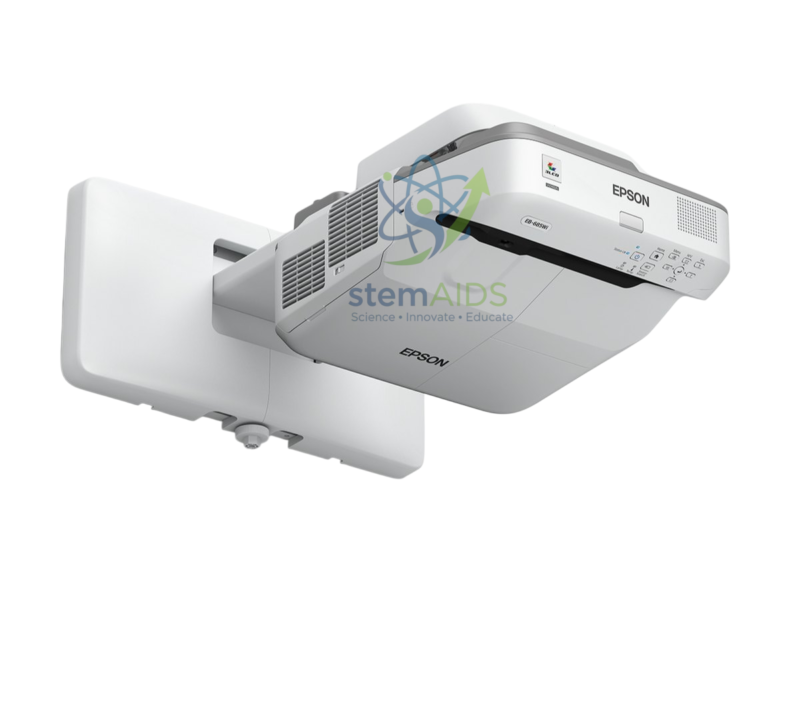
Quick Answer: The Projector Model EB-685W EPSON is an ultra-short-throw classroom projector from Epson, mounted just above the whiteboard on a wall arm, as the listing photo shows. Because the Epson EB-685W projector sits so close to the board, a teacher standing there casts little shadow and rarely looks into the beam.
Ultra-Short-Throw Projection in a Classroom
A conventional projector sits at the back of the room or on a ceiling mount several metres from the screen, so anyone walking in front of the image blocks it. An ultra-short-throw model such as the EB-685W is fixed a short distance from the wall and projects at a steep angle onto the board below it, which frees the front of the room for writing and demonstrations.
The W in Epson’s model code points to WXGA resolution, 1280 × 800 pixels in a 16:10 shape, which suits widescreen laptops and slides. Epson builds its EB classroom projectors on 3LCD technology, with separate panels for red, green and blue light.
Because the image lands on the wall from very close range, the surface needs to be flat: a smooth whiteboard or rigid projection board gives a cleaner picture than a roll-down screen, which can ripple. Brightness, inputs and the wall-arm kit should be checked against Epson’s current specification for the model.
Specifications
| Brand and model | Epson EB-685W |
| Projector type | Ultra-short-throw, wall-arm mounted |
| Resolution class | WXGA (1280 × 800, 16:10) |
| Display technology | 3LCD |
| Typical surface | Whiteboard or rigid flat projection board |
| Brightness, inputs and included mount | Confirm at enquiry |
Applications
- Projecting slides and videos onto the classroom whiteboard, where teachers write over the image with markers
- Showing live output from a document camera, for example an experiment filmed at the teacher’s bench
- Displaying data-logging graphs and simulations during science practicals
- Small seminar rooms with no space for a long throw distance
Care & Handling
- Have the wall arm fixed by a competent installer into a wall that can carry the projector and arm; plasterboard alone is not suitable.
- Clean the air filter at the interval given in the manual, since dust build-up raises the internal temperature and dims the image.
- Switch off with the power button and let the fan finish cooling before cutting mains power at the wall.
- Wipe the lens only with a blower or lens cloth; short-throw optics sit close to the board and gather chalk or marker dust.
Why Choose LabEquip
Schools refitting classrooms with interactive teaching walls often choose ultra-short-throw models such as the EB-685W. LabEquip lists it in General Lab Products beside the standard-throw Epson EB-X49; share room layouts and board sizes through the contact page so the right model is proposed.
Frequently Asked Questions
What does ultra-short-throw mean?
It means the projector sits very close to the projection surface, usually on a wall arm just above the board, and still fills a large image. Standard projectors need several metres of throw distance for the same image size.
Why choose an ultra-short-throw projector for a classroom?
The teacher can stand at the board without casting a large shadow and is far less likely to look straight into the light. Cables stay near the front wall, and the projector is out of reach of students.
Can the EB-685W project onto an ordinary whiteboard?
Yes, a whiteboard is a common surface for this type of projector. Very glossy boards can show a bright hotspot at the steep angle, so a matt or low-gloss board designed for projection gives a more even image.
What resolution does the EB-685W have?
It is a WXGA model, 1280 by 800 pixels in a 16:10 shape. That matches many laptop screens closely, so slides and websites appear without heavy scaling or black bars.
Does the projector need a special mount?
Ultra-short-throw projectors are usually hung on a wall arm designed for that model, which sets the distance and angle from the board. Confirm at enquiry whether the arm is part of the supply for your order.
How is it connected to a laptop or document camera?
Classroom projectors of this kind normally take an HDMI signal from a laptop, PC or visualizer. Epson also sells optional wireless modules for some models, so check compatibility for this model before planning wireless lessons.
Last Updated: September 2026
You must be logged in to post a review.
Bestsellers




Reviews
There are no reviews yet.