

In Stock
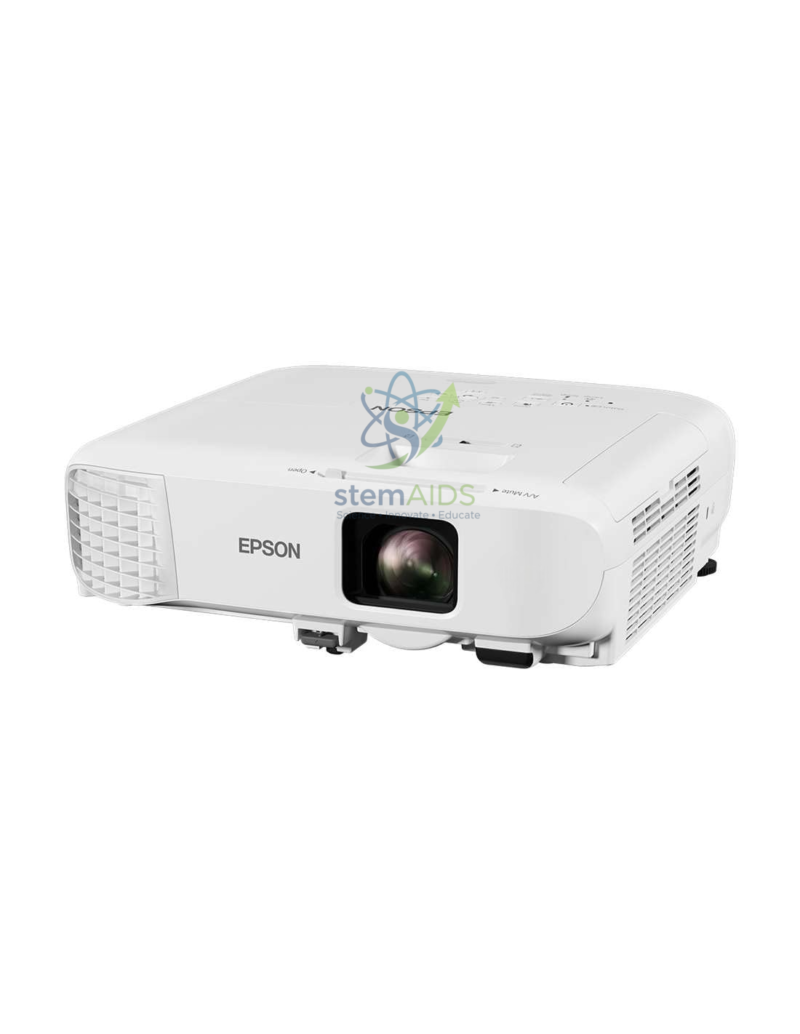
Projector Model EB-X49 EPSON
₹48,952.00
The StemAids Projector Model EB-X49 EPSON (Vidéoprojecteur – Modèle EB-X49 – EPSON) is a bright, reliable, and classroom-friendly XGA projector designed for schools, colleges, training centers, smart classrooms, conference rooms, ICT labs, STEM labs, and institutional presentation spaces. It delivers clear visuals, sharp text, and vivid images, making it suitable for teaching, presentations, digital lessons, multimedia learning, and professional display applications.
With 3LCD technology, 3,600 lumens brightness, XGA resolution, HDMI connectivity, network capability, and long lamp life, the EB-X49 is suitable for regular classroom and office use. It is a practical choice for institutions looking for a dependable projector for daily teaching, training, and meeting requirements.
Product Overview
The StemAids Projector Model EB-X49 EPSON is designed to provide high-quality projection in classrooms, laboratories, and meeting rooms. Its bright output helps display presentations, diagrams, videos, charts, learning modules, and digital content clearly, even in rooms with normal lighting.
This projector supports flexible placement with optical zoom and keystone correction, making setup easier in different classroom and training environments. It also includes built-in audio support, reducing the need for separate speakers in small to medium-sized rooms.
Key Features
- 3,600 Lumens Brightness: Provides bright projection suitable for classrooms, labs, and training rooms.
- 3LCD Technology: Delivers equal white and colour light output for balanced image quality.
- XGA Resolution: Offers 1024 x 768 resolution for clear text, diagrams, slides, and educational visuals.
- High Contrast Ratio: 16,000:1 contrast ratio helps improve image depth and clarity.
- Large Screen Projection: Supports projection sizes from approximately 30 inches to 300 inches.
- HDMI Connectivity: Allows easy connection with laptops, desktop computers, media players, and smart classroom devices.
- Network Support: RJ45 connectivity allows network-enabled use in compatible institutional setups.
- Optional Wireless Connectivity: Wireless projection may be supported with compatible optional accessories.
- Built-In Speaker: 5W speaker supports basic classroom audio and presentation sound.
- Long Lamp Life: Lamp life up to 12,000 hours in Eco mode helps reduce maintenance frequency.
Product Specifications
| Product Name | Projector Model EB-X49 EPSON |
|---|---|
| Supplied By | StemAids |
| Model | EB-X49 |
| Product Type | Classroom / Business 3LCD Projector |
| Projection Technology | 3LCD Technology, RGB liquid crystal shutter |
| Brightness | 3,600 lumens white and colour light output |
| Native Resolution | XGA, 1024 x 768 pixels |
| Aspect Ratio | 4:3 |
| Contrast Ratio | 16,000:1 |
| Screen Size | Approx. 30 inches to 300 inches |
| Lamp Type | 210W UHE lamp |
| Lamp Life | Approx. 6,000 hours normal mode / up to 12,000 hours Eco mode |
| Zoom | Manual zoom, 1.2x factor |
| Throw Ratio | Approx. 1.48 – 1.77:1 |
| Keystone Correction | Automatic vertical ±30° and manual horizontal ±30° |
| Connectivity | HDMI, VGA, USB, RJ45 LAN, and compatible AV inputs depending on setup |
| Wireless Support | Optional wireless support with compatible adapter |
| Built-In Speaker | 5W speaker |
| Application Area | Schools, colleges, STEM labs, ICT labs, training centers, meeting rooms, and classrooms |
How to Use the Projector Model EB-X49 EPSON
- Select a Suitable Location: Place the projector on a stable table, ceiling mount, or projector stand facing the screen or wall.
- Connect the Power Cable: Plug the projector into a suitable power socket using the recommended power cable.
- Connect the Input Device: Use HDMI, VGA, USB, or network connection to connect a laptop, desktop, media player, or classroom AV system.
- Turn On the Projector: Press the power button and allow the projector to start properly.
- Adjust the Image: Use zoom, focus, and keystone correction to align the projected image clearly on the screen.
- Start Presentation: Open your lesson, presentation, video, diagram, or digital content on the connected device.
- Use Eco Mode: Enable Eco mode when suitable to reduce power consumption and extend lamp life.
- Shut Down Safely: Turn off the projector using the power button and allow it to complete the shutdown or cooling cycle.
Educational Benefits
The StemAids Projector Model EB-X49 EPSON supports clear and effective visual teaching. It helps teachers present diagrams, charts, videos, simulations, experiment explanations, coding screens, mathematical content, and digital lesson material to the entire class.
- Improves classroom visibility for digital teaching content
- Supports smart classroom and multimedia learning programs
- Useful for science, mathematics, robotics, and STEM demonstrations
- Helps teachers display presentations, videos, charts, and online learning material
- Suitable for training rooms, seminars, meetings, and institutional presentations
- Provides flexible setup for different classroom layouts
Applications
- School classroom projection
- College lecture room presentations
- STEM and science lab demonstrations
- ICT lab digital teaching
- Training center presentations
- Conference room display setup
- Smart classroom AV installation
- Multimedia lessons and video learning
- Online and hybrid teaching support
Why Choose StemAids Projector Model EB-X49 EPSON?
StemAids provides practical educational technology solutions for smart classrooms, STEM labs, ICT rooms, and institutional learning environments. The Projector Model EB-X49 EPSON is suitable for schools and organizations that need a dependable projector for everyday teaching, training, and presentation use.
With bright projection, XGA resolution, HDMI support, network capability, built-in speaker, easy setup, and long lamp life, this projector helps institutions create a professional and effective digital learning environment.
Safety and Maintenance Guidelines
- Install or place the projector only on a stable surface or compatible mount.
- Do not block the projector ventilation openings during use.
- Keep the projector away from water, dust, and excessive heat.
- Do not look directly into the projector lens while it is operating.
- Use only compatible power cables and AV connections.
- Clean the lens and air filter as recommended in the user manual.
- Allow the projector to cool properly after operation.
- Installation and servicing should be handled by trained personnel.
Google E-E-A-T Focus
This product content is written for school procurement teams, ICT administrators, STEM coordinators, AV integrators, and institutional buyers. It focuses on verified technical specifications, real classroom use, installation safety, practical benefits, and long-term educational value to support Google E-E-A-T principles of experience, expertise, authoritativeness, and trustworthiness.
Frequently Asked Questions
1. What is the StemAids Projector Model EB-X49 EPSON used for?
It is used for classroom teaching, presentations, STEM demonstrations, smart classroom projection, training sessions, meetings, and digital learning applications.
2. What is the brightness of the EB-X49 projector?
The EB-X49 projector offers 3,600 lumens brightness, making it suitable for classrooms and meeting rooms with normal lighting.
3. What is the resolution of this projector?
It has XGA resolution of 1024 x 768 pixels, suitable for slides, text, diagrams, charts, and educational videos.
4. Does the EB-X49 support HDMI?
Yes, the projector includes HDMI connectivity for laptops, computers, media players, and other compatible devices.
5. What is the lamp life of the EB-X49?
The lamp life is approximately 6,000 hours in normal mode and up to 12,000 hours in Eco mode.
6. Does this projector have a built-in speaker?
Yes, it includes a built-in 5W speaker for basic classroom and presentation audio.
7. Is wireless projection available?
Wireless projection may be available with a compatible optional wireless adapter, depending on the selected setup.
8. Is this projector suitable for schools?
Yes, it is suitable for schools, colleges, ICT labs, STEM labs, lecture rooms, training centers, and smart classrooms.
9. Can it be used in a room with lights on?
Yes, its 3,600 lumens brightness supports clear projection in normally lit classrooms and meeting rooms.
10. What screen size can it project?
The EB-X49 can project image sizes from approximately 30 inches to 300 inches, depending on placement distance and screen setup.
SEO Keywords
Projector Model EB-X49 EPSON, StemAids projector, Epson EB-X49 projector, XGA projector, 3600 lumens projector, classroom projector, school projector, 3LCD projector, HDMI projector, smart classroom projector, STEM lab projector, education projector, projector for schools and colleges, business projector for training room.
You must be logged in to post a review.
Bestsellers





Reviews
There are no reviews yet.