

In Stock
Zioxi Charging and Storage Carts for Tablets
₹46,820.00
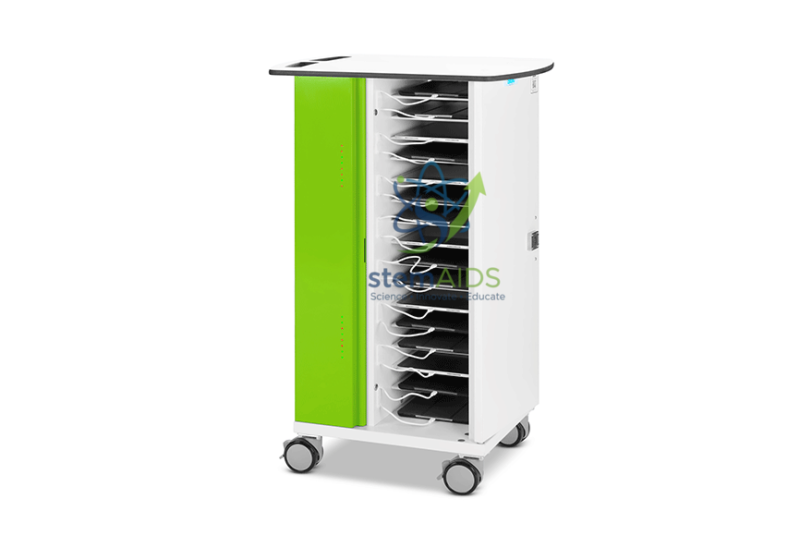
The StemAids Charging and Storage Carts for Tablets (Chariots de recharge et de stockage zioxi pour tablettes) are secure, mobile, and classroom-ready device management solutions designed for schools, colleges, ICT labs, STEM classrooms, robotics labs, training centers, libraries, and institutional digital learning environments. These carts help store, charge, protect, and transport multiple tablets in one organized unit.
Designed for modern smart classrooms and digital learning programs, this tablet charging cart keeps devices neatly arranged, charged, and ready for use. It is suitable for institutions using iPads, Android tablets, USB tablets, e-readers, and other compatible learning devices.
Product Overview
The StemAids Charging and Storage Cart for Tablets provides a practical solution for managing multiple classroom devices. It supports organized shelf-based storage, integrated charging, cable management, lockable access, and smooth movement between rooms.
The cart is especially useful for schools and training centers where tablets are shared between students or moved between classrooms. It helps reduce cable clutter, misplaced chargers, device downtime, and manual device handling issues.
Key Features
- Multi-Device Storage: Suitable for storing and charging multiple tablets in 16, 20, 32, or 40-device configurations depending on model variant.
- Integrated Charging System: Supports USB-C or compatible charging formats depending on selected model.
- Organized Cable Management: Keeps only a short charging cable length accessible at each shelf for a neat and safe setup.
- LED Charging Indicators: Allows users to check charging status quickly, depending on model configuration.
- Lockable Doors: Helps protect tablets when stored or charging unattended.
- Mobile Cart Design: Equipped with wheels for easy movement between classrooms, labs, and storage areas.
- Lockable Castors: Helps keep the cart stable when positioned for charging or storage.
- Compact Classroom Footprint: Designed to save space while managing multiple devices efficiently.
- Easy-Clean Surfaces: Suitable for regular use in schools, labs, and institutional environments.
Product Specifications
| Product Name | Charging and Storage Carts for Tablets |
|---|---|
| Brand | StemAids |
| Product Type | Mobile Tablet Charging and Storage Cart |
| Device Capacity | 16, 20, 32, or 40 tablets depending on model variant |
| Compatible Devices | iPads, Android tablets, USB tablets, e-readers, and compatible classroom devices |
| Recommended Device Size | Suitable for tablets up to approximately 11 inches, subject to device dimensions and case thickness |
| Charging Type | Integrated USB-C charging or compatible charging system depending on model configuration |
| Charging Output | Up to 20W per USB-C port in compatible USB-C models |
| Storage Style | Horizontal shelf-based tablet storage |
| Shelf Aperture | Approx. 310 mm depth x 210 mm width x 30–40 mm height depending on model |
| Security | Key lock, digital code lock, or RFID access lock depending on model variant |
| Mobility | Mobile trolley/cart design with lockable wheels |
| Typical Dimensions | Approx. 60W x 41D x 92H cm for 16/20-device models; approx. 95W x 41D x 92H cm for 32/40-device models |
| Application Area | Schools, ICT labs, STEM labs, robotics labs, smart classrooms, libraries, and training centers |
How to Use the StemAids Charging and Storage Cart for Tablets
- Check Device Compatibility: Confirm tablet size, case thickness, charging connector type, and storage capacity before use.
- Place the Cart Safely: Position the cart on a flat surface near a suitable power socket and lock the wheels.
- Arrange Tablets on Shelves: Place each tablet horizontally on its assigned shelf or slot.
- Connect Charging Cables: Attach the charging cable to each device using the cable management system.
- Start Charging: Connect the cart to the mains power supply and switch on the charging system as per instructions.
- Monitor Charging Status: Check charging indicators or device screens to confirm that tablets are charging properly.
- Lock the Cart: Close and lock the doors when tablets are being stored or charged unattended.
- Move the Cart Carefully: Disconnect from power, unlock castors, and move the cart slowly between rooms using the handle areas.
Educational Benefits
The StemAids Charging and Storage Cart for Tablets supports efficient device management in digital classrooms. It helps teachers, IT coordinators, and lab managers keep tablets charged, organized, and ready for learning activities.
- Supports tablet-based learning and smart classroom programs
- Helps reduce misplaced chargers and loose cables
- Keeps shared classroom devices organized in one central unit
- Improves device readiness for STEM, coding, robotics, and ICT sessions
- Provides secure storage when devices are not in use
- Allows easy movement between classrooms and labs
- Helps institutions manage large numbers of student tablets efficiently
Applications
- School tablet charging and storage
- ICT lab device management
- STEM classroom tablet organization
- Robotics and coding lab device charging
- Smart classroom digital learning setup
- Library tablet storage
- Training center device management
- College and university tablet deployment
- Public sector and institutional digital device storage
Why Choose StemAids Charging and Storage Carts for Tablets?
StemAids provides practical solutions for STEM, ICT, robotics, and digital learning environments. The Charging and Storage Cart for Tablets is designed to help institutions manage shared learning devices safely, neatly, and efficiently.
With organized storage, integrated charging, lockable access, cable management, and easy mobility, this cart is suitable for schools and institutions that need reliable tablet management for daily classroom use.
Safety and Maintenance Guidelines
- Do not overload the cart beyond its recommended device capacity.
- Use only compatible charging cables and approved power connections.
- Keep ventilation and electrical areas clear during charging.
- Do not move the cart while it is connected to mains power.
- Lock the wheels when the cart is parked for charging or storage.
- Keep the cart away from water, dust, and excessive heat.
- Inspect cables, plugs, wheels, locks, and shelves regularly.
- Use under adult supervision in school and institutional environments.
Google E-E-A-T Focus
This product content is written for school procurement teams, ICT administrators, STEM lab coordinators, and institutional buyers. It focuses on practical product use, device compatibility, charging safety, classroom application, and operational benefits to support Google E-E-A-T principles of experience, expertise, authoritativeness, and trustworthiness.
Frequently Asked Questions
1. What are StemAids Charging and Storage Carts for Tablets used for?
They are used to store, charge, secure, and transport multiple tablets in schools, ICT labs, STEM labs, training centers, and smart classrooms.
2. How many tablets can the cart hold?
The capacity depends on the model variant. Common configurations include 16, 20, 32, or 40 tablets.
3. What type of tablets are compatible?
The cart is suitable for compatible iPads, Android tablets, USB tablets, e-readers, and similar classroom devices, subject to size and connector compatibility.
4. Does the cart support USB-C charging?
USB-C charging is available in compatible model variants. Some models may support other charging configurations depending on the selected design.
5. Is the cart suitable for tablets with protective cases?
Many tablet charging carts are designed with large shelf space for devices in standard protective cases. Always check device dimensions and case thickness before ordering.
6. Is the cart lockable?
Yes, lockable options are available, including key lock, digital code lock, or RFID access lock depending on model configuration.
7. Can the cart be moved between classrooms?
Yes, the mobile cart design includes wheels for movement. The cart should be unplugged from mains power before moving.
8. Does it reduce cable clutter?
Yes, the cable management system presents only a short cable length at each shelf, helping keep the cart neat and reducing cable loss.
9. Is this suitable for STEM and robotics labs?
Yes, it is suitable for STEM labs, robotics labs, coding classrooms, ICT rooms, and digital learning programs where tablets are used regularly.
10. Are charging cables included?
Charging cable inclusion depends on the model and supply configuration. This should be confirmed before purchase.
SEO Keywords
Charging and storage carts for tablets, StemAids tablet charging cart, tablet charging trolley for schools, iPad charging cart, USB-C tablet charging cart, school tablet storage cart, ICT lab tablet charging trolley, STEM lab tablet cart, smart classroom tablet charging cart, lockable tablet storage cart, mobile tablet charging station, tablet charging cabinet for schools.
You must be logged in to post a review.
Bestsellers


Sale

Sale

Sale


Reviews
There are no reviews yet.