



In Stock
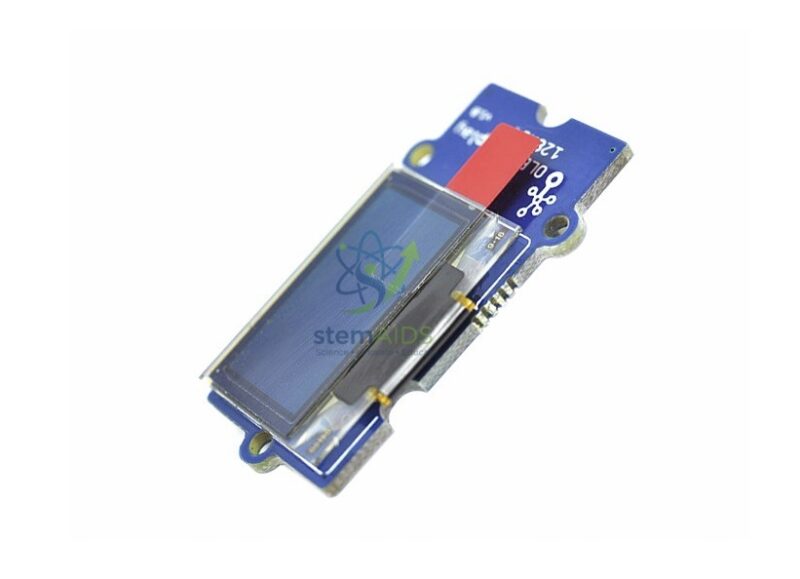
OLED Display 1.12″ Grove
₹856.00
This Grove-compatible OLED display is useful for projects that require a compact, high-contrast visual output. Unlike LCD displays, OLED displays are self-emissive and do not require a separate backlight, making them suitable for crisp text display, compact dashboards, and real-time embedded project monitoring.
The StemAids OLED Display 1.12″ Grove is suitable for school STEM labs, Arduino learning kits, Raspberry Pi classrooms, robotics labs, IoT learning spaces, smart automation models, sensor display projects, and electronics training setups.
Key Features
- Compact 1.12-inch Grove-compatible OLED display module
- Suitable for text, numbers, icons, menus, and small graphics
- OLED technology provides high contrast without separate backlight
- Supports 16 grayscale display output, depending on module version
- Uses I2C communication for simplified wiring
- Supports normal and inverse display modes, depending on library support
- Useful for Arduino, Raspberry Pi, robotics, IoT, and STEM projects
- Ideal for classroom dashboards, sensor readouts, and embedded-system learning
Product Specifications
| Brand | StemAids |
|---|---|
| Product Name | OLED Display 1.12″ Grove |
| Product Type | Grove-compatible OLED display module |
| Display Size | 1.12 inch |
| Display Technology | OLED |
| Display Color | 16 grayscale shades, depending on module version |
| Communication Mode | I2C |
| Interface Type | Grove 4-pin interface |
| Supported Display Modes | Normal and inverse display, depending on library support |
| Scrolling Support | Continuous horizontal scrolling, depending on library support |
| Operating Voltage | 3.3V–5V, depending on module version |
| Common Resolution | 96 x 96 pixels in earlier version; 128 x 128 pixels in later version |
| Driver IC | SSD1327 or SH1107G, depending on module version |
| Operating Temperature | Approx. -40°C to 70°C, depending on module version |
| Compatible Platforms | Arduino, Raspberry Pi with Grove interface, and Grove-compatible boards |
| Applications | Sensor display, IoT dashboard, robotics status, menu display, and STEM projects |
| Recommended Users | Students, teachers, electronics learners, robotics trainers, makers, and STEM labs |
How to Use the OLED Display 1.12″ Grove
- Connect the StemAids OLED Display 1.12″ Grove to a Grove Base Shield, Grove Base Hat, or compatible I2C expansion board.
- Use a Grove cable to connect the display to the I2C port.
- Ensure the Grove connection includes VCC, GND, SDA, and SCL lines.
- Open Arduino IDE, Python environment, or another compatible programming platform.
- Install the required OLED display library according to the display version and controller IC.
- Initialize the display in the program.
- Print text, numbers, icons, sensor readings, or menu information on the OLED screen.
- Connect the display with sensors such as temperature, humidity, ultrasonic, RFID, light, or sound modules.
- Use the OLED display as a real-time dashboard for STEM, robotics, IoT, or automation projects.
Educational Benefits
The StemAids OLED Display 1.12″ Grove helps students understand display interfacing, I2C communication, embedded-system output, sensor data visualization, menu design, graphics rendering, and IoT dashboard concepts. It makes electronics projects more interactive by allowing learners to see real-time values and status messages directly on a compact display.
Applications
- Arduino OLED display projects
- Raspberry Pi sensor dashboard experiments
- IoT data display systems
- Robotics status display modules
- Temperature and humidity display projects
- Distance and object-detection readouts
- RFID tag ID display projects
- Mini weather station displays
- Menu-based electronics projects
- STEM classroom embedded-system experiments
Important Use Note
The StemAids OLED Display 1.12″ Grove is intended for educational, prototype, and embedded display projects. Handle the display carefully, avoid scratching the screen, and confirm the correct display driver library before uploading code. Exact resolution and controller IC may vary according to module version.
Why Choose StemAids?
StemAids provides practical STEM, robotics, electronics, IoT, and automation learning modules for schools, colleges, training centers, and technical laboratories. The StemAids OLED Display 1.12″ Grove is designed to make data display learning simple, visual, and classroom-friendly. It is a useful module for institutions building Arduino labs, robotics labs, IoT learning spaces, embedded-system kits, and smart automation training setups.
FAQ
Q1. What is the StemAids OLED Display 1.12″ Grove used for?
It is used to display text, numbers, sensor readings, icons, menus, status messages, and small graphics in Arduino, Raspberry Pi, robotics, IoT, and STEM projects.
Q2. Is this OLED display compatible with Arduino?
Yes, it can be used with Arduino through a Grove Base Shield or compatible I2C connection.
Q3. Can this OLED display be used with Raspberry Pi?
Yes, it can be used with Raspberry Pi when connected through compatible Grove interface hardware and suitable user-written code.
Q4. What communication interface does this display use?
The commonly documented Grove OLED Display 1.12″ uses I2C communication.
Q5. What resolution does this display support?
Earlier versions are commonly documented with 96 x 96 pixels, while later versions are documented with 128 x 128 pixels. Exact resolution may depend on the supplied module version.
Q6. Does OLED require a backlight?
No, OLED pixels are self-emissive, so the display does not require a separate backlight.
Q7. Does this module require soldering?
No, when used with Grove-compatible boards, the Grove connector allows simple plug-and-play wiring.
Q8. What projects can students make with this OLED display?
Students can make sensor dashboards, mini weather stations, RFID display systems, robotics status panels, IoT data monitors, menu screens, countdown displays, and embedded-system display projects.
SEO Keywords
OLED Display 1.12″ Grove, StemAids OLED display module, Grove OLED display, Arduino OLED display module, Raspberry Pi OLED display, I2C OLED display module, STEM electronics display, robotics OLED display, IoT dashboard display, embedded system OLED module, Grove compatible OLED display for students, electronics lab OLED display.
You must be logged in to post a review.
Bestsellers

Sale
Sale
Sale


Reviews
There are no reviews yet.