




In Stock
Micro:bot Mechanical Kit
₹1,560.00
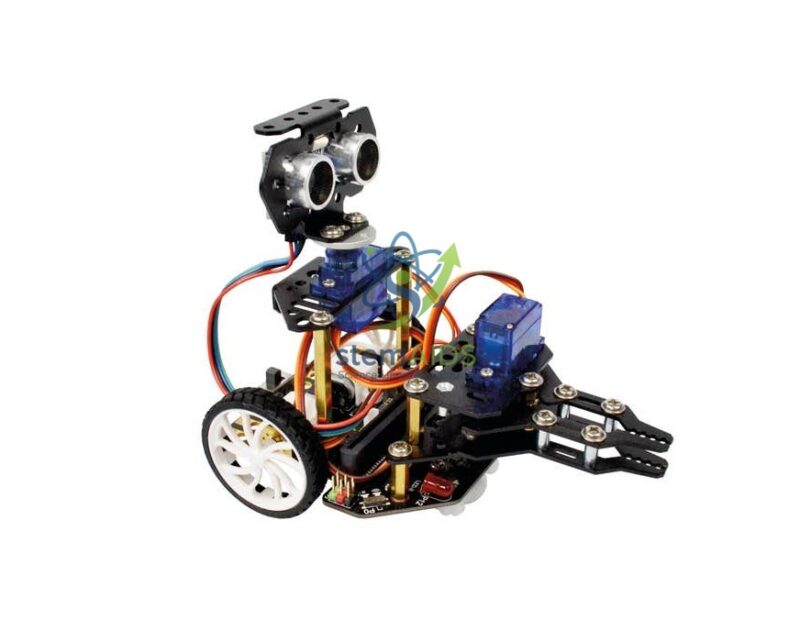
The Micro:bot Mechanical Kit for micro:bit by StemAids is an educational robotics accessory designed to add mechanical movement, lifting action, arm operation, and forklift-style functionality to compatible micro:bit-based robots such as Maqueen / Micro:bot platforms. It helps students explore mechanical structures, servo motor control, linkages, robot movement, and hands-on STEM engineering concepts.
This kit allows students to transform a simple educational robot into a more interactive mechanical robot capable of demonstrating lifting, pushing, loading, and movement-based activities. By combining metal mechanical parts with a servo motor, learners can understand how robotic mechanisms convert programmed instructions into real physical motion.
The StemAids Micro:bot Mechanical Kit for micro:bit is suitable for robotics labs, STEM classrooms, coding workshops, engineering demonstrations, and project-based learning. It supports practical learning in mechanics, electronics, programming, automation, and design thinking.
Key Features
- Mechanical robotics kit for compatible Micro:bot / Maqueen robot platforms
- Includes metal gear 9g servo motor for controlled mechanical movement
- Metal mechanical parts support classroom robotics assembly activities
- Useful for forklift, lifting arm, loading, and object-moving demonstrations
- Helps students learn servo control, mechanical linkage, and robot motion
- Supports hands-on STEM, robotics, coding, and engineering learning
- Suitable for micro:bit programming activities using MakeCode or Python, depending on robot setup
- Ideal for school labs, robotics clubs, innovation labs, and project-based education
Product Specifications
| Product Name | Micro:bot Mechanical Kit for micro:bit |
|---|---|
| Brand | StemAids |
| Product Type | Mechanical Robotics Accessory Kit |
| Compatible Platform | Compatible Micro:bot / Maqueen micro:bit-based robot platforms |
| Main Mechanism | Servo-operated mechanical arm / forklift-style attachment |
| Servo Motor | Metal gear 9g servo motor |
| Mechanical Components | Metal servo base, metal arm base plate, metal arm linkage, metal arm plate, metal servo arm linkage, and metal forklift plate |
| Mounting Hardware | M3 copper pillars and fixing screws |
| Learning Concepts | Robotics, Servo Control, Mechanical Linkage, Forklift Mechanism, Motion Control, Coding Logic, STEM Engineering |
| Programming Support | micro:bit-compatible programming platforms such as MakeCode and Python, depending on the robot control setup |
| Recommended Use | School STEM Labs, Robotics Labs, Coding Workshops, Engineering Demonstrations, Project-Based Learning |
| User Level | Beginner to Intermediate, with teacher supervision for assembly |
| Package Note | Robot chassis, micro:bit board, batteries, sensors, and additional programming accessories may not be included unless specifically mentioned in the final supplied package. |
Kit Contents
- One metal gear 9g servo motor
- One metal servo base
- One metal arm base plate
- Three metal arm linkages
- One metal arm plate
- One metal servo arm linkage
- One metal forklift plate
- Two M3 copper pillars, 15 mm
- Five M2.5 × 5 mm screws
- Eighteen M3 × 5 mm screws
How to Use Micro:bot Mechanical Kit for micro:bit
- Check Compatibility: Confirm that the mechanical kit is suitable for your Micro:bot / Maqueen robot model before assembly.
- Prepare the Robot: Switch off the robot and disconnect the battery before attaching the mechanical kit.
- Assemble the Mechanical Parts: Fit the metal servo base, arm base plate, linkages, arm plate, and forklift plate according to the supplied assembly guide.
- Install the Servo Motor: Mount the metal gear 9g servo motor securely in the correct position using the supplied screws.
- Attach the Kit to Robot Chassis: Fix the assembled mechanical attachment to the compatible robot using screws and copper pillars.
- Connect the Servo: Connect the servo motor cable to the correct servo port or control pin on the robot controller.
- Open the Programming Platform: Use MakeCode for beginner-friendly block programming or Python for advanced micro:bit coding activities.
- Program the Mechanism: Write commands to raise, lower, hold, or move the mechanical arm or forklift attachment using servo angle control.
- Test Movement: Place a lightweight object near the robot and test lifting, pushing, or movement actions carefully.
- Improve the Project: Combine arm movement with robot driving, line following, object detection, or obstacle avoidance to create advanced robotics projects.
Educational Benefits
The StemAids Micro:bot Mechanical Kit for micro:bit helps students move beyond basic robot driving and explore how mechanical systems work in real robots. By assembling metal parts and controlling a servo motor, learners can understand linkage movement, lifting force, robot mechanism design, and automation logic.
This kit supports experiential learning by combining coding, mechanical assembly, electronics, troubleshooting, and engineering design. Students can test how small changes in servo angle, linkage position, and robot movement affect the final mechanical action.
Applications
- Micro:bot / Maqueen mechanical robot projects
- Forklift robot classroom demonstration
- Servo motor control experiments
- Robotic arm and linkage learning activities
- Object lifting and loading projects
- STEM robotics competition practice
- Engineering design and mechanism study
- Automation and movement-control demonstrations
- School robotics lab and innovation lab activities
Why Choose StemAids Micro:bot Mechanical Kit for micro:bit?
StemAids provides practical STEM learning products that help students understand coding, robotics, mechanics, and automation through working models. The Micro:bot Mechanical Kit for micro:bit by StemAids is designed to give learners hands-on experience with robot attachments, servo-driven movement, metal linkages, and mechanical problem-solving.
For schools and training institutions, this kit adds strong learning value to existing Micro:bot or Maqueen robots. It allows teachers to conduct practical lessons on mechanical design, robotic movement, object handling, and program-controlled action in a simple classroom-friendly format.
SEO Keywords
Micro:bot Mechanical Kit for micro:bit, StemAids Micro:bot Mechanical Kit, micro:bit Robot Mechanical Kit, Maqueen Mechanical Kit, Micro:bot Forklift Kit, Servo Motor Mechanical Robot Kit, STEM Robotics Accessory, micro:bit Robotics Kit for Schools, Educational Robot Arm Kit, Mechanical Linkage Robot Kit.
FAQ
1. What is the Micro:bot Mechanical Kit for micro:bit?
It is a mechanical robotics accessory kit used to add servo-operated arm, linkage, or forklift-style movement to compatible Micro:bot / Maqueen micro:bit-based robots.
2. Which brand offers this product?
This product is offered under the StemAids brand for STEM robotics, coding, mechanics, and educational engineering projects.
3. Is the micro:bit board included?
The kit is a mechanical accessory. The micro:bit board may not be included unless specifically mentioned in the final supplied package.
4. Is the robot chassis included?
The mechanical kit is designed for use with compatible Micro:bot / Maqueen robot platforms. The robot chassis may need to be purchased separately unless supplied as part of a bundle.
5. What components are included in the kit?
The kit includes a metal gear 9g servo motor, metal servo base, metal arm base plate, metal arm linkages, metal arm plate, metal servo arm linkage, metal forklift plate, copper pillars, and screws.
6. What can students learn from this kit?
Students can learn servo control, mechanical linkage, robot arm movement, lifting mechanisms, assembly skills, coding logic, troubleshooting, and STEM engineering design.
7. Is this kit suitable for beginners?
Yes, it is suitable for beginners when assembled and used under teacher supervision. Students can start with simple servo angle control programs.
8. Can it lift heavy objects?
This kit is intended for educational robotics and lightweight object-handling demonstrations. Heavy objects should not be used unless the official load rating confirms suitability.
9. Which programming platform can be used?
Students can use micro:bit-compatible programming platforms such as MakeCode for block coding or Python for advanced programming, depending on the robot controller setup.
10. Can this kit be used in school STEM labs?
Yes, it is suitable for school STEM labs, robotics labs, coding classes, engineering workshops, innovation labs, and project-based learning programs.
You must be logged in to post a review.
Bestsellers


Sale
Sale

Sale


Reviews
There are no reviews yet.