
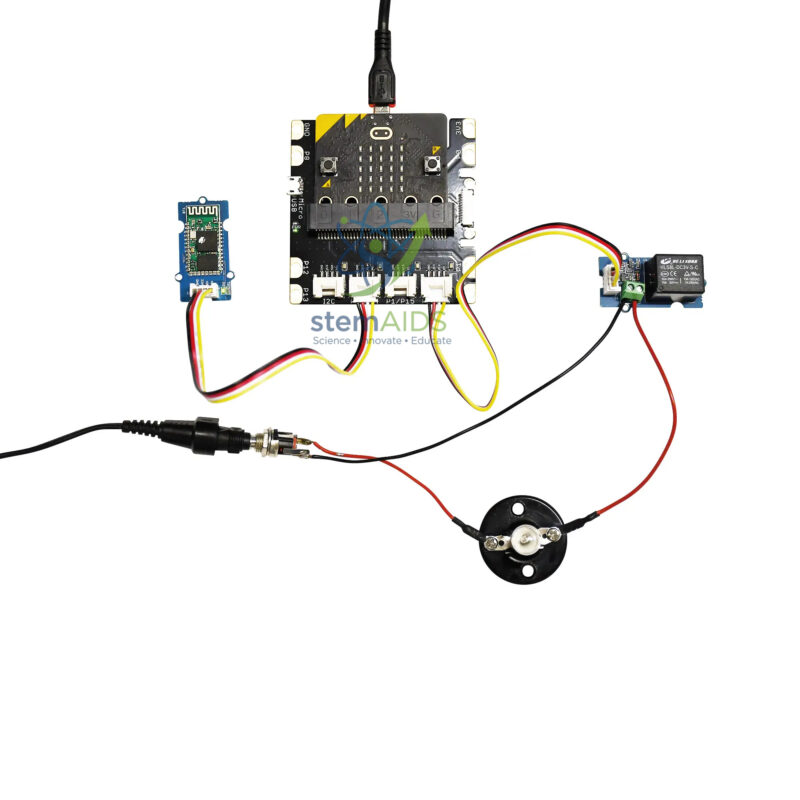
The Micro:Bit Smart Bulb Kit Without Micro:Bit Interface by StemAids is an educational home automation and IoT learning kit designed to help students understand how a programmable controller can switch and control a lamp using electronic modules, Bluetooth communication, and block-based coding.
This kit introduces learners to smart lighting, relay control, wireless communication, human-machine interface design, and basic Internet of Things concepts. Students can use a compatible micro:bit board and required interface setup to create a smart bulb project that can be controlled through a programmed logic system or smartphone-based interface.
The kit is supplied without the Micro:Bit Interface, making it suitable for institutions that already have compatible micro:bit interface boards or Grove-compatible expansion systems in their STEM lab. It is useful for classroom demonstrations, smart home models, coding workshops, and hands-on automation learning.
Key Features
- Educational smart bulb kit for micro:bit-based home automation projects
- Designed for learning programming, IoT, relay switching, and Bluetooth control
- Includes Grove relay for controlling the lamp circuit
- Includes HC05 Bluetooth module for wireless communication activities
- Includes E10 4V lamp and E10 screw socket for lighting demonstrations
- Useful for creating smartphone-controlled smart lighting projects
- Supports block programming and App Inventor-style interface learning
- Supplied without micro:bit interface, suitable for labs with existing interface modules
- Ideal for STEM labs, robotics labs, coding classes, and innovation projects
Product Specifications
| Product Name | h3 |
|---|---|
| Brand | StemAids |
| Product Type | Smart Bulb / Home Automation STEM Kit |
| Compatible Platform | micro:bit-compatible programming platform |
| Interface Status | Without Micro:Bit Interface |
| Main Function | Smart lamp control using relay switching and Bluetooth communication |
| Communication Module | HC05 Bluetooth module |
| Control Module | Grove relay |
| Lamp Type | E10 4V lamp |
| Lamp Holder | E10 screw socket |
| Base Type | Japan-type base |
| Power Supply | 600 mA power supply unit |
| Programming Method | Block programming using a compatible micro:bit programming environment |
| Learning Concepts | Home Automation, IoT Basics, Relay Control, Bluetooth Communication, Smart Lighting, App-Based Control, Coding Logic |
| Recommended Use | School STEM Labs, Coding Classes, Robotics Labs, Smart Home Demonstrations, Innovation Labs |
| User Level | Beginner to Intermediate, with teacher supervision for wiring |
Kit Contents
- One Grove relay
- One Bluetooth module HC05
- One E10 4V lamp
- One E10 screw socket
- One Japan-type base
- One 600 mA power supply unit
- Note: Micro:bit interface is not included in this version
- Note: micro:bit board may be required separately depending on the supplied package and lab setup
How to Use h3
- Check the Components: Verify the Grove relay, HC05 Bluetooth module, E10 4V lamp, E10 screw socket, base, power supply unit, and connecting accessories before use.
- Prepare the Required micro:bit Setup: Since this version is supplied without the micro:bit interface, arrange a compatible micro:bit board and interface or Grove-compatible expansion module separately.
- Connect the Lamp: Fit the E10 lamp into the E10 screw socket and mount it properly on the supplied base.
- Connect the Relay: Connect the Grove relay to the compatible micro:bit interface. The relay is used to switch the lamp circuit on and off through programmed commands.
- Connect the Bluetooth Module: Attach the HC05 Bluetooth module to the compatible interface port as per the classroom wiring instructions.
- Create the Program: Use a compatible block programming platform to create logic for switching the bulb on and off.
- Create a Mobile Control Interface: Students can design a simple smartphone-based control interface using an App Inventor-style platform to send commands through Bluetooth.
- Upload and Test: Upload the program to the micro:bit board, power the circuit, and test whether the bulb responds correctly to programmed or smartphone commands.
- Improve the Project: Add conditions such as timer control, button control, automatic switching, brightness indication, or smart home demonstration logic.
Educational Benefits
The StemAids h3 helps students understand how smart home systems work through a simple and practical lighting project. It connects coding with real-world output by allowing learners to control a lamp using programmed instructions and wireless communication.
This kit supports experiential learning in STEM education by combining electronics, microcontroller programming, Bluetooth communication, relay operation, and mobile interface design. It helps students develop logical thinking, troubleshooting ability, wiring confidence, and a basic understanding of IoT-based automation.
Applications
- Smart bulb classroom demonstration
- Home automation STEM project
- Bluetooth-controlled lamp activity
- Relay switching experiment
- IoT and smart home learning model
- micro:bit programming activity
- App-based control project
- Innovation lab and project-based learning activity
- Coding and electronics workshop project
Why Choose StemAids h3?
StemAids provides practical STEM learning products that help schools and training institutions teach coding, electronics, robotics, and automation through hands-on projects. The h3 by StemAids is designed to make smart home technology simple and understandable for students.
This kit is especially useful for institutions that already have micro:bit boards and compatible interfaces. It gives teachers a clear classroom model for explaining relay control, Bluetooth communication, lamp switching, and smartphone-based human-machine interface concepts. For STEM labs and coding classrooms, it offers strong educational value in a compact and practical format.
SEO Keywords
h3, StemAids Smart Bulb Kit, micro:bit Smart Bulb Kit, micro:bit Home Automation Kit, Smart Bulb STEM Kit, Bluetooth Lamp Control Kit, Grove Relay micro:bit Kit, IoT Learning Kit for Schools, Smart Home Education Kit, micro:bit Programming Kit.
FAQ
1. What is the h3?
It is an educational smart lighting kit used to demonstrate micro:bit-based home automation, relay switching, Bluetooth communication, and IoT learning concepts.
2. Which brand offers this product?
This product is offered under the StemAids brand for STEM education, coding, robotics, electronics, and smart home learning projects.
3. Is the micro:bit interface included?
No, this version is supplied without the micro:bit interface. A compatible micro:bit interface or expansion board may be required separately.
4. Is the micro:bit board included?
The title specifies that the kit is without the micro:bit interface. The micro:bit board may also need to be arranged separately depending on the supplied package. Please confirm the final package contents before purchase.
5. What components are included in the kit?
The kit includes a Grove relay, HC05 Bluetooth module, E10 4V lamp, E10 screw socket, Japan-type base, and 600 mA power supply unit.
6. What can students learn from this kit?
Students can learn relay control, Bluetooth communication, block programming, smart lighting, IoT basics, wiring, troubleshooting, and smartphone-based control logic.
7. Can the bulb be controlled using a smartphone?
Yes, students can create a simple smartphone control interface using Bluetooth communication and compatible app development tools, depending on the classroom setup.
8. Is this kit suitable for school STEM labs?
Yes, it is suitable for school STEM labs, coding classes, robotics labs, smart home demonstrations, electronics workshops, and innovation lab projects.
9. Does this kit use high-voltage AC mains wiring?
The educational kit uses an E10 4V lamp and supplied power unit for classroom demonstration. Students should not connect the kit to unsafe external mains circuits. Teacher supervision is recommended during wiring.
10. Which programming method is suitable for beginners?
Beginners can start with block programming using a compatible micro:bit programming platform. Advanced learners can extend the project with mobile app control and additional automation logic.
Safety and Classroom Use Note
This kit should be assembled and tested under teacher or trainer supervision. Students should check correct wiring, avoid short circuits, use the supplied low-voltage components properly, and never modify the kit for unsafe high-voltage electrical use.




Reviews
There are no reviews yet.