
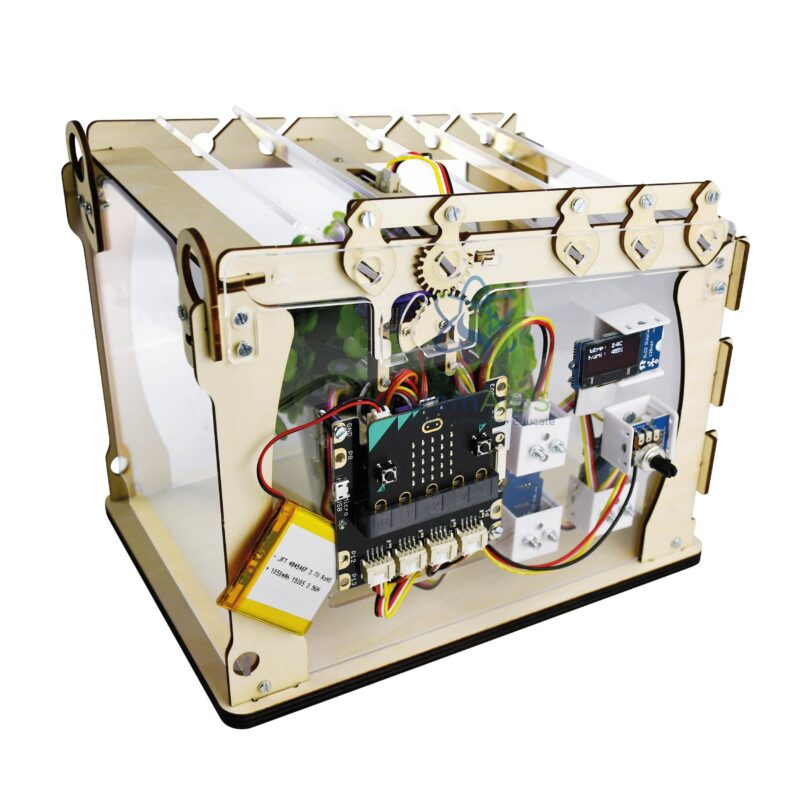
Quick Answer: The Micro:bit greenhouse with micro:bit interface is a small programmable greenhouse model in which a micro:bit, connected through the included interface board, reads growing conditions and drives outputs such as a roof vent. Students use it to learn how sensors and code automate plant care in smart agriculture.
A Control System Students Can Watch Working
Commercial greenhouses run on simple rules repeated all day: if the air is too warm, open the vents; if the soil is dry, water; if the light is low, switch on lamps. The micro:bit greenhouse lets students write those rules themselves. Smart-greenhouse kits of this type are generally built around sensors for light, air temperature and humidity and soil moisture, with a servo that opens the roof as a vent and a display or light bar to show readings; confirm the module list of this model.
Because the interface is included in this listing, modules plug straight into the board that carries the micro:bit, so the greenhouse is a complete project rather than an add-on. It gives a class a place to practise thresholds, comparisons and loops with real data. A useful exercise is to log a day of readings first and then choose the temperature that should open the vent from the graph, instead of guessing a number.
The model carries science beyond coding. Transpiration raises the humidity inside a closed greenhouse, sunlight on the cover warms it, and opening the roof shows ventilation cooling at work. If the model holds a small pot or seed tray, students can compare growth under automated and hand-managed conditions over a few weeks.
Projects and Investigations
- An automatic roof vent that opens above a temperature chosen by the students
- A soil-moisture alarm that tells the class when the plant needs water
- Logging light and temperature through a school day and graphing the data
- Comparing a plant grown inside the model with one grown on a windowsill
Specifications
| Item | Programmable mini greenhouse model |
| Controller | BBC micro:bit |
| Interface | micro:bit interface board included, per the listing title |
| Typical sensing | Light, air temperature and humidity, soil moisture |
| Typical output | Servo-opened roof vent and a display for readings |
| Exact modules and whether a micro:bit is supplied | Confirm at enquiry |
Care & Handling
- Push soil-moisture probes in only up to their marked line so the electronics above stay dry.
- Water carefully and wipe up spills away from the interface board and micro:bit.
- Do not leave the model in strong summer sun for long periods, as plastic covers can warp.
- Remove probes from wet soil at the end of a project, because continuous use corrodes them.
Why Choose LabEquip
Science and technology departments choose the greenhouse for a project that joins biology, environmental monitoring and coding. LabEquip offers it in the STEM kits range, and schools planning online dashboards can look at the Micro:bit Wi-Fi kit as a follow-on project. Ask about class sets on the contact page.
Frequently Asked Questions
What does the micro:bit greenhouse measure?
Smart-greenhouse kits of this type usually measure light level, air temperature, humidity and soil moisture. The exact modules supplied with this model should be confirmed, as sensor choices vary between versions.
How does the roof open automatically?
In greenhouse models of this kind a servo is linked to the roof. The program reads the temperature and, when it passes the threshold set by the students, turns the servo to the open angle; when it falls again, the roof closes.
Can real plants be grown in it?
A small pot of fast-growing seeds such as cress works well for short projects. Water carefully, because water on the electronics causes faults, and choose plants small enough for the model.
Why do soil-moisture readings drift over time?
Resistive soil probes corrode when left in damp soil with current flowing, which changes the reading. Power the probe only when taking a reading and remove it between projects.
Is a micro:bit board included?
The listing title confirms that the interface board is included. Whether a micro:bit comes with it should be confirmed at enquiry, so schools with existing boards avoid buying extras.
Which programming languages can students use?
MakeCode blocks suit beginners, and the same projects can be written in Python when students are ready. The extensions for the sensor modules are added in the editor.
Last Updated: September 2026






Reviews
There are no reviews yet.