




In Stock
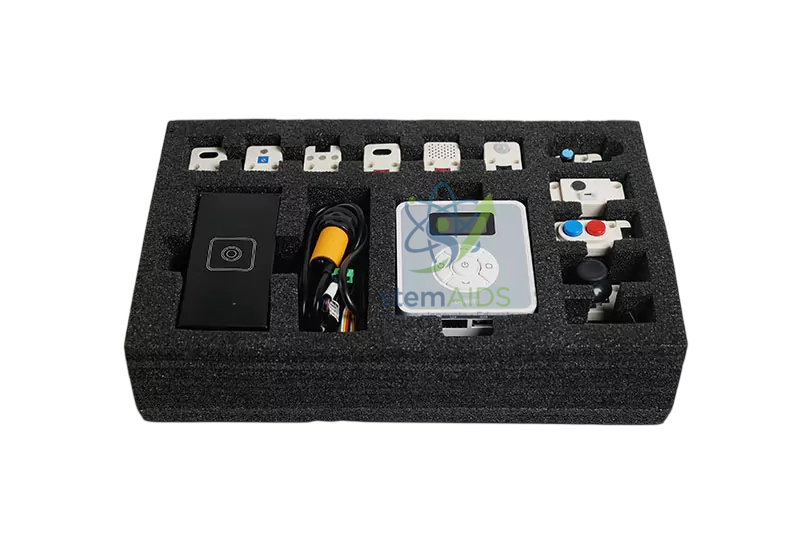
Magician sensor kit
₹15,608.00
Quick Answer: The Magician Sensor Kit is a set of add-on sensor modules for the Dobot Magician desktop robot arm, letting student programs respond to inputs from their surroundings. With the Magician sensor kit, the arm can start on a button press, wait for an object to arrive or choose an action based on a reading.
Why a Robot Arm Needs Sensors
A robot arm without sensors is blind: it repeats the same moves whether or not a part is there. The Magician Sensor Kit gives Dobot Magician projects inputs, so students move from writing sequences to writing decisions. The program now has to read a sensor, compare the value with a threshold and choose what the arm does next.
This is the point where robotics becomes control engineering. Students learn to wait for a condition, to handle noisy readings by averaging or adding a margin, and to avoid a program that locks up when a sensor never triggers. Many projects combine a sensor with the arm’s own motion, for example ending a stacking routine when a light beam shows the stack is complete.
The number and types of sensors in the kit are not given in the listing, so confirm them before ordering. Sensor kits of this kind usually plug into the arm’s controller ports and are read through the same Dobot software used to program the moves.
Specifications
| Type | Add-on sensor kit for robot-arm projects |
| Robot | Dobot Magician desktop arm |
| Connection | Controller ports on the arm, read through Dobot programming software (usual arrangement) |
| Skills taught | Reading inputs, thresholds, conditional logic and event-driven programs |
| Sensors included | Confirm at enquiry |
Applications
- Starting and stopping arm routines from a button or switch input
- Sorting projects in which a colour or light reading decides the drop-off bin
- Detecting when an object arrives on a conveyor such as the Dobot Conveyor before the arm moves in
- Interactive demonstrations where the arm reacts to a hand wave, a sound or a change in light
Care & Handling
- Label each sensor and its cable, and note which controller port it uses, so programs do not break when the Magician sensor kit is re-plugged.
- Connect and disconnect sensors only with the arm and controller powered off.
- Keep optical sensors clean and shielded from direct sunlight, which can swamp the reading.
- Store sensors in a divided box so small modules and cables are not lost or crushed.
Why Choose LabEquip
Robotics teachers usually add a sensor kit once students have mastered fixed pick-and-place moves on the Dobot Magician Basic Arm and are ready for conditional programs. LabEquip lists the kit in its STEM kits section. Ask through the contact page for the sensor list and arm compatibility.
Frequently Asked Questions
What does adding sensors change in a robot program?
The program stops being a fixed sequence and starts making decisions. Students read a sensor, compare the value with a threshold and branch, for example picking only when an object is detected or choosing a bin by colour.
How do students choose a threshold value?
They take readings in both conditions, such as with and without an object in front of the sensor, then set the threshold between the two with a safety margin. Rechecking under different lighting shows why margins matter.
Why does a sensor reading jump around?
Electrical noise, flickering room lights and small movements all cause variation. Averaging several readings, adding a margin around the threshold or requiring a reading to hold for a short time before acting all make the program steadier.
Will the sensor kit work with the Dobot Magician E6?
The kit is named for the Magician desktop arm. The Magician E6 is a different robot with its own interfaces, so check compatibility with the specific arm you own when you enquire rather than assuming the kit will connect.
What is event-driven programming?
Instead of running step by step, the program waits for an event, such as a button press or an object arriving, and then runs the matching action. It is how most real automation responds to its surroundings.
Can the sensors be used without the robot arm?
They are intended to be read through the arm’s controller and software. Using them with another controller may need different cables and code, so plan them as part of the arm set-up.
Last Updated: September 2026
You must be logged in to post a review.
Bestsellers



Sale

Sale
Sale


Reviews
There are no reviews yet.