

In Stock
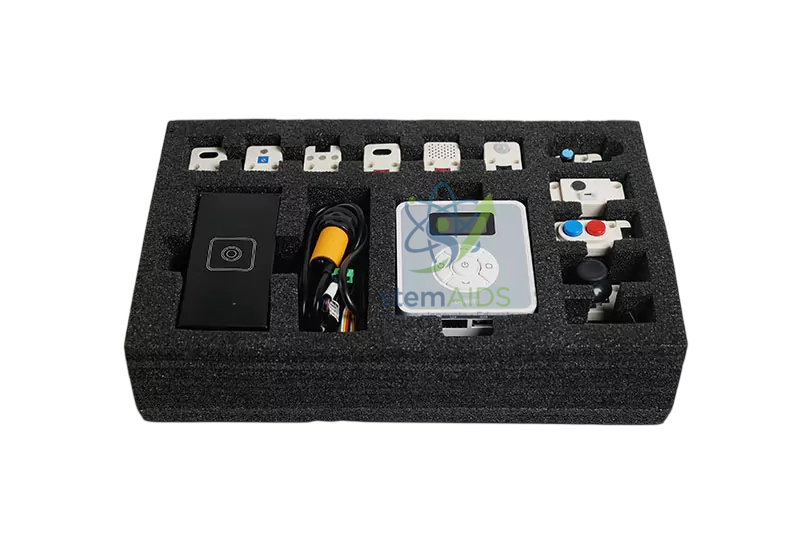
Magician sensor kit
₹15,608.00
This kit is ideal for schools, engineering colleges, robotics laboratories, vocational training centres and STEM innovation labs. It allows learners to perform practical experiments using light sensing, sound sensing, colour detection, gesture control, motion detection, humidity sensing, joystick control, button input, servo movement and photoelectric object detection.
Product Description
The Magician Sensor Kit by StemAids is a modular robotics learning kit that enables students to build interactive automation projects. By connecting different sensors to the control interface, learners can program the robotic system to respond to physical inputs such as light intensity, sound, movement, colour, touch, gesture and environmental conditions.
The kit supports hands-on learning in robotics and automation by combining sensor input, programming logic and robotic output. Students can create practical projects such as colour-based sorting, object detection, motion-triggered response, gesture-controlled robot
movement, light-controlled automation and AI-based smart demonstration activities.
Key Features
- Robotics Sensor Expansion Kit: Designed to expand compatible Magician robotic arm learning applications.
- Multiple Sensor Modules: Includes modules for light, sound, colour, motion, humidity, gesture, joystick and button-based experiments.
- Programming Friendly: Supports graphical programming and Python-based learning depending on the compatible platform.
- Hands-On STEM Learning: Helps students understand sensor data, input-output control and automation logic.
- AI & IoT Project Support: Useful for smart automation, environmental monitoring, object recognition and interactive robotics projects.
- Modular Connection: Sensors can be connected and combined to create different classroom experiments.
- Beginner-Friendly Design: Suitable for guided classroom activities and practical robotics training.
- Engineering Practice: Encourages students to design, test and improve real-world automation solutions.
Product Specifications
| Brand | StemAids |
|---|---|
| Product Name | Magician Sensor Kit |
| Product Type | Robotics Sensor Expansion and Automation Teaching Kit |
| Application | Robotics, STEM education, AI learning, IoT projects, automation training and sensor experiments |
| Compatible Use | Designed for compatible Magician robotic arm and automation learning platforms |
| Programming Support | Graphical programming and Python-based programming depending on platform configuration |
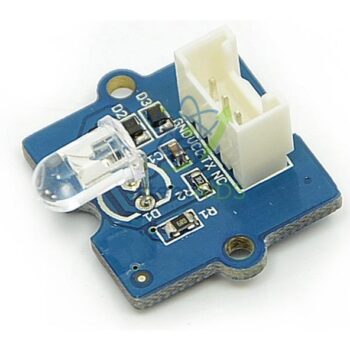
| Main Sensor Modules | Light sensor, sound sensor, colour sensor, gesture sensor, humiture sensor, PIR sensor, joystick, dual button and photoelectric switch |
| Output Modules | LED module, micro servo and compatible output modules depending on kit configuration |
| Communication Modes | ADC, I2C, PWM, single-bus and IO based module communication |
| Learning Areas | Sensor technology, robotics control, data input, automation logic, AI basics, IoT and mechatronics |
| Power Requirement | As per controller and module configuration |
| Usage Type | Classroom demonstration, laboratory practicals, student projects and robotics workshops |
| Suitable For | Schools, colleges, universities, robotics labs, STEM labs and technical training institutes |
Sensor Module Details
| Sensor / Module | Learning Use |
|---|---|
| Light Sensor | Used to detect light intensity and demonstrate light-based automation. |
| Sound Sensor | Used to detect sound signals for clap control or noise-based response projects. |
| Colour Sensor | Used for colour detection, colour sorting and object identification experiments. |
| Gesture Sensor | Used to control robotic actions using hand movement and directional gestures. |
| Humiture Sensor | Used for temperature and humidity monitoring demonstrations. |
| PIR Motion Sensor | Used to detect human or object movement for motion-triggered automation. |
| Joystick Module | Used for manual control, directional input and robot movement experiments. |
| Dual Button Module | Used to provide simple digital input for control and switching activities. |
| Photoelectric Switch | Used for object detection, counting and conveyor-based automation projects. |
| LED Module | Used for output indication, signal response and status display experiments. |
| Micro Servo | Used to demonstrate controlled movement and actuator-based automation. |
How to Use the StemAids Magician Sensor Kit
- Prepare the Workspace:
Place the robotic arm, sensor kit, controller and accessories on a clean and stable laboratory table. - Select the Sensor:
Choose the required sensor module according to the experiment, such as colour detection, motion detection or gesture control. - Connect the Sensor Module:
Attach the selected sensor to the compatible control interface using the supplied cable or connector. - Open the Programming Software:
Use the compatible graphical programming or Python-based environment to create the control logic. - Write the Program:
Define how the robotic system should respond when the sensor detects input. - Upload or Run the Code:
Transfer the program to the controller and start the experiment. - Test the Sensor Response:
Provide real-world input such as light, sound, motion, colour or gesture and observe the robotic output. - Modify and Improve:
Change the program values, sensor conditions or output actions to understand how automation logic works. - Create Projects:
Combine multiple sensors to build advanced robotics, AI, IoT and smart automation projects.
Educational Applications
- Sensor-based robotics experiments
- Colour sorting and object recognition activities
- Gesture-controlled robot demonstrations
- Light and sound response experiments
- Motion detection and security system projects
- Temperature and humidity monitoring activities
- Joystick-based robotic control
- Photoelectric object counting experiments
- AI and IoT-based STEM projects
- Automation and mechatronics laboratory training
Benefits for Students and Institutions
The StemAids Magician Sensor Kit helps students understand the connection between sensors, programming and robotic response. It develops practical skills in electronics, coding, logical thinking, automation design and problem-solving. Students can learn how smart
systems collect data from the environment and use that data to perform programmed actions.
For institutions, this sensor kit is a useful addition to STEM labs, robotics labs, AI labs, Atal Tinkering Labs, engineering workshops and vocational training centres. It supports project-based learning and helps teachers demonstrate real-world automation concepts in a
simple and practical way.
Why Choose StemAids?
StemAids provides practical STEM, robotics and automation learning solutions for schools, colleges and technical institutions. The StemAids Magician Sensor Kit is designed to make sensor-based robotics easy to understand through modular components, hands-on experiments and classroom-ready activities. It is suitable for institutions that want to introduce students to smart automation, AI, IoT and modern robotics applications.
E-E-A-T Product Content Note
This product description is written with Google E-E-A-T principles in mind by focusing on experience-based product use, technical clarity, educational application, transparent specifications and practical learning benefits. The content is structured to support users who are searching for a reliable sensor kit for robotics education, STEM labs and automation training.
SEO-Friendly Product Summary
The StemAids Magician Sensor Kit is a robotics sensor expansion kit for STEM education, AI learning, IoT projects and automation training. It includes multiple sensor modules for detecting light, sound, colour, gesture, motion, humidity and object presence.
This kit is ideal for robotics labs, engineering colleges, schools and technical training centres that want to teach sensor-based programming and smart automation through practical experiments.
SEO Keywords
Magician Sensor Kit, StemAids Magician Sensor Kit, robotics sensor kit, educational sensor kit, STEM sensor kit, AI sensor kit, IoT teaching kit, robotics lab equipment, automation sensor training kit, sensor kit for robotic arm, colour sensor robotics kit, gesture sensor kit, photoelectric sensor training kit, mechatronics sensor kit, robotics education kit.
FAQ
1. What is the StemAids Magician Sensor Kit used for?
The StemAids Magician Sensor Kit is used for teaching robotics, sensor technology, automation, AI basics, IoT projects and hands-on STEM experiments.
2. Is this kit suitable for schools?
Yes. It is suitable for schools, STEM labs, robotics clubs, Atal Tinkering Labs and teacher-led classroom activities.
3. Can college students use this kit?
Yes. It is useful for engineering colleges, polytechnic institutes, automation labs and mechatronics training centres.
4. What sensors are commonly included in the kit?
The kit commonly includes sensor modules such as light sensor, sound sensor, colour sensor, gesture sensor, humiture sensor, PIR sensor, joystick, dual button and photoelectric switch.
5. Does the kit support programming?
Yes. It supports programming-based learning through compatible graphical programming and Python-based programming environments, depending on the system configuration.
6. Can this kit be used for AI and IoT projects?
Yes. The sensor modules can be used to create AI, IoT and smart automation projects involving data collection, object detection, response control and environmental monitoring.
7. Can the sensor kit be used with a robotic arm?
Yes. It is designed for compatible Magician robotic arm learning platforms and can be used to create sensor-controlled robotic actions.
8. What can students learn from this kit?
Students can learn sensor input, robotic response, programming logic, control systems, automation workflow, AI project basics and practical mechatronics concepts.
9. What is the brand name of this product?
The product is offered under the StemAids brand.
10. Is this product suitable for project-based learning?
Yes. It is suitable for STEM projects, robotics competitions, science exhibitions, AI projects, IoT demonstrations and engineering mini-projects.
You must be logged in to post a review.
Bestsellers


Sale

Sale

Sale


Reviews
There are no reviews yet.