





In Stock
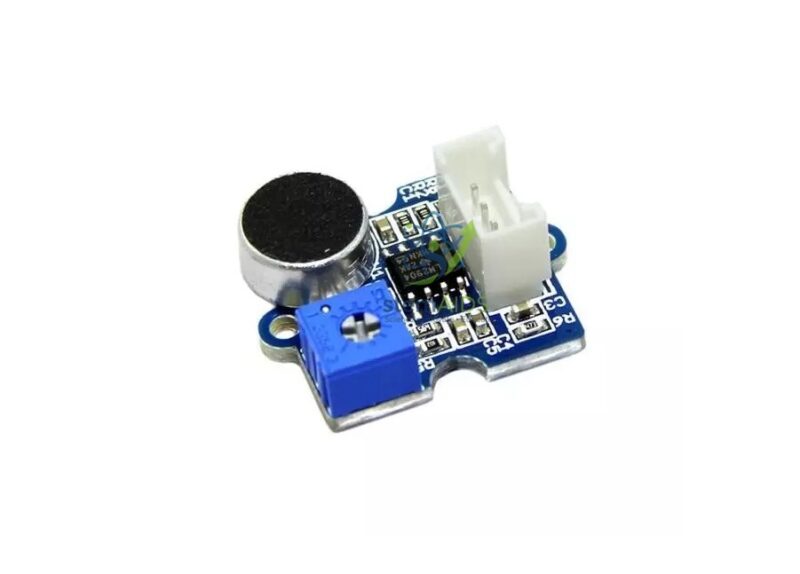
Grove Sound Sensor
₹320.00
Quick Answer: The Grove Sound Sensor is a microphone module with an amplifier on a Grove board, giving an analogue output that follows the loudness of sound around it. Students use the Grove sound sensor for clap-controlled switches, classroom noise meters and experiments on how materials absorb sound.
Turning Sound into a Voltage
Sound is a pressure wave. When it reaches the microphone, a thin diaphragm vibrates and produces a tiny electrical signal that rises and falls with the wave. That signal is too small for a microcontroller to read usefully, so the module amplifies it before it reaches the signal pin, where the analogue input samples it.
A single sample catches the wave at a random point, so readings jump around even in steady noise. Programs therefore take many samples over a short window and use the highest value, or the difference between highest and lowest, as the loudness. The result is a relative level rather than calibrated decibels, which is ideal for comparisons: which corner of the room is noisiest, and which material muffles a sound most effectively.
The sensor responds to overall loudness, not to words or pitch, so a clap switch has to be designed around a sudden jump above the background level rather than a particular sound.
Specifications
| Sensor | Microphone with amplifier on a Grove board |
| Output | Analogue signal following sound intensity |
| Connection | Grove analogue port |
| Reading type | Relative loudness, not calibrated decibels |
| Supply voltage and sensitivity adjustment | Confirm at enquiry |
Applications
- Clap-controlled lights using a threshold above background noise
- Classroom noise meters that change colour with loudness, using the RGB LED 8mm Grove
- Sound-insulation experiments comparing foam, cloth, card and bubble wrap around a sound source
- Logging noise levels in different school areas over a day
- Sound-reactive robots that start or stop on a loud noise
Care & Handling
- Keep the microphone opening of the Grove Sound Sensor clear of dust, glue and tape.
- Avoid tapping or blowing directly into the microphone, which overloads it and can damage the diaphragm.
- Mount the sensor away from fans and motors, whose noise and vibration raise the background reading.
- Keep the module dry and store it in a padded box.
Why Choose LabEquip
Physics teachers use sound sensors for experiments on sound insulation, and coding clubs use them for interactive projects that respond to a clap. LabEquip lists this sensor in its Stem Kits category; send class numbers through the contact page.
Frequently Asked Questions
Does the sound sensor measure decibels?
No, it gives a relative loudness reading. It can be roughly compared with a sound-level meter, but for most projects the relative value and a threshold above background noise are enough.
Why do the readings jump around?
Sound is a rapidly changing wave, and each sample catches it at a random point. Take many samples over a short period and use the peak, or the peak-to-peak difference, as the loudness value.
How do I make a clap switch that ignores talking?
Measure the background level, set the threshold well above it, and look for a sharp rise that falls quickly again. Requiring two claps within a short time further reduces false triggers.
Can it recognise words or notes?
No. It responds to loudness only. Recognising speech or pitch needs a microphone sampled much faster, plus signal processing or a dedicated voice-recognition module.
How can it be used to test sound insulation?
Place a steady sound source in a box, wrap it in different materials in turn and record the sensor reading at a fixed distance each time. The lower the reading, the better the material absorbs or blocks the sound.
Which port should it use?
The analogue port, because loudness varies over a range rather than switching between two states. On a digital port the program would only learn whether the signal crossed a fixed level.
Last Updated: September 2026
You must be logged in to post a review.
Bestsellers


Sale
Sale

Sale


Reviews
There are no reviews yet.