


In Stock
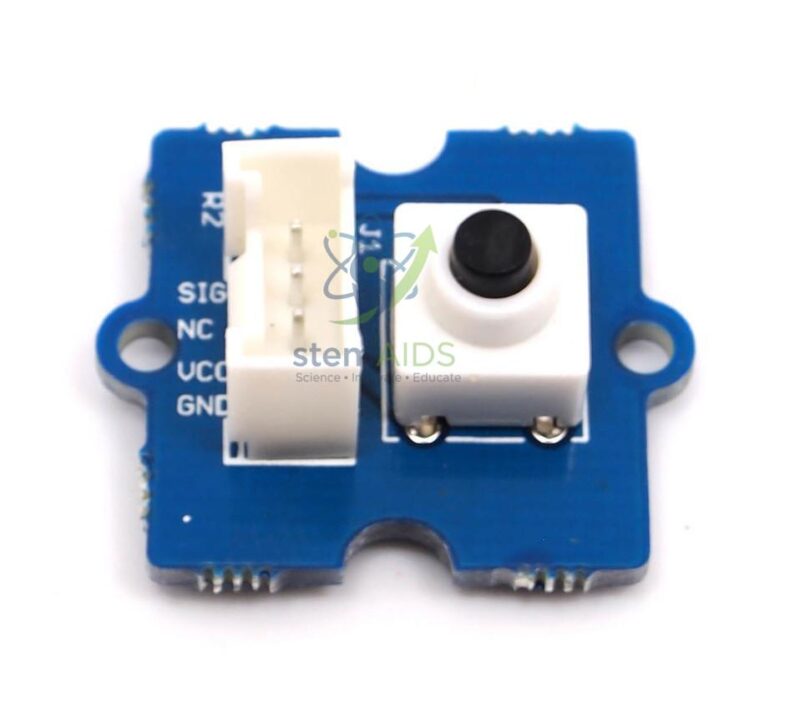
Grove Push Button Module
₹240.00
This Grove-compatible module is ideal for learning digital input, logic states, button-controlled circuits, user interaction, start-stop control, project triggering, and microcontroller programming. A momentary push button returns to its original state after release, making it useful for interactive classroom demonstrations and control projects.
The StemAids Grove Push Button Module is suitable for school STEM labs, Arduino learning kits, Raspberry Pi classrooms, robotics labs, IoT projects, electronics workshops, and digital input experiments.
Key Features
- Grove-compatible push button module for STEM and electronics learning
- Momentary button action for manual digital input control
- Useful for ON/OFF triggering, mode selection, alarms, and start-stop projects
- Provides a digital input signal for microcontroller-based systems
- Works with 3.3V and 5V compatible controller platforms
- Simple Grove 4-pin interface for clean and beginner-friendly wiring
- Suitable for Arduino, Raspberry Pi, robotics, IoT, and automation projects
- Ideal for school labs, electronics labs, robotics labs, and training centers
Product Specifications
| Brand | StemAids |
|---|---|
| Product Name | Grove Push Button Module |
| Product Type | Grove-compatible push button input module |
| Button Type | Momentary push button |
| Signal Type | Digital input signal |
| Operating Voltage | 3.3V / 5V compatible |
| Output State | Commonly HIGH when pressed and LOW when released |
| Electrical Life | Approx. 200,000 cycles |
| Operation Force | 100 ± 50gf |
| Operating Temperature | -25°C to +70°C |
| Module Size | Approx. 20 mm x 20 mm |
| Interface Type | Grove 4-pin interface |
| Compatible Platforms | Arduino, Raspberry Pi with Grove interface, and Grove-compatible boards |
| Applications | Digital input, button control, project triggering, robotics, IoT, and STEM projects |
| Recommended Users | Students, teachers, electronics learners, robotics trainers, makers, and STEM labs |
How to Use the Grove Push Button Module
- Connect the StemAids Grove Push Button Module to a Grove Base Shield, Grove Base Hat, or compatible digital input interface.
- Use a Grove cable to connect the button module to a digital input port, such as D2.
- Open Arduino IDE, Python environment, or another compatible programming platform.
- Set the connected digital pin as an input pin in the program.
- Read the button state as HIGH or LOW, depending on the button position and board configuration.
- Use the button input to control an LED, buzzer, LCD message, relay, motor, robot action, or IoT response.
- Test the button by pressing and releasing it while observing the output response.
- Use a short debounce delay in code for stable button reading during practical projects.
Educational Benefits
The StemAids Grove Push Button Module helps students understand digital input, manual control, logic states, switch debouncing, circuit triggering, microcontroller programming, and user-interface design. It is one of the simplest modules for teaching how a physical input can control electronic devices and software responses.
Applications
- Arduino button input experiments
- Raspberry Pi switch-control projects
- LED ON/OFF control circuits
- Buzzer activation projects
- Robot start-stop control
- Mode selection in robotics projects
- IoT device trigger buttons
- Smart home control panels
- LCD message control projects
- STEM classroom electronics experiments
Why Choose StemAids?
StemAids provides practical STEM, robotics, electronics, and automation learning modules for schools, colleges, training centers, and technical laboratories. The StemAids Grove Push Button Module is designed to make digital input learning simple, visual, and classroom-friendly. It is a useful module for institutions building Arduino labs, robotics labs, IoT learning spaces, electronics project kits, and smart automation training setups.
FAQ
Q1. What is the StemAids Grove Push Button Module used for?
It is used for manual input, button-controlled circuits, start-stop functions, project triggering, robotics control, and digital input learning.
Q2. Is this push button module compatible with Arduino?
Yes, it can be used with Arduino through a Grove Base Shield or compatible digital input connection.
Q3. Can this button module be used with Raspberry Pi?
Yes, it can be used with Raspberry Pi when connected through compatible Grove interface hardware and suitable user-written code.
Q4. What type of signal does the push button provide?
The push button provides a digital signal that changes when the button is pressed or released.
Q5. What does momentary push button mean?
A momentary push button changes state only while it is being pressed and returns to its original state when released.
Q6. Does this module require soldering?
No, when used with Grove-compatible boards, the Grove connector allows simple plug-and-play wiring.
Q7. Is this module suitable for school STEM labs?
Yes, it is suitable for school STEM labs, electronics classes, Arduino training, robotics projects, IoT activities, and beginner-level circuit learning.
Q8. What projects can students make with this button module?
Students can make LED control circuits, buzzer alarms, robot start-stop systems, IoT trigger buttons, smart home control panels, LCD message projects, and mode-selection activities.
SEO Keywords
Grove Push Button Module, StemAids push button module, Grove button sensor, Arduino push button module, Raspberry Pi button module, STEM electronics button, robotics input button, IoT push button module, digital input button module, momentary switch module, Grove compatible button for students, electronics lab button module.
You must be logged in to post a review.
Bestsellers

Sale

Sale
Sale
Sale


Reviews
There are no reviews yet.