

In Stock
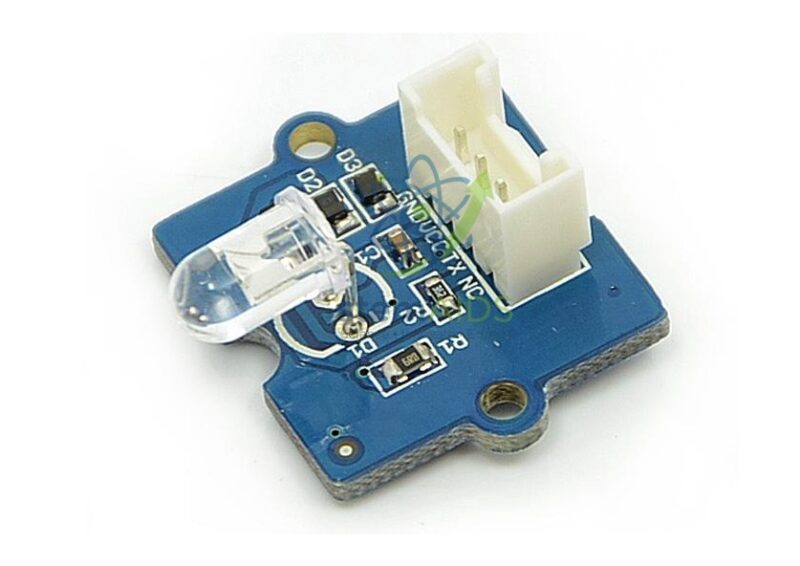
Grove Infrared Emitter
₹230.00
This Grove-compatible IR emitter helps students understand infrared communication, digital signal transmission, remote-control systems, embedded electronics, and sensor-to-sensor communication. It is useful for classroom demonstrations where learners need to send wireless commands between electronic modules.
The StemAids Grove Infrared Emitter is suitable for school STEM labs, Arduino learning kits, robotics labs, IoT classrooms, smart appliance demonstrations, IR remote projects, wireless communication experiments, and automation training setups.
Key Features
- Grove-compatible infrared emitter module for STEM and electronics learning
- Uses an infrared LED to transmit IR signals
- Useful for remote-control projects, IR communication, and automation experiments
- Commonly used with an infrared receiver module for transmitter-receiver learning
- Supports 3.3V and 5V compatible controller platforms
- Simple Grove 4-pin interface for clean and beginner-friendly wiring
- Suitable for Arduino, Raspberry Pi, robotics, IoT, and smart appliance demonstrations
- Ideal for school labs, electronics labs, robotics labs, and training centers
Product Specifications
| Brand | StemAids |
|---|---|
| Product Name | Grove Infrared Emitter |
| Product Type | Grove-compatible infrared transmitter module |
| Main Component | Infrared LED emitter |
| Main Function | Transmits infrared signals |
| Operating Voltage | 3.3V / 5V compatible |
| Peak Wavelength | 940 nm |
| Angle of Half Intensity | ±17° |
| Radiant Intensity | 72 mW/sr |
| Maximum Transmission Distance | Up to 10 m, depending on receiver and environment |
| Operating Temperature | -40°C to +80°C |
| Module Size | Approx. 20 mm x 20 mm |
| Interface Type | Grove 4-pin interface |
| Compatible Platforms | Arduino, Raspberry Pi, BeagleBone, Wio, LinkIt ONE, and Grove-compatible boards |
| Applications | IR communication, remote-control projects, robotics, IoT, automation, and STEM experiments |
| Recommended Users | Students, teachers, electronics learners, robotics trainers, makers, and STEM labs |
How to Use the Grove Infrared Emitter
- Connect the StemAids Grove Infrared Emitter to a Grove Base Shield, Grove Base Hat, or compatible digital output interface.
- Use a Grove cable to connect the emitter module to a digital output port, such as D3.
- Place a compatible infrared receiver module facing the IR emitter for transmitter-receiver experiments.
- Open Arduino IDE, Python environment, or another compatible programming platform.
- Install the required IR communication library for your controller board.
- Select the connected output pin in the program.
- Upload code to transmit IR signals or remote-control codes.
- Test the signal using an IR receiver module or compatible IR-controlled device.
- Adjust alignment and distance if the receiver does not detect the signal properly.
Educational Benefits
The StemAids Grove Infrared Emitter helps students understand infrared communication, digital signal output, wireless command transmission, remote-control systems, electronics interfacing, and automation logic. It gives learners practical experience with invisible light communication and helps connect classroom electronics with real-world devices such as remote controls, smart appliances, robotic commands, and IoT systems.
Applications
- Arduino infrared transmission projects
- Raspberry Pi IR communication experiments
- Remote-control signal demonstrations
- Infrared transmitter and receiver learning
- Robotics wireless command projects
- Smart appliance control demonstrations
- IoT-based control models
- Wireless sensor communication experiments
- Automation and embedded-system training
- STEM classroom electronics activities
Why Choose StemAids?
StemAids provides practical STEM, robotics, electronics, and automation learning modules for schools, colleges, training centers, and technical laboratories. The StemAids Grove Infrared Emitter is designed to make IR communication learning simple, visual, and classroom-friendly. It is a useful module for institutions building Arduino labs, robotics labs, IoT learning spaces, electronics project kits, and smart automation training setups.
FAQ
Q1. What is the StemAids Grove Infrared Emitter used for?
It is used to transmit infrared signals for remote-control projects, IR communication experiments, robotics commands, automation models, and STEM electronics learning.
Q2. Is this infrared emitter compatible with Arduino?
Yes, it can be used with Arduino through a Grove Base Shield or compatible digital output connection.
Q3. Can this infrared emitter be used with Raspberry Pi?
Yes, it can be used with Raspberry Pi when connected through compatible Grove interface hardware and suitable user-written code.
Q4. What is the wavelength of this IR emitter?
The commonly documented Grove Infrared Emitter peak wavelength is 940 nm.
Q5. What is the maximum transmission distance?
The commonly documented maximum transmission distance is up to 10 m, depending on receiver sensitivity, alignment, and environmental conditions.
Q6. Does this module need an infrared receiver?
For communication experiments, it is commonly used with a compatible infrared receiver module to receive and decode the transmitted IR signal.
Q7. Does this module require soldering?
No, when used with Grove-compatible boards, the Grove connector allows simple plug-and-play wiring.
Q8. What projects can students make with this IR emitter?
Students can make IR remote-control models, wireless command systems, transmitter-receiver experiments, smart appliance demonstrations, robotics control activities, IoT automation models, and embedded electronics projects.
SEO Keywords
Grove Infrared Emitter, StemAids infrared emitter, Grove IR emitter module, Arduino infrared transmitter, Raspberry Pi IR transmitter, STEM electronics IR module, robotics infrared module, IoT infrared control module, remote control transmitter module, 940nm infrared LED module, Grove compatible IR emitter, electronics lab infrared transmitter.
You must be logged in to post a review.
Bestsellers


Sale

Sale
Sale


Reviews
There are no reviews yet.