




In Stock
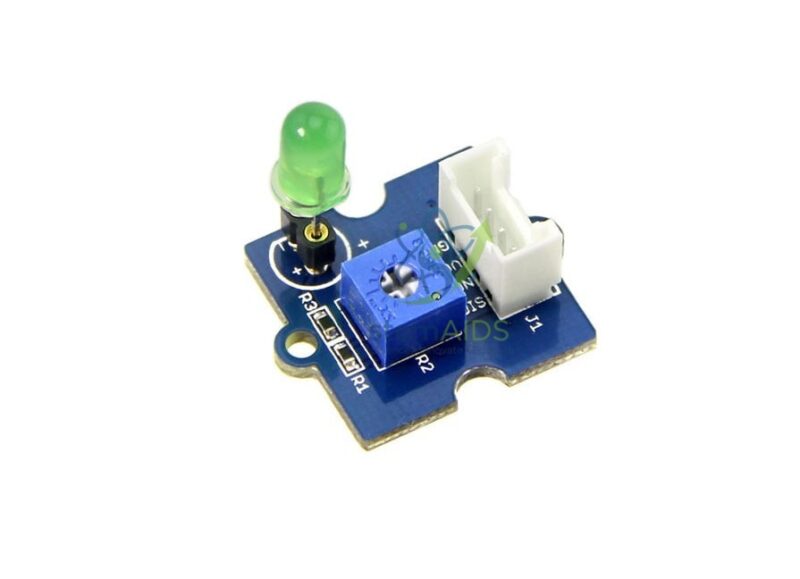
Green LED module 5 mm Grove
$1.91
Quick Answer: The Green LED module 5 mm Grove is a single green 5 mm LED on a Grove board that plugs into a digital port. The green LED module serves as a ‘ready’, ‘OK’ or ‘go’ indicator, and as the green stage of traffic-light and threshold projects.
Green as a Status Signal
Where red signals a problem, green tells the user that all is well: the device is powered, the reading is in range, the way is clear. Giving a project a green status light is a small step that makes it much easier to use, and deciding when that light should be on makes students think about what ‘normal’ means for their system.
Green LEDs emit at a shorter wavelength than red ones and need a somewhat higher forward voltage. The human eye is most sensitive to green-yellow light, so a green LED often looks brighter than a red one at a similar current. Placing the Green LED module 5 mm Grove next to a red module and comparing them at the same settings is a quick observation exercise with a genuine physics explanation.
Programming is identical to other single-LED Grove modules: digital HIGH for on, LOW for off, PWM for dimming. Whether the LED is socketed and whether a brightness adjuster is fitted should be confirmed before ordering.
Specifications
| Module | 5 mm green LED on a Grove board |
| Connection | Grove digital port |
| Control | Digital on and off; PWM dimming on a PWM-capable pin |
| Typical role | Power, ready, OK or go indicator |
| Socketed LED, brightness adjuster and supply voltage | Confirm at enquiry |
Applications
- Traffic-light and pedestrian-crossing models with the Grove Red LED 5mm Module
- In-range indicators, for example soil moisture or temperature within set limits
- Ready lights showing that a program has started or a sensor has settled
- Reaction and quiz games where green means go
- Comparing the perceived brightness of green and red LEDs in a lesson on light
Care & Handling
- Fit the Grove cable to the green LED module and the controller port with the power off.
- If the LED is socketed and needs replacing, use a green LED of the same size and put the longer leg to the positive mark.
- Keep modules away from metal clips and loose wires on the desk that could short the pins on the underside.
- Store the module dry, in a labelled compartment, so colours do not get mixed up in a class set.
Why Choose LabEquip
Teachers building traffic-light or status-light activities usually order green and red LED modules in equal numbers. LabEquip lists the green module in its Stem Kits range beside its red counterpart; send your class-set requirement through the contact page.
Frequently Asked Questions
Why does the green LED look brighter than the red one?
The eye is most sensitive to light in the green-yellow part of the spectrum, so green light of similar power appears brighter. LED efficiency and drive current also play a part, which makes a good discussion point.
How do I build a traffic light with it?
Connect red and green modules, and a third colour if available, to separate digital ports. Write a sequence that switches each on and off with suitable delays, then add a push button to request a pedestrian crossing.
Can the brightness be changed in code?
Yes, on a PWM-capable pin. Writing a lower value makes the LED spend less of each cycle switched on, so it looks dimmer.
What does a green status light usually mean?
Conventionally it means powered, ready, normal or go. Using it consistently in projects teaches students that users rely on clear, standard signals.
Why is a higher voltage needed for green than for red?
An LED’s forward voltage depends on the energy of the light it emits. Green light has a shorter wavelength and more energy per photon than red, so a green LED needs a higher voltage across it to light.
Can I use the module on a micro:bit?
Yes, through a Grove adapter board for the micro:bit, which provides Grove ports. The LED is then switched with the micro:bit’s digital write blocks or code.
Last Updated: September 2026
You must be logged in to post a review.
Bestsellers


Sale

Sale

Sale
Sale


Reviews
There are no reviews yet.