
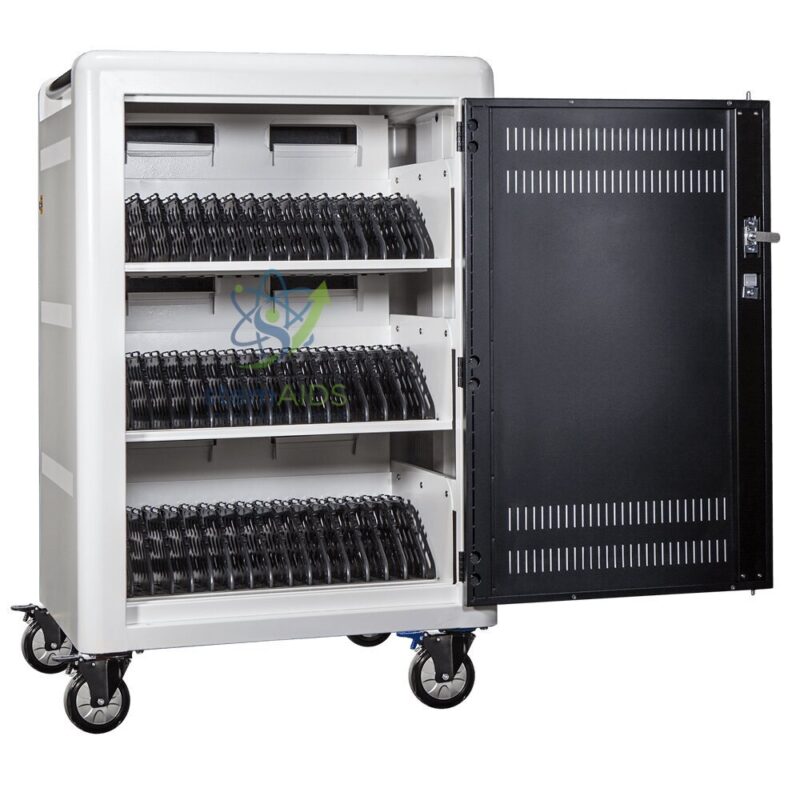
The StemAids Cartice 16 and 30+ Carts (Chariots Cartice 16 et 30+) are durable, mobile, and classroom-ready charging carts designed for schools, colleges, ICT labs, STEM classrooms, robotics labs, training centers, and digital learning environments. These carts help institutions store, transport, and charge multiple digital devices in one organized and secure unit.
Designed for modern classrooms, the Cartice 16 and 30+ Carts support easy movement of tablets, compact laptops, Chromebooks, digital learning devices, and classroom technology accessories. They are especially useful for teachers and IT coordinators who need to manage shared devices across different classrooms and activity areas.
Product Overview
The StemAids Cartice 16 and 30+ Carts are practical mobile charging solutions for educational institutions that use digital devices for teaching, learning, coding, robotics, STEM activities, and multimedia lessons. The carts are designed to keep devices arranged, protected, charged, and ready for classroom use.
The Cartice 16 model is suitable for smaller classrooms or limited-device programs, while the Cartice 30+ model is designed for larger classrooms, shared labs, and institutional device management where more equipment needs to be stored and charged.
Key Features
- Available in 16 and 30+ Models: Suitable for small and large classroom device management requirements.
- Fast and Efficient Charging: Supports simultaneous charging of multiple compatible devices.
- Mobile Cart Design: Equipped with casters for easy movement between classrooms, labs, and storage areas.
- Durable Construction: Built for regular use in schools, colleges, and training institutions.
- Spacious Storage: Provides organized space for digital devices, accessories, and related classroom equipment.
- Optimized Classroom Mobility: Helps teachers quickly move digital resources between teaching spaces.
- No Synchronization Function: Designed primarily for storage, transport, and charging, not data synchronization.
- Ideal for Digital Learning: Suitable for ICT labs, STEM education, robotics labs, coding programs, and smart classrooms.
Product Specifications
| Product Name | Cartice 16 and 30+ Carts |
|---|---|
| Brand | StemAids |
| Product Type | Mobile Device Storage and Charging Cart |
| Available Models | Cartice 16 and Cartice 30+ |
| Device Capacity | Cartice 16 for up to 16 compatible devices; Cartice 30+ for larger 30+ device storage and charging needs |
| Charging Function | Fast and simultaneous charging for compatible classroom devices |
| Synchronization | No synchronization function |
| Mobility | Mounted on casters for easy movement |
| Cartice 16 Dimensions | Approx. 60 cm x 40 cm x 100 cm |
| Cartice 30+ Dimensions | Larger than Cartice 16; exact dimensions may vary by model configuration |
| Construction | Robust and durable cart body suitable for educational use |
| Compatible Devices | Tablets, compact laptops, Chromebooks, and compatible digital learning devices |
| Application Area | Schools, ICT labs, STEM labs, robotics labs, smart classrooms, and training centers |
| Recommended Users | Teachers, IT coordinators, STEM trainers, lab assistants, and institutional buyers |
How to Use StemAids Cartice 16 and 30+ Carts
- Choose the Right Model: Select Cartice 16 for smaller device requirements or Cartice 30+ for larger classroom and lab requirements.
- Check Device Compatibility: Confirm that tablets, laptops, Chromebooks, or digital devices fit properly inside the cart storage spaces.
- Place Devices Carefully: Arrange each device in its assigned slot or storage area to avoid scratches and device-to-device contact.
- Connect Chargers: Connect each device to the suitable charging cable or adapter as per the cart configuration.
- Start Charging: Plug the cart into a suitable power socket and switch on charging according to the operating instructions.
- Check Charging Status: Ensure all devices are charging properly before closing the cart.
- Move Safely: Disconnect the cart from the power supply before moving it between classrooms or labs.
- Store After Use: Keep the cart in a dry, clean, and secure location when not in use.
Educational Benefits
The StemAids Cartice 16 and 30+ Carts help schools manage digital resources more efficiently. They reduce charging clutter, support quick classroom setup, improve equipment organization, and help teachers focus more on teaching rather than device preparation.
- Supports organized device charging for digital classrooms
- Helps teachers move devices between classrooms easily
- Useful for ICT, STEM, robotics, coding, and multimedia learning
- Reduces scattered chargers and loose cables
- Improves device readiness before lessons
- Encourages collaborative and group-based learning activities
- Suitable for daily institutional use in schools and colleges
Applications
- School tablet charging and storage
- ICT lab device management
- STEM classroom digital learning setup
- Robotics and coding lab device storage
- Chromebook and compact laptop charging
- Smart classroom device organization
- Training center equipment management
- Library and shared digital resource storage
- Mobile classroom technology deployment
Why Choose StemAids Cartice 16 and 30+ Carts?
StemAids provides practical educational products for STEM labs, ICT classrooms, robotics programs, and digital learning spaces. The Cartice 16 and 30+ Carts are designed for institutions that need reliable, mobile, and spacious charging carts for shared classroom devices.
These carts help improve classroom efficiency by keeping digital devices stored, charged, and ready for lessons. Their mobile design allows easy movement between teaching spaces, while the durable construction supports regular use in demanding school and training environments.
Safety and Maintenance Guidelines
- Do not exceed the recommended device capacity of the selected cart model.
- Use only compatible chargers, cables, and approved power connections.
- Always disconnect the power cable before moving the cart.
- Move the cart slowly on flat surfaces to avoid tipping or device movement.
- Keep charging cables organized and away from moving wheels.
- Do not block ventilation areas during charging.
- Keep the cart away from water, dust, and excessive heat.
- Inspect wheels, plugs, cables, and storage slots regularly.
- Use under adult supervision in schools and institutional environments.
Google E-E-A-T Focus
This product content is written for school procurement teams, ICT administrators, STEM coordinators, lab managers, and institutional buyers. It focuses on product use, classroom application, safety, device organization, charging functionality, and practical institutional benefits to support Google E-E-A-T principles of experience, expertise, authoritativeness, and trustworthiness.
Frequently Asked Questions
1. What are StemAids Cartice 16 and 30+ Carts used for?
They are used for storing, charging, organizing, and transporting multiple classroom digital devices such as tablets, compact laptops, and Chromebooks.
2. What is the difference between Cartice 16 and Cartice 30+?
Cartice 16 is designed for up to 16 compatible devices, while Cartice 30+ is intended for larger classroom or institutional device management needs.
3. Do these carts support device synchronization?
No, these carts are designed for storage, transport, and charging. They do not include a synchronization function.
4. Are these carts suitable for schools?
Yes, they are suitable for schools, colleges, ICT labs, STEM labs, robotics labs, libraries, training centers, and smart classrooms.
5. Can the carts be moved between classrooms?
Yes, the carts include casters for mobility. The cart should be unplugged from the power supply before movement.
6. What types of devices can be stored?
They can store compatible tablets, compact laptops, Chromebooks, and other digital learning devices depending on size and charging requirements.
7. What is the dimension of Cartice 16?
Cartice 16 is approximately 60 cm x 40 cm x 100 cm. Dimensions for Cartice 30+ may vary according to the selected configuration.
8. Are the carts suitable for STEM and robotics labs?
Yes, they are suitable for STEM labs, robotics labs, coding classrooms, and activity-based digital learning environments.
9. Can all devices be charged at the same time?
Yes, the carts are designed to support simultaneous charging of compatible devices, subject to model capacity and electrical configuration.
10. Is a professional setup required?
Basic use is simple, but electrical setup, cable arrangement, and first installation should be handled by a trained person or responsible staff member.
SEO Keywords
Cartice 16 and 30+ Carts, StemAids Cartice carts, mobile charging cart for schools, tablet charging cart, laptop charging trolley, Chromebook charging cart, ICT lab charging cart, STEM lab device cart, school digital device storage cart, mobile classroom cart, device charging trolley for schools, digital learning charging cart, classroom technology storage cart.





Reviews
There are no reviews yet.