








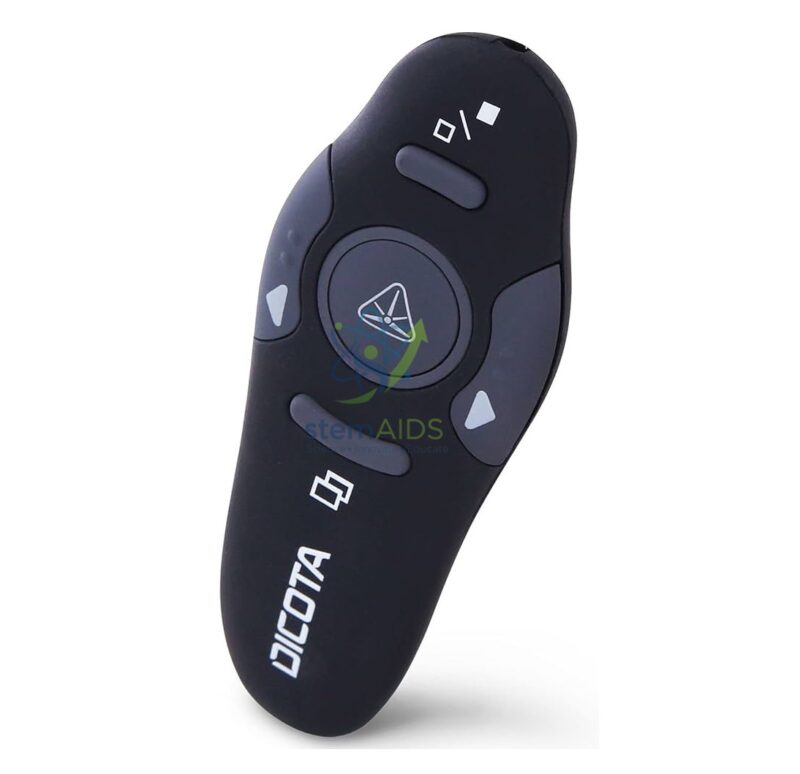
In Stock
Wireless Presenter with Laser Pointer
₹1,025.00
The StemAids Wireless Presenter with Laser Pointer is a compact and easy-to-use presentation control device designed for classrooms, training centers, conference rooms, seminar halls, offices, smart classrooms, ICT rooms, STEM labs, and professional presentation spaces. It helps teachers, trainers, speakers, and presenters control slides wirelessly while highlighting important points using the built-in laser pointer.
This wireless presenter allows smooth navigation through PowerPoint slides, PDF presentations, digital lessons, training modules, and classroom teaching content. It is suitable for schools, colleges, universities, corporate offices, coaching centers, and institutional AV setups where professional and confident presentation delivery is required.
Product Overview
The StemAids Wireless Presenter with Laser Pointer is designed to give users freedom of movement during presentations. Instead of standing near a laptop or computer, the presenter can move around the classroom or stage while controlling slide forward, slide backward, screen functions, and laser pointing from a distance.
It usually works through a USB receiver that connects to a laptop or desktop computer. The presenter is suitable for teaching, product demonstrations, lectures, business meetings, webinars, seminars, workshops, and interactive classroom sessions.
Key Features
- Wireless Slide Control: Allows presenters to move slides forward and backward without touching the computer.
- Built-In Laser Pointer: Helps highlight important text, diagrams, charts, and presentation points.
- USB Receiver Support: Connects easily to compatible laptops and desktops through a USB receiver.
- Plug-and-Play Operation: Works with most compatible systems without complicated installation.
- Comfortable Handheld Design: Compact body fits comfortably in the hand during long presentations.
- Long Wireless Range: Suitable for classrooms, seminar halls, meeting rooms, and training spaces.
- Multi-Software Compatibility: Useful with PowerPoint, PDF readers, Keynote, Google Slides, and other presentation tools depending on system support.
- Portable and Lightweight: Easy to carry in a laptop bag, teaching kit, or presentation pouch.
Product Specifications
| Product Name | Wireless Presenter with Laser Pointer |
|---|---|
| Brand | StemAids |
| Product Type | Wireless Presentation Remote / Laser Pointer Presenter |
| Connection Type | Wireless USB receiver connection depending on model variant |
| Control Functions | Slide forward, slide backward, laser pointer, blank screen, and presentation control depending on model |
| Laser Type | Red laser pointer or model-specific laser pointer |
| Wireless Technology | 2.4 GHz wireless technology or compatible wireless standard depending on model |
| Wireless Range | Suitable for classroom and meeting room use; exact range depends on model and environment |
| Power Source | Battery powered, depending on model configuration |
| Receiver | USB nano receiver or standard USB receiver depending on model |
| Compatibility | Compatible laptops, desktops, smart classroom systems, and presentation software |
| Operating System Support | Windows, macOS, Linux, and other systems with USB presentation device support |
| Application Area | Classrooms, training centers, conference rooms, seminar halls, offices, STEM labs, and smart classrooms |
| Recommended Users | Teachers, trainers, professors, presenters, speakers, office users, and institutional buyers |
How to Use the StemAids Wireless Presenter with Laser Pointer
- Insert the Battery: Open the battery compartment and insert the recommended battery as per polarity marking.
- Connect the USB Receiver: Plug the USB receiver into a compatible laptop or desktop computer.
- Wait for Detection: Allow the computer to detect the presenter automatically.
- Open Presentation File: Open your PowerPoint, PDF, Keynote, Google Slides, or other presentation file.
- Start Slide Show: Begin the presentation mode from the computer or compatible software.
- Control Slides: Use the forward and backward buttons to move through slides wirelessly.
- Use Laser Pointer Carefully: Press the laser button to highlight important content on the projection screen.
- Store After Use: Turn off the presenter if required, remove or store the USB receiver, and keep the device safely.
Educational and Professional Benefits
The StemAids Wireless Presenter with Laser Pointer helps improve presentation confidence and classroom engagement. It allows teachers and speakers to move freely while explaining slides, diagrams, charts, and learning content.
- Supports smooth classroom and training presentations
- Helps teachers highlight key points on projected content
- Reduces the need to stand near the computer during lectures
- Useful for seminars, workshops, meetings, and smart classrooms
- Improves professional presentation delivery
- Suitable for STEM lessons, business presentations, and academic lectures
Applications
- School classroom presentations
- College and university lectures
- STEM lab demonstrations
- ICT and smart classroom teaching
- Corporate meetings and office presentations
- Training center sessions
- Seminar and workshop presentations
- Conference room use
- Product demonstrations and project presentations
Why Choose StemAids Wireless Presenter with Laser Pointer?
StemAids provides practical educational technology and presentation accessories for classrooms, STEM labs, ICT rooms, offices, and institutional learning spaces. The StemAids Wireless Presenter with Laser Pointer is designed to support confident, flexible, and professional presentation delivery.
It is a suitable choice for teachers, trainers, speakers, and office users who need easy slide control and clear highlighting during presentations. Its wireless operation, compact design, plug-and-play connectivity, and laser pointer function make it an essential accessory for modern classrooms and meeting rooms.
Safety and Maintenance Guidelines
- Do not point the laser beam at eyes, faces, reflective surfaces, vehicles, or aircraft.
- Keep the laser pointer away from children when not supervised.
- Use only the recommended battery type.
- Remove the battery if the presenter will not be used for a long time.
- Keep the presenter away from water, dust, excessive heat, and physical impact.
- Do not drop or open the device body unnecessarily.
- Store the USB receiver safely after use to avoid loss.
- Use under responsible supervision in schools and institutional environments.
Google E-E-A-T Focus
This product content is prepared for school procurement teams, ICT lab coordinators, teachers, trainers, office administrators, AV integrators, and institutional buyers. It focuses on practical use, presentation benefits, safety guidelines, device compatibility, and long-term usability to support Google E-E-A-T principles of experience, expertise, authoritativeness, and trustworthiness.
Frequently Asked Questions
1. What is the StemAids Wireless Presenter with Laser Pointer used for?
It is used to control presentation slides wirelessly and highlight important points using a built-in laser pointer.
2. Is this presenter suitable for classrooms?
Yes, it is suitable for school classrooms, colleges, smart classrooms, ICT rooms, STEM labs, seminars, and training centers.
3. Does it require software installation?
Most wireless presenters support plug-and-play use through a USB receiver. Special software is usually not required for basic slide control.
4. Can it be used with PowerPoint?
Yes, it can be used with Microsoft PowerPoint and many other presentation tools depending on system compatibility.
5. Can it be used with PDF presentations?
Yes, it can help move forward and backward through PDF presentation pages when used with compatible software.
6. What type of laser pointer does it have?
Most models include a red laser pointer, but the exact laser type may vary depending on the selected model.
7. Is it safe to use the laser pointer?
Yes, it is safe when used responsibly. The laser should never be pointed at eyes, faces, reflective surfaces, vehicles, or aircraft.
8. Can it be used with laptops?
Yes, it can be used with compatible laptops and desktop computers that support USB presentation devices.
9. Does it need batteries?
Yes, most wireless presenters are battery powered. The required battery type depends on the model variant.
10. Is it suitable for bulk institutional purchase?
Yes, the StemAids Wireless Presenter with Laser Pointer is suitable for schools, colleges, offices, training centers, conference rooms, and seminar halls requiring multiple presentation accessories.
SEO Keywords
Wireless Presenter with Laser Pointer, StemAids Wireless Presenter, presentation remote, laser pointer presenter, wireless slide clicker, presenter for classroom, PowerPoint remote, USB wireless presenter, smart classroom presenter, presenter for teachers, conference room presenter, training center presentation remote, laser pointer for presentations, slide changer remote.
You must be logged in to post a review.
Bestsellers




Reviews
There are no reviews yet.