
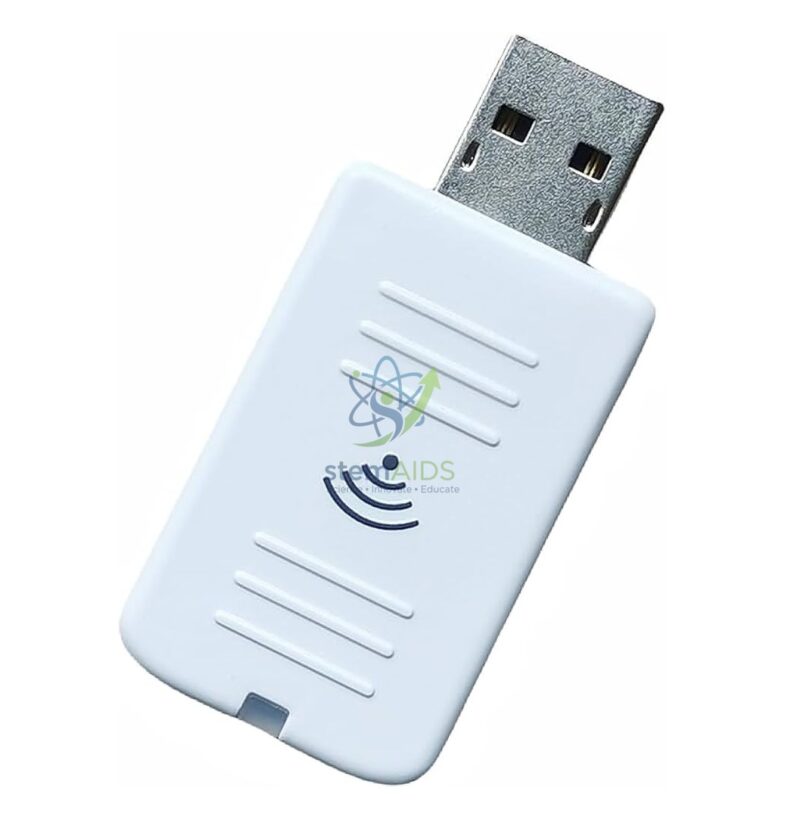
Quick Answer: The Wifi dongle Model ELPAP10 EPSON is the Epson ELPAP10 wireless LAN module, a small USB-style dongle that adds Wi-Fi to compatible Epson projectors. Once it is fitted, teachers can send a laptop, tablet or phone screen to the projector without an HDMI cable.
What the ELPAP10 Adds to a Projector
Many Epson classroom projectors are built with a port for an optional wireless module rather than Wi-Fi inside. The ELPAP10 fills that port. The projector recognises it as a network adapter, then joins the network or offers a direct connection, depending on the mode chosen in its menu.
Epson pairs its wireless modules with the Epson iProjection app for computers and mobile devices, which lets several devices connect while a moderator chooses whose screen is shown. That is useful when students present work from their own tablets.
Compatibility is model-specific. Before ordering, check the projector’s manual or Epson’s compatibility list for the ELPAP10, for example for the Epson EB-X49 or EB-685W, before planning wireless lessons with either.
Specifications
| Brand and model | Epson ELPAP10 |
| Type | Wireless LAN module (Wi-Fi dongle) for projectors |
| Form | Compact USB-style plug-in module (per listing photo) |
| Used with | Epson projectors that accept an optional wireless LAN module |
| Software | Epson iProjection app on computers and mobile devices |
| Compatible projector list | Confirm at enquiry |
Applications
- Cable-free projection from a teacher’s laptop while moving around the room
- Letting students share tablet work on the projector for class discussion
- Meeting rooms where several presenters take turns without swapping HDMI cables
- Rooms where a long HDMI run from desk to ceiling projector is impractical
Care & Handling
- Fit or remove the module only with the projector switched off, and fix any cover or retaining screw so the dongle cannot be knocked out.
- Set a network password in the projector menu so only intended users can connect.
- Update the projector firmware and the iProjection app when updates are released, since connection problems are often solved that way.
- Keep an HDMI cable in the room as a fallback for lessons when the network is down.
Why Choose LabEquip
The ELPAP10 is ordered by schools that already use Epson projectors and want wireless presenting without replacing them. LabEquip lists it in General Lab Products; send your projector models through the contact page so compatibility can be checked first.
Frequently Asked Questions
Will the ELPAP10 work with any projector?
No. It is designed for Epson projectors that support an optional wireless LAN module, and support varies by model. Check the projector’s manual or Epson’s compatibility list before ordering.
Do I need special software to project wirelessly?
Epson’s iProjection app is the usual route, available for computers and mobile devices. Install it before the lesson and test the connection once, since the first pairing takes the longest.
Can several students connect at the same time?
Yes, iProjection allows several devices to connect to one projector, and the moderator chooses which screen to show, or shows more than one at once, depending on the projector model.
Does the dongle need the school Wi-Fi network?
Not necessarily. Epson projectors with a wireless module can usually join an existing network or connect directly to a device in a simpler peer-to-peer mode. The mode is chosen in the projector menu.
Is wireless projection good enough for video?
Slides, documents and web pages work well. Fast-moving video can stutter over wireless, especially on a busy network, so a wired HDMI connection remains the safer choice for films and animations.
How is the ELPAP10 installed?
With the projector off, insert it into the wireless LAN port and secure any cover or screw provided. On power-up the projector detects the module and its network menu becomes available.
Last Updated: September 2026





Reviews
There are no reviews yet.