






In Stock
Self-Tracking Camera
₹23,560.00
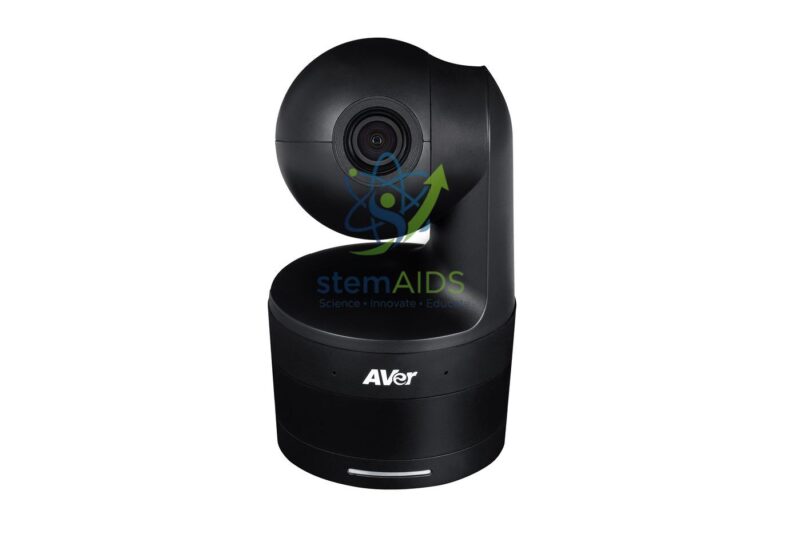
Quick Answer: A self-tracking camera is a video camera on a motorised pan-and-tilt base that detects a presenter and turns to keep them in frame. This self-tracking camera lets a teacher move around the front of the room during a recorded or live-streamed lesson without anyone operating the camera.
How Automatic Tracking Works
The listing photo shows a compact camera head sitting in a rotating base, the usual form of a tracking camera for classrooms and meeting rooms. Software in the camera recognises a person, typically by body shape or face, and drives the pan and tilt motors so the presenter stays near the centre of the picture. Many models also zoom to keep the framing steady as the presenter moves nearer or further away.
Tracking works well with one presenter against a plain background. It becomes less reliable when several people walk through the frame, when the presenter stands in front of a bright window, or when the teacher leaves the area the camera has been set to watch. Tracking cameras commonly allow a tracking zone or preset positions, so the camera can hold a wide shot of the board when the teacher steps away.
Connection type (for example USB to a computer, or network or HDMI output), zoom range and tracking modes vary between models and should be confirmed at enquiry. For showing documents or bench experiments rather than the teacher, a visualizer such as the HUE HD visualizer is the better tool.
Specifications
| Type | Auto-tracking video camera with pan-tilt base (as pictured) |
| Tracking | Follows a presenter automatically |
| Typical uses | Lecture capture, hybrid lessons, video calls |
| Placement | Desk, shelf or bracket facing the teaching area |
| Outputs, zoom and tracking modes | Confirm at enquiry |
Where It Is Used
- Recording lessons for revision or for pupils who are absent
- Hybrid teaching, with remote students seeing the teacher move around the room
- Recording science demonstrations at the front bench for later review
- Staff training sessions and school events in a hall
Care & Handling
- Place the camera at about head height, facing the teaching area and away from bright windows behind the presenter.
- Clean the lens with a microfibre cloth and avoid touching the glass.
- Do not turn the camera head by hand while it is powered, which strains the pan-tilt motors.
- Follow the school’s policy on consent and notice before recording pupils.
Why Choose LabEquip
Schools, colleges and training centres buy tracking cameras when they record or stream lessons regularly and have no one free to operate a camera. The camera is listed under General Lab Products; describe your room and recording software on the contact page so LabEquip can confirm the right connection.
Frequently Asked Questions
What does a self-tracking camera do?
It recognises the presenter and turns, tilts and often zooms by itself to keep them in the picture, so a lesson can be recorded or streamed without a camera operator.
Can it track more than one person?
Tracking cameras are designed around one main presenter. With several people moving in the frame the camera may switch between them, so set a tracking zone or change to a fixed wide shot for group activities.
Why does the camera lose the teacher?
Common causes are strong backlight from a window, the presenter walking out of the tracking zone, or someone crossing in front. Adjust the zone and camera position, and draw blinds behind the teaching area.
Does it work with video-call software?
Cameras that connect by USB usually appear to the computer as an ordinary webcam and can be selected in video-call and recording software. Check the output type of the supplied model against your setup.
Where should the camera be mounted?
Facing the teaching area at roughly head height, with a clear view of the board and front bench. Avoid spots where pupils walk directly in front of it.
Is recording pupils allowed?
That depends on your school’s policy and local law. Most schools inform pupils and parents in advance and frame the camera on the teacher and board rather than the class.
Last Updated: September 2026
You must be logged in to post a review.
Bestsellers




Reviews
There are no reviews yet.