



In Stock
Padcaster Studio web TV
$852.79
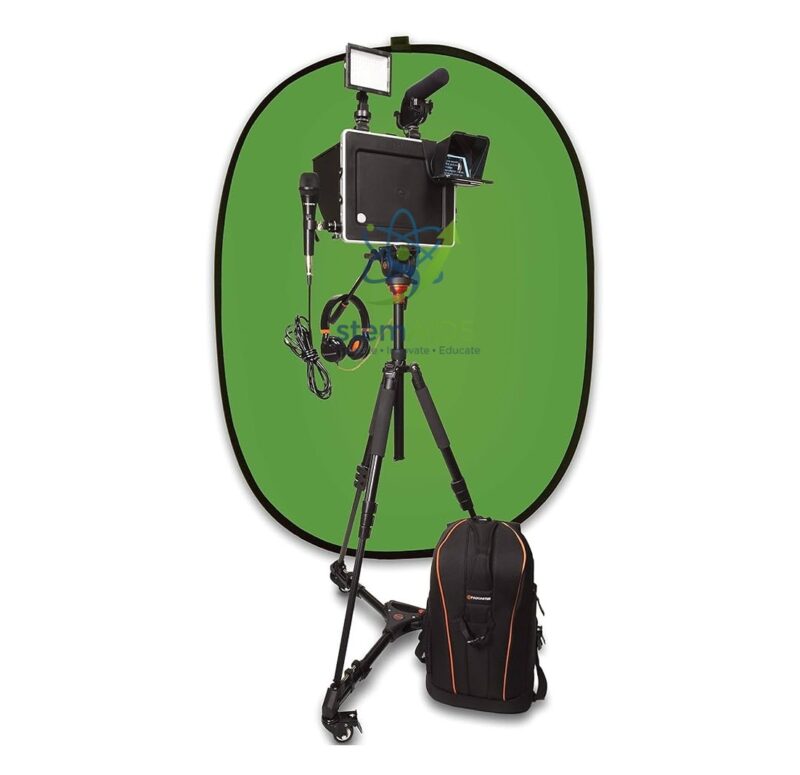
Quick Answer: The Padcaster Studio web TV listing is a portable video-production kit built around a Padcaster tablet frame. The Padcaster Studio photo shows the frame on a tripod with a wheeled base, an LED light, a microphone, headphones, a pop-up green screen and a backpack, which together turn a tablet into a small school web TV studio.
A Tablet Becomes a Broadcast Camera
Padcaster makes frames that hold a tablet and add mounting points around it, so a light, a microphone and a tripod can be attached. The tablet does the recording, editing and uploading; the frame and accessories bring its picture and sound up to a standard fit for a school broadcast. In the photo, the tablet frame sits on a tripod with a rolling dolly, a small LED panel and a microphone are fixed on top, and an oval green backdrop stands behind.
Web TV in the title describes the use: a school or college channel for news bulletins, interviews and event coverage published online. The green screen lets pupils replace the background with a weather map, a newsroom or a historical scene using a chroma-key app. Whether a tablet is included, which tablet sizes the frame accepts, and the full contents list should be confirmed at enquiry.
For recording lessons without a camera operator, the self-tracking camera is an alternative; the Padcaster kit is for productions that pupils plan, film and edit themselves.
Specifications
| Type | Tablet video-production kit (Padcaster frame system) |
| Pictured parts | Tablet frame, tripod with dolly, LED light, microphone, headphones, green screen, backpack |
| Recording device | A tablet held in the frame |
| Use | School web TV, vlogs, interviews, green-screen video |
| Tablet compatibility and inclusion | Confirm at enquiry |
Production Projects
- A weekly school news bulletin written, presented and edited by pupils
- Green-screen weather reports or history reconstructions
- Interviews with visitors, recorded with clear sound through the microphone
- Teacher explainer videos for flipped learning
Care & Handling
- Set up the green screen without creases and light it evenly so the background keys out cleanly.
- Lock the tripod legs and dolly wheels before mounting the tablet.
- Pack the microphone and light into the backpack after each shoot.
- Charge the tablet, the light and any battery-powered microphone the day before filming.
Why Choose LabEquip
Schools setting up a media club, a student news channel or a video production course choose a kit like this because the tablet they already use becomes the camera. Find it under General Lab Products, and list the tablets you already own on the contact page so LabEquip can check compatibility.
Frequently Asked Questions
What is a Padcaster?
Padcaster is a brand of frames and cases that turn a tablet into a video camera rig, with mounting points for lights, microphones and a tripod.
What does ‘web TV’ mean in the title?
It refers to a school or college channel publishing video online, such as news bulletins and event coverage. The kit is sized for that kind of small studio.
Why use a green screen?
A plain green backdrop can be removed in a chroma-key app and replaced with any image or video. Even lighting and a gap between presenter and screen give the cleanest result.
Is a tablet included?
The listing photo shows a tablet in the frame, but whether one is supplied, and which models fit, should be confirmed at enquiry before ordering.
Why add an external microphone?
Built-in tablet microphones pick up room echo and noise. A microphone mounted close to the presenter records clearer speech, which matters more to viewers than picture quality.
Can pupils run the kit themselves?
Yes. It works through a tablet interface pupils already know, and roles such as presenter, camera operator, sound checker and editor can rotate between lessons.
Last Updated: September 2026
You must be logged in to post a review.
Bestsellers




Reviews
There are no reviews yet.