
In Stock
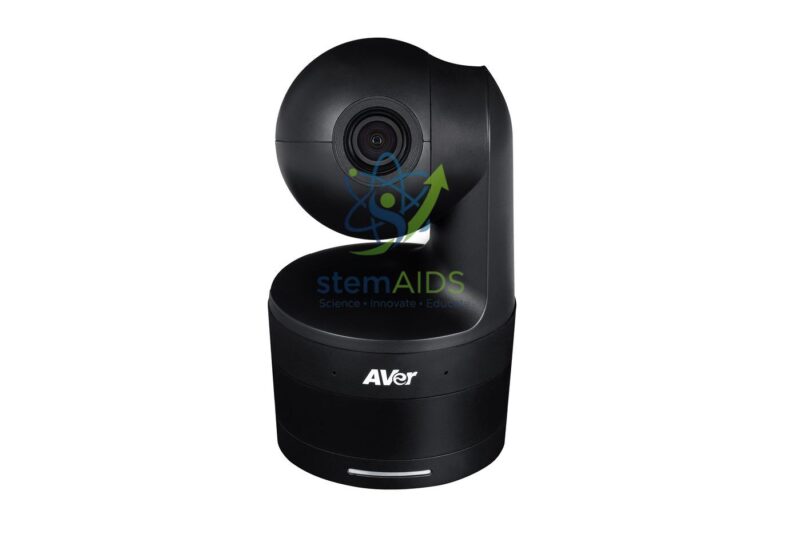
Self-Tracking Camera
₹23,560.00
The StemAids Self-Tracking Camera is an intelligent video camera designed for smart classrooms, online teaching, hybrid learning, conference rooms, training centers, lecture halls, STEM labs, and professional presentation spaces. It automatically follows the speaker or presenter, helping create smooth and focused video output without requiring a separate camera operator.
This camera is useful for teachers, trainers, lecturers, content creators, presenters, and institutions that conduct online classes, webinars, recorded lectures, virtual meetings, product demonstrations, and training sessions. With automatic tracking, wide-angle viewing, video conferencing support, and easy connectivity, it helps improve remote learning and digital communication quality.
Product Overview
The StemAids Self-Tracking Camera is designed to detect and follow a moving subject within the camera frame. It helps keep the presenter centered during lectures, classroom demonstrations, board teaching, and training sessions. This makes it ideal for smart classrooms and hybrid education environments where teachers need freedom of movement while staying visible to online viewers.
Depending on the selected model, the camera may include AI tracking, face detection, gesture control, pan-tilt movement, zoom support, built-in microphone, USB connectivity, HDMI output, remote control, and compatibility with popular video conferencing platforms.
Key Features
- Automatic Presenter Tracking: Follows the teacher, trainer, or speaker during movement.
- Smart Classroom Ready: Suitable for online teaching, hybrid learning, and lecture recording.
- Wide-Angle Viewing: Captures classroom, meeting room, or training space effectively depending on model.
- Pan-Tilt-Zoom Support: Some variants may include motorized pan, tilt, and zoom functions.
- Clear Video Output: Supports HD, Full HD, or higher resolution depending on model configuration.
- Easy Connectivity: Can connect through USB, HDMI, LAN, or other supported interfaces depending on model.
- Video Conferencing Compatible: Useful with online class and meeting platforms such as Zoom, Google Meet, Microsoft Teams, and similar software.
- Remote Control Support: Some models may include remote control for manual camera adjustment.
- Useful for Recording: Helps record lectures, training videos, demonstrations, and presentations.
- Hands-Free Operation: Reduces the need for manual camera handling during sessions.
Product Specifications
| Product Name | Self-Tracking Camera |
|---|---|
| Brand | StemAids |
| Product Type | Auto-Tracking Video Camera / Smart Classroom Camera |
| Tracking Function | Automatic face, body, or presenter tracking depending on model |
| Video Resolution | HD, Full HD, 2K, or 4K depending on selected model |
| Camera Movement | Fixed wide-angle or motorized pan-tilt movement depending on variant |
| Zoom Support | Digital or optical zoom depending on model configuration |
| Field of View | Wide-angle field of view depending on model |
| Microphone | Built-in microphone or external microphone support depending on model |
| Connectivity | USB, HDMI, LAN, Wi-Fi, or model-specific connection options |
| Mounting Options | Tripod, desktop, wall mount, or ceiling mount depending on model |
| Compatibility | Computers, smart classroom systems, video conferencing platforms, and recording software |
| Application Area | Smart classrooms, online teaching rooms, conference rooms, training centers, lecture halls, and STEM labs |
| Recommended Users | Teachers, trainers, lecturers, presenters, content creators, office teams, and institutional buyers |
How to Use the StemAids Self-Tracking Camera
- Select the Installation Location: Place the camera where it can clearly view the teaching area, presentation zone, or speaker position.
- Mount the Camera: Install it on a tripod, table, wall mount, or ceiling mount as per the classroom or meeting room setup.
- Connect to Device: Connect the camera to a computer, interactive panel, recording device, or conferencing system using the supported cable or wireless method.
- Open Camera Software: Use video conferencing software, recording software, or the camera’s supported control application.
- Enable Tracking Mode: Turn on auto-tracking, face tracking, or presenter tracking as per the model settings.
- Adjust Framing: Set the required viewing angle, zoom, and tracking sensitivity if available.
- Start Session: Begin the online class, lecture, meeting, webinar, or recording session.
- Monitor Output: Check the video preview to ensure the speaker remains centered and clearly visible.
- Switch Off After Use: End the session, turn off the camera if required, and disconnect safely.
Educational and Professional Benefits
The StemAids Self-Tracking Camera helps improve the quality of digital teaching and online communication. It allows presenters to move naturally while remaining visible to remote students or meeting participants.
- Supports online classes and hybrid learning
- Keeps teachers and presenters centered during movement
- Improves lecture recording and webinar quality
- Reduces the need for a camera operator
- Useful for board teaching, demonstrations, and presentations
- Supports professional meeting and training room setups
Applications
- Smart classroom teaching
- Online and hybrid learning
- Lecture capture and recording
- Training center sessions
- Conference room meetings
- Webinars and virtual events
- STEM lab demonstrations
- Teacher training programs
- Corporate presentations
- Digital content creation
Why Choose StemAids Self-Tracking Camera?
StemAids provides practical educational technology solutions for smart classrooms, ICT rooms, STEM labs, training centers, and institutional learning spaces. The StemAids Self-Tracking Camera is designed to support modern teaching, digital communication, and professional video presentation needs.
Its auto-tracking function, flexible connectivity, classroom-friendly design, and compatibility with online meeting platforms make it a useful solution for schools, colleges, training centers, offices, and digital learning environments.
Safety and Maintenance Guidelines
- Install the camera on a stable surface or compatible mount.
- Do not place the camera near water, dust, excessive heat, or direct sunlight.
- Use only compatible cables, adapters, mounts, and accessories.
- Do not force the camera head or motorized section manually if the model has pan-tilt movement.
- Clean the camera lens gently with a soft microfiber cloth.
- Keep cables arranged safely to avoid tripping or pulling.
- Switch off or disconnect the camera when not in use for long periods.
- Use under teacher, trainer, or technical staff supervision in institutional setups.
Google E-E-A-T Focus
This product content is prepared for school procurement teams, ICT coordinators, smart classroom planners, training centers, AV integrators, office administrators, and institutional buyers. It focuses on practical use, safe operation, device compatibility, teaching application, and long-term usability to support Google E-E-A-T principles of experience, expertise, authoritativeness, and trustworthiness.
Frequently Asked Questions
1. What is the StemAids Self-Tracking Camera used for?
It is used for online teaching, lecture recording, video conferencing, hybrid learning, webinars, training sessions, and presentations where the camera automatically follows the speaker.
2. Is this camera suitable for smart classrooms?
Yes, it is suitable for smart classrooms, ICT rooms, STEM labs, online teaching rooms, training centers, and conference rooms.
3. How does self-tracking work?
Self-tracking uses camera-based detection, face tracking, body tracking, or AI-based tracking depending on the model to keep the presenter in view.
4. Can it be used for online classes?
Yes, it can be used for online classes, hybrid teaching, recorded lectures, and live virtual sessions.
5. Does it work with Zoom and Google Meet?
Yes, many self-tracking cameras work with popular video conferencing platforms when connected as a compatible camera device.
6. Does it need a computer?
Some models connect to a computer through USB, while others may connect directly to recording or conferencing systems using HDMI, LAN, or wireless options.
7. Can it track a moving teacher?
Yes, the camera is designed to follow a moving presenter or teacher within its supported tracking range.
8. Can it be mounted on a tripod?
Yes, many self-tracking camera models support tripod mounting, desktop placement, wall mounting, or ceiling mounting depending on the design.
9. Is it useful for training centers?
Yes, it is useful for training centers, webinars, workshops, lecture capture, employee training, and professional presentation recording.
10. Is it suitable for bulk institutional purchase?
Yes, the StemAids Self-Tracking Camera is suitable for schools, colleges, offices, training centers, lecture halls, smart classrooms, and institutions requiring video teaching or conferencing equipment.
SEO Keywords
Self-Tracking Camera, StemAids Self-Tracking Camera, auto tracking camera, smart classroom camera, AI tracking camera for teachers, presenter tracking camera, camera for online teaching, lecture capture camera, video conferencing camera, hybrid classroom camera, training room camera, PTZ tracking camera, classroom recording camera, webcam for smart classroom.
You must be logged in to post a review.
Bestsellers




Reviews
There are no reviews yet.