

In Stock
Padcaster Studio web TV
₹75,602.00
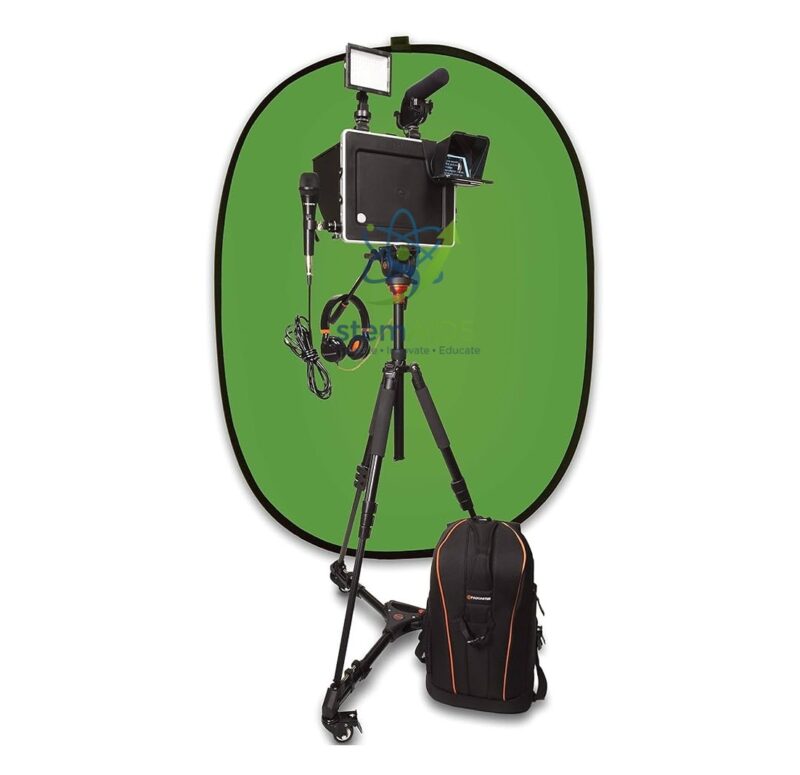
The StemAids Padcaster Studio Web TV is a complete mobile video production and web broadcasting solution designed for schools, colleges, smart classrooms, media labs, ICT rooms, STEM labs, training centers, journalism departments, corporate communication teams, and institutional content creation spaces. It helps users convert a compatible tablet into a professional-style video recording, livestreaming, and digital content production setup.
This Web TV studio kit is suitable for creating classroom videos, student news channels, online lessons, interviews, training modules, school event coverage, digital storytelling projects, webinars, social media content, and educational livestreams. With camera support, audio accessories, lighting, teleprompter support, tripod setup, and green screen capability, it provides a practical production workflow for modern digital learning environments.
Product Overview
The StemAids Padcaster Studio Web TV is designed as an all-in-one mobile production suite for tablet-based video creation. It allows teachers, students, trainers, and media teams to record and broadcast high-quality content using a compatible iPad or tablet along with professional production accessories.
The system is useful for institutions that want to build a small web TV studio, school media room, digital journalism lab, online teaching setup, or mobile video production unit without investing in a large fixed broadcast studio. It supports recording, presenting, interviewing, livestreaming, and creating polished educational media content.
Key Features
- Mobile Web TV Studio: Helps create video lessons, interviews, livestreams, school news, and training content.
- Tablet-Based Production: Designed to transform a compatible tablet into a portable video production system.
- Adjustable Padcaster Case: Supports compatible iPads from approximately 9.7 inches to 13 inches, depending on model fit and configuration.
- Professional Audio Support: Includes microphone options such as unidirectional, stick, and lavalier microphones depending on kit configuration.
- Optical Accessories: Supports wide-angle/macro and telephoto lens options for different shooting styles.
- LED Lighting: Provides controlled lighting for clearer video recording and presentation quality.
- Teleprompter Support: Helps presenters read scripts while looking toward the camera for natural delivery.
- Tripod and Mobility Support: Includes tripod/monopod and dolly-style mobility support depending on supplied kit.
- Green Screen Capability: Useful for virtual backgrounds, school news production, and creative media projects.
- Producer Software Support: Supports video production tools for recording, livestreaming, overlays, and content management depending on software plan.
Product Specifications
| Product Name | Padcaster Studio Web TV |
|---|---|
| Supplied By | StemAids |
| Product Type | Mobile Video Production Studio / Web TV Studio Kit |
| Primary Use | Video recording, livestreaming, online teaching, interviews, school news, digital storytelling, and media production |
| Tablet Compatibility | Compatible with selected iPad/tablet sizes; Padcaster case supports many iPad sizes from approximately 9.7″ to 13″ depending on model |
| Tablet Included | Tablet/iPad is generally not included unless specifically mentioned in the supply configuration |
| Main Components | Padcaster case, microphones, lens accessories, LED light, tripod/monopod, teleprompter, green screen, dolly wheels, and backpack depending on kit variant |
| Audio Accessories | Unidirectional microphone, stick microphone, lavalier microphone, and audio splitter depending on package |
| Lighting | Dimmable LED light with rechargeable battery support depending on kit configuration |
| Optics | Wide-angle/macro lens and telephoto lens options depending on supplied kit |
| Teleprompter | Parrot teleprompter support for script reading during recording or livestreaming |
| Background Support | Portable green screen support depending on kit package |
| Software Support | Padcaster Producer App and portal support depending on software plan and device compatibility |
| Application Area | Schools, colleges, media labs, ICT rooms, STEM labs, smart classrooms, training centers, and digital content studios |
| Recommended Users | Teachers, students, media educators, trainers, journalists, presenters, content creators, and institutional buyers |
How to Use the StemAids Padcaster Studio Web TV
- Check Tablet Compatibility: Confirm that the tablet or iPad fits the Padcaster case and supports the required recording or livestreaming software.
- Mount the Tablet: Place the compatible tablet securely inside the Padcaster case or frame.
- Attach the Tripod: Fix the Padcaster setup on the tripod or monopod stand for stable shooting.
- Connect Audio Accessories: Attach the microphone, lavalier mic, or stick microphone as per the recording requirement.
- Add Lighting: Mount and switch on the LED light to improve subject visibility.
- Attach Lens if Required: Use wide-angle, macro, or telephoto lens accessories depending on the scene.
- Set Up Teleprompter: Insert a compatible phone into the teleprompter and load the script if scripted presentation is required.
- Use Green Screen: Set up the green screen for virtual backgrounds, school news videos, or creative productions.
- Open Recording Software: Use compatible video recording, livestreaming, or Padcaster Producer software to start production.
- Record or Stream: Capture lessons, interviews, events, announcements, tutorials, or livestream content.
Educational Benefits
The StemAids Padcaster Studio Web TV helps institutions create a hands-on media production environment. It supports digital literacy, communication skills, presentation confidence, journalism activities, online teaching, and project-based learning.
- Helps students learn video production, scripting, filming, and presenting
- Supports school news channels, event coverage, and digital storytelling
- Useful for online lessons, recorded lectures, webinars, and training videos
- Encourages teamwork between presenters, camera operators, editors, and teachers
- Supports media literacy, ICT education, and creative classroom projects
- Helps schools create professional-looking educational video content
Applications
- School Web TV studio
- Digital journalism lab
- Smart classroom video recording
- Online teaching and livestreaming
- Student news bulletin production
- Teacher training video creation
- STEM project documentation
- Event coverage and interviews
- Virtual background and green screen videos
- Corporate and institutional training content
Why Choose StemAids Padcaster Studio Web TV?
StemAids provides practical educational technology solutions for schools, colleges, ICT labs, STEM labs, smart classrooms, and institutional media spaces. The Padcaster Studio Web TV setup is suitable for institutions that want a portable and easy-to-deploy video production solution for teaching, training, broadcasting, and digital content creation.
With tablet-based operation, professional audio accessories, lighting support, lens options, teleprompter use, green screen capability, tripod stability, and production software support, this system helps educators and students create engaging video content for modern learning environments.
Safety and Maintenance Guidelines
- Use only compatible tablets, cables, software, microphones, and accessories.
- Mount the tablet securely before recording or moving the setup.
- Do not overtighten clamps, mounts, or lens accessories.
- Keep microphones, lenses, lights, and teleprompter glass clean and protected.
- Keep the LED light away from water, excessive heat, and direct impact.
- Place the tripod on a stable surface to prevent tipping.
- Store accessories in the padded backpack or protective case after use.
- Use under teacher, trainer, or media lab supervision in school environments.
Google E-E-A-T Focus
This product content is prepared for school procurement teams, ICT coordinators, media lab managers, STEM educators, online teaching teams, training centers, and institutional buyers. It focuses on practical use, device compatibility, safe operation, educational application, and content creation value to support Google E-E-A-T principles of experience, expertise, authoritativeness, and trustworthiness.
Frequently Asked Questions
1. What is the StemAids Padcaster Studio Web TV used for?
It is used for video recording, livestreaming, online teaching, school news production, interviews, digital storytelling, event coverage, and training content creation.
2. Is this suitable for schools?
Yes, it is suitable for schools, colleges, smart classrooms, ICT labs, media labs, STEM labs, journalism clubs, and training centers.
3. Does the kit include an iPad or tablet?
The tablet or iPad is generally not included unless specifically mentioned in the supply order. The user normally provides a compatible tablet.
4. What tablet sizes are supported?
The Padcaster case is designed to support many compatible iPad sizes from approximately 9.7 inches to 13 inches. Exact compatibility should be checked before purchase.
5. Can it be used for livestreaming?
Yes, it can be used for livestreaming when paired with compatible tablet hardware, internet connection, and supported livestreaming software.
6. Does it include microphone support?
Yes, the studio setup commonly includes microphone accessories such as unidirectional, stick, and lavalier microphone options depending on configuration.
7. Can students use it for school news?
Yes, it is useful for student news bulletins, school announcements, interviews, event reporting, and digital media projects.
8. Does it support green screen recording?
Yes, green screen support is available depending on the supplied kit configuration and compatible software workflow.
9. Is a teleprompter included?
Padcaster Studio configurations commonly include Parrot teleprompter support. Final inclusion should be confirmed according to the supplied package.
10. Is it suitable for bulk institutional purchase?
Yes, the StemAids Padcaster Studio Web TV is suitable for schools, colleges, training centers, media departments, ICT labs, and institutions building digital content creation spaces.
SEO Keywords
Padcaster Studio Web TV, StemAids Padcaster Studio, mobile video production studio, school web TV studio, classroom video recording kit, livestreaming kit for schools, tablet video production kit, digital journalism lab equipment, smart classroom video studio, Padcaster Studio for education, green screen video kit, teleprompter video kit, school media lab equipment, online teaching recording setup.
You must be logged in to post a review.
Bestsellers




Reviews
There are no reviews yet.