


In Stock
Microscopy adapter for Aver F50 visualizer
₹1,000.00
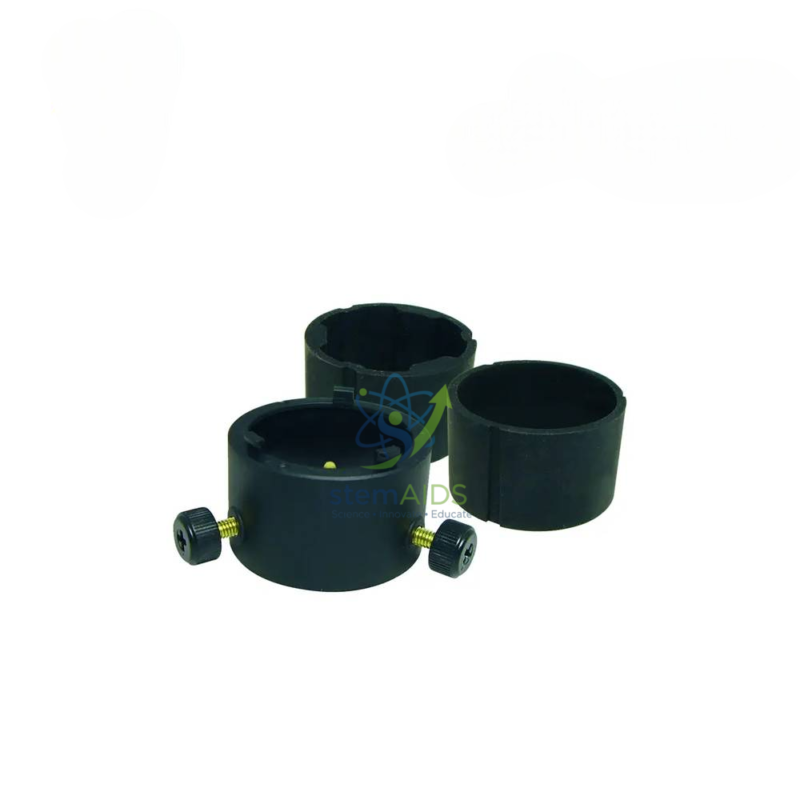
Quick Answer: The Microscopy adapter for Aver F50 visualizer is a fitting that joins the camera head of an AVer F50 document camera to the eyepiece of a microscope. The listing photo shows this microscopy adapter as a set of black rings with thumbscrews, which grip eyepieces of different diameters so the microscope image can be shown on the class screen.
Putting a Microscope Image on the Big Screen
In a microscopy practical, a teacher cannot easily check that thirty students are looking at the right cells. With the F50 visualizer’s camera fitted to a microscope eyepiece through this adapter, the teacher’s own slide appears on the projector: the class sees the onion epidermis, cheek cells or stomata being described, then finds the same structure at their own microscopes.
Eyepiece tubes are not all the same outer diameter, which is why the adapter is shown as several rings. The ring that fits the eyepiece snugly is tightened with its thumbscrew, and the camera head is aligned so its lens sits centred over the eyepiece lens. Correct centring removes the dark ring that appears when a camera looks through an eyepiece off-axis.
The adapter is listed for the F50 only. For microscopes without a visualizer, a dedicated eyepiece camera for microscopes is an alternative, fitting in place of the eyepiece and connecting straight to a computer.
Care & Handling
- Tighten thumbscrews just enough to hold the ring on the eyepiece; overtightening can mark the eyepiece tube.
- Focus the microscope by eye first, then fit the camera and fine-tune the focus while watching the screen.
- Remove the adapter after use and keep the rings together in a labelled bag or box so none go missing.
- Wipe the eyepiece lens before fitting, since dust on it shows sharply in the camera image.
Specifications
| Fits | AVer F50 visualizer camera head, as titled |
| Connects to | Microscope eyepiece |
| Form | Set of rings with thumbscrews (per listing photo) |
| Finish | Black; material not stated |
| Eyepiece diameters accommodated | Confirm at enquiry |
Applications
- Whole-class demonstration of prepared slides before students start their own microscope work
- Showing live specimens, such as pond-water organisms, as they move
- Capturing microscope images through the visualizer for worksheets and records
- Checking students’ drawings against the real image on screen
Why Choose LabEquip
Biology departments with an AVer F50 visualizer order this adapter to turn one microscope into a class demonstration. LabEquip lists it in General Lab Products and a wider choice of microscopes in Microscope & Optics; confirm your visualizer model through the contact page.
Frequently Asked Questions
Which visualizer does this adapter fit?
It is listed for the AVer F50 visualizer. Fitting it to other visualizers, including other AVer models, is not stated, so check the camera head size of any other model before ordering.
Will it fit my microscope?
It fits onto the eyepiece, and the set of rings suggests it covers several eyepiece diameters. Measure the outer diameter of your eyepiece and compare it with the ring sizes when you enquire.
Why is there a black circle around the image?
This vignetting happens when the camera lens is not centred on the eyepiece or sits too far from it. Re-centre the camera on the ring and adjust its distance until the circle opens up to fill more of the frame.
Do I need to refocus after fitting the camera?
Usually yes, slightly. Focus the microscope by eye first, fit the camera, then turn the fine focus while watching the screen until the image is sharp.
Can I use it with a stereo microscope?
An eyepiece adapter can be fitted to one eyepiece of a stereo microscope, giving a flat view through that side. Stereo eyepieces vary in diameter, so check that one of the rings fits.
What is the alternative to a visualizer adapter?
An eyepiece camera replaces the microscope eyepiece and connects directly to a computer by USB. It suits schools without a compatible visualizer, while the adapter makes use of a visualizer the school already owns.
Last Updated: September 2026
You must be logged in to post a review.
Bestsellers





Reviews
There are no reviews yet.