
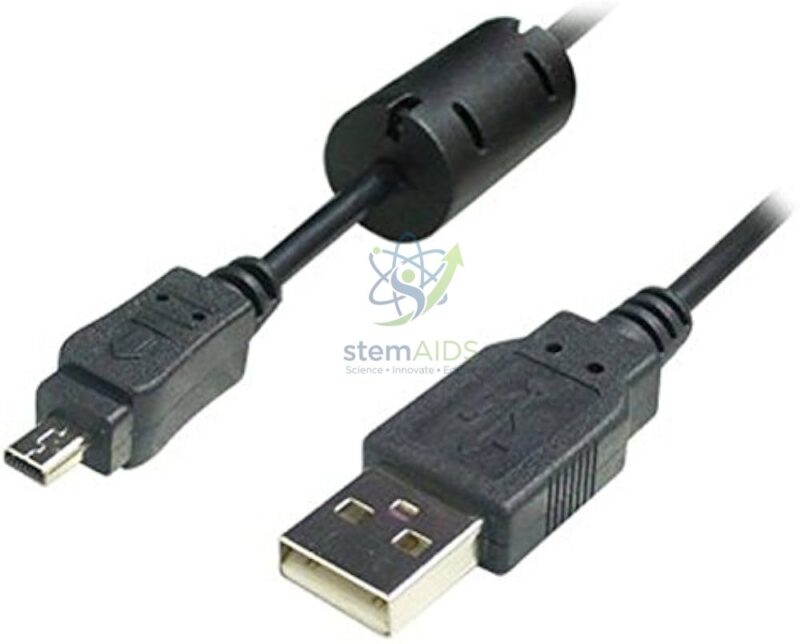
Quick Answer: Micro USB B cables have a small Micro-B plug at one end and, usually, a standard USB-A plug at the other, and are used to program and power a BBC micro:bit and other classroom boards from a computer. For coding, each micro USB B cable must carry data as well as power.
Data Cable or Charge-Only Cable
The Micro-B plug is the small, flat, tapered connector found on the micro:bit and on many sensor boards, robots and older phones. It fits only one way round, with the wider side of the taper matching the socket. The other end of the cable is usually a full-size USB-A plug for a computer port or a charger; check this if your computers have only USB-C ports.
The most common cause of a failed micro:bit lesson is not the board but the cable. Some cheap Micro-B cables carry only the two power wires, so the micro:bit lights up but never appears as the MICROBIT drive and cannot be programmed. A data cable carries four wires: power, ground and the two data lines. Keeping tested data cables with each board saves a great deal of lesson time.
Through a data cable the micro:bit can be programmed by dragging a hex file onto its drive, or directly from the browser by WebUSB in MakeCode and the Python editor, which removes the drag-and-drop step. The same cable carries serial data back to the computer for the MakeCode data viewer. Cable length and the number per pack should be confirmed.
Specifications
| Item | Micro USB B cables for programming and powering boards |
| Board end | Micro-B plug |
| Computer end | Usually USB-A; check if your computers have USB-C only |
| Function | Power and data; data lines are needed for programming |
| Typical use | BBC micro:bit, robot kits and sensor boards with Micro-B sockets |
| Length and quantity per pack | Confirm at enquiry |
Where the Cables Are Used
- Flashing MakeCode or Python programs onto micro:bit boards
- Powering boards from a computer or USB charger during lessons
- Streaming sensor readings to the MakeCode data viewer
- Replacing lost or damaged cables in robotics and electronics kits
Care & Handling
- Pull the plug, not the cable, when disconnecting.
- Insert the Micro-B plug straight and the right way up; forcing it at an angle damages the board’s socket, which is harder to replace than the cable.
- Coil cables loosely with a tie instead of winding them tightly round a board.
- Test and label data cables, and set aside any cable that only charges.
Why Choose LabEquip
Schools buy spare Micro USB B cables because lost and damaged cables stop more micro:bit lessons than faulty boards do. LabEquip supplies them in the STEM kits range for use with items such as the Bit car. State how many you need on the contact page.
Frequently Asked Questions
Why does my micro:bit light up but not show as a drive?
The cable is probably a charge-only type without data wires. Swap to a known data cable. If the drive still does not appear, try another USB port and check that the board has not started in maintenance mode.
How can I tell a data cable from a charge-only cable?
They look the same, so test them. Connect a micro:bit: if the MICROBIT drive appears on the computer, the cable carries data. Label tested cables so they stay with the boards.
Do these cables work with micro:bit V1 and V2?
Yes. Both versions use a Micro-B USB socket for programming and power.
Do I need an adapter for laptops with USB-C ports?
If the laptop has only USB-C ports and the cable has a USB-A plug, a USB-C to USB-A adapter or hub is needed. Some Micro-B cables have a USB-C plug at the computer end, which avoids the adapter.
What is WebUSB?
It lets MakeCode and the micro:bit Python editor send a program straight to the board from the browser, without dragging a file. It needs a data cable and a browser that supports it, such as Chrome or Edge.
Can the cable power a robot?
It can power the micro:bit and light loads while connected to a computer, but motors should run from the robot’s own batteries. Computer USB ports limit how much current they supply.
Last Updated: September 2026



Reviews
There are no reviews yet.